Scan a QR code every day and never once think about those three squares. I was in that category for years. Turns out they are doing some genuinely clever engineering work — and the reason there are exactly three, not four, is more interesting than you’d expect.
They Have a Name: Finder Patterns
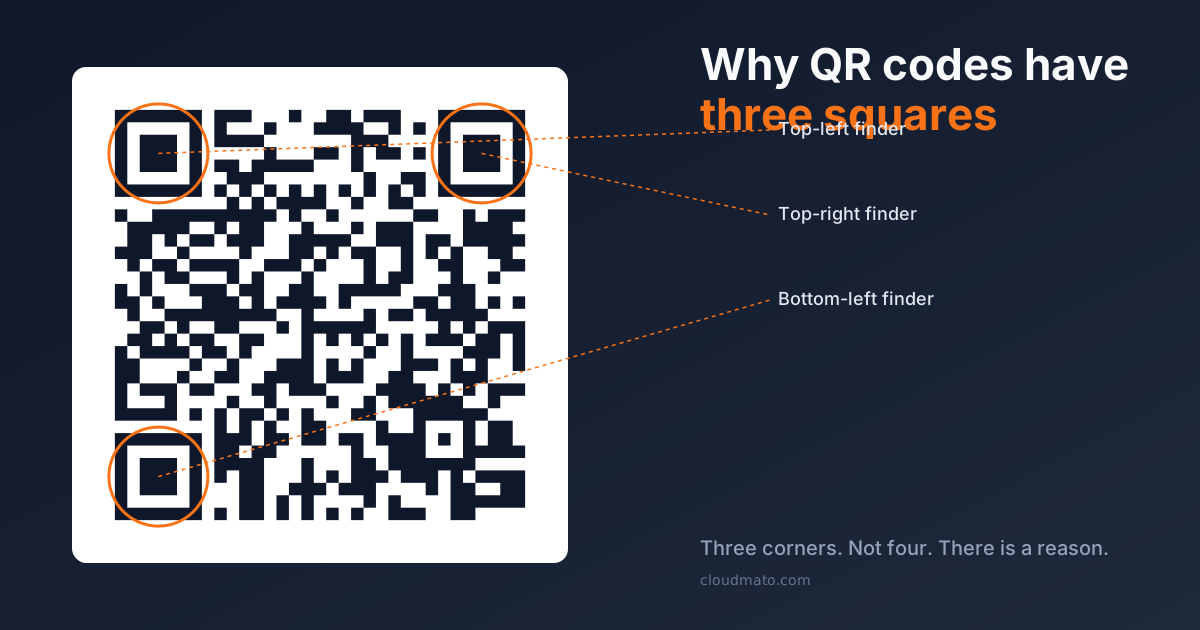
The three large squares are officially called position detection patterns, though almost everyone calls them finder patterns [4]. They sit in the top-left, top-right, and bottom-left corners of every QR code — never the bottom-right. That asymmetry is intentional, and it’s the whole point.
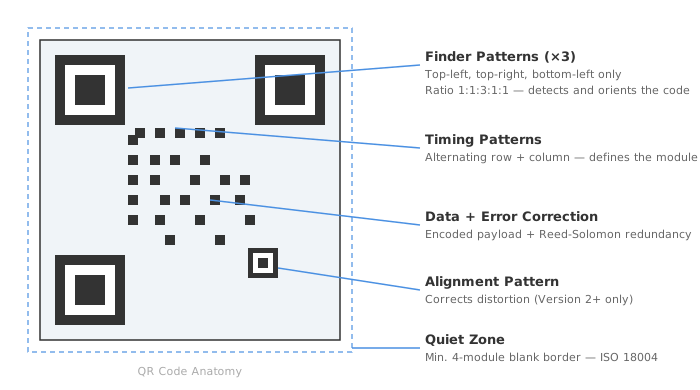
Each finder pattern is built from three nested squares: a solid black outer square, a white ring in the middle, a smaller black square at the centre [6]. When a scanner reads across any horizontal or vertical line through one of these patterns, it sees a very specific sequence of dark and light modules: 1:1:3:1:1 — one black, one white, three black, one white, one black [6].
This ratio holds regardless of how large or small the QR code is, regardless of the angle it is scanned from. That consistency is what lets a camera lock onto the pattern in milliseconds.
Why 1:1:3:1:1 Specifically?
QR codes were invented in 1994 by Masahiro Hara at the Japanese company Denso Wave, originally for tracking car parts on assembly lines [2]. Hara’s team needed a pattern that a scanner could find instantly even when surrounded by printed text, logos, or packaging graphics. The challenge: any pattern you pick might accidentally appear in the surrounding design, causing the scanner to read the wrong thing as the code boundary.
Their solution was methodical. Find the pattern least likely to appear anywhere in normal printed material.
They actually went and surveyed real fliers, magazines, and cardboard boxes — reducing everything down to black-and-white module ratios [1]. After an exhaustive analysis, the 1:1:3:1:1 sequence came out as the one that almost never appeared naturally in printed matter. So they built the entire finder pattern around that ratio.
The physical look of the patterns — concentric alternating squares — was also inspired by a Go board. The contrast of black and white stones gave Hara the visual idea of working with nested alternating modules [1]. Small detail, but I like that a board game influenced one of the most scanned images on the internet.
Why Three Corners — Not Four?
This is the more interesting part.
Three points define a unique orientation. Four identical points do not.
If you have three finder patterns arranged in an L-shape (top-left, top-right, bottom-left), the scanner sees that L and immediately knows: here is which way is “up”, here is the top-left anchor, here is how the grid is oriented [3][5]. It does not matter if the QR code is upside-down, rotated 45 degrees, or printed on the side of a bottle — the L-shape resolves the orientation unambiguously.
Four identical large squares would be a problem. The scanner would see four possible “correct” orientations and have no way to decide which one is actually right [5]. You’d need additional information elsewhere in the code to resolve the ambiguity, which defeats the purpose of having detection patterns at all.
The bottom-right corner instead gets a smaller alignment pattern in larger QR codes (Version 2 and above) — a 5×5 nested square whose job is different: correcting for perspective distortion when the code is on a curved surface or being read at a steep angle [6]. It helps but it isn’t a finder pattern. The asymmetry is the feature.
The Rest of the Code Structure
Beyond the finder patterns, a QR code has several other functional zones [4]:
- Timing patterns: alternating black-and-white lines running between the finder patterns horizontally and vertically — they act as a ruler, letting the scanner measure module size and lay out the data grid precisely
- Format information: a strip near the finder patterns that encodes the error correction level and which data mask pattern was applied — duplicated in two places for resilience
- Quiet zone: the blank white border around the entire code — at minimum 4 modules wide per ISO 18004 [8]. Remove this and scanners start confusing nearby graphics for part of the code
- Version information: for codes at Version 7 and above, additional blocks store the version number (1–40), telling the scanner how many rows and columns to expect [4]
Versions go from 1 (21×21 modules, ~25 alphanumeric characters) to 40 (177×177 modules, ~4,000+ characters). The number of alignment patterns grows as the version increases.
Error Correction: Why Damaged QR Codes Still Work
You’ve definitely seen it — a QR code with a company logo stamped right in the middle that still scans fine. That is Reed-Solomon error correction, not a coincidence [7].
The code stores redundant data calculated from the actual payload. As long as a sufficient fraction of the modules survives, the scanner can mathematically reconstruct the original data — even if the surviving modules are scattered randomly. There are four error correction levels:
| Level | Max Recoverable Data |
|---|---|
| L | 7% |
| M | 15% |
| Q | 25% |
| H | 30% |
Level H is why you can cover up to roughly 30% of a QR code with a logo and still scan it [7]. Designers exploit this deliberately — generate the code at Level H, then place artwork over the centre. It usually works as long as the finder patterns stay intact.
And that’s the thing — the finder patterns themselves are not covered by error correction. They are structural. If all three are badly damaged or obscured, no amount of Reed-Solomon math will recover the scan. The scanner won’t even find the code in the first place.
The three squares are not decoration. They are the entry point to everything else.
End
Sources
- QR Code Development Story — DENSO WAVE
- History of QR Code — QRcode.com / DENSO WAVE
- QR code — Wikipedia
- What is QR Code Structure and How Does It Work? — Scanova
- QR code anatomy explained — QR Code Kit
- QR Code Anatomy: Finder Patterns & Error Correction — FileFusion
- QR Code Error Correction Explained — Scanova
- What is a QR Code Quiet Zone and Why Does It Matter? — QR Code Generator