You open Windows 11, right-click the Start menu, and you see: Command Prompt, PowerShell, Windows Terminal. Three things. You just wanted to run a quick command. Now you’re questioning your life choices.
This confusion is real, and honestly, Microsoft did not make it easy. But there’s a genuinely good reason PowerShell exists — and once you understand it, the whole picture starts to make sense.
CMD Was Never Really a Shell — It Was a Stopgap
Let’s start at the beginning. cmd.exe — the Command Prompt — has been around since Windows NT launched in December 1987 [1]. Before that, COMMAND.COM handled things in MS-DOS. So yeah, Windows has had a command-line interface for nearly 40 years.
But here’s the thing people miss: CMD was not designed for power users or administrators. It was designed to keep old DOS batch files running and let you do basic stuff — copy a file, check an IP address, run a program. That’s it. Its roots were in a single-user, single-tasking operating system from the 1980s, and that baggage never went away.
The evolution of the Windows command-line tells this story well — CMD was always playing catch-up, never really designed for the complexity that modern Windows systems demand [2].
Some actual CMD limitations that drove people crazy:
- Maximum command line string length: 8,191 characters. Hit that ceiling trying to pass long file paths and you’d get cryptic failures [3].
- No native support for objects — everything is plain text, so you had to parse output with string gymnastics.
- Scripting capabilities in
.batfiles are genuinely awful — conditional logic, loops, error handling — all painful. - Zero built-in access to Windows internals like the registry, services, WMI, or Active Directory.
- No tab completion worth mentioning. No syntax highlighting. No modern UX.
When you’re managing one PC, these limitations are annoying. When you’re a sysadmin responsible for hundreds or thousands of Windows machines in an enterprise? CMD simply doesn’t even come close to having what it takes [4]. You’d need to script things with VBScript or write custom tools just to do basic bulk administration. It was a mess.
One Guy Got Tired of It — And Wrote a Manifesto
This is where the story gets interesting.
In 1999, a developer named Jeffrey Snover joined Microsoft. He had a Unix background and knew what a real shell could do. He looked at Windows system administration and was, by his own admission, horrified. Unix had bash, grep, awk, sed — a whole ecosystem of composable tools for managing systems at scale. Windows had… .bat files.
Snover spent a couple of years thinking about this problem. Then, on August 8, 2002, he wrote what became known as the Monad Manifesto — a 17-page document laying out his vision for a new kind of Windows shell [5]. He called the project Monad.
The manifesto is surprisingly readable. Snover’s core argument was this: Unix shells are powerful because they compose simple tools through pipelines of text. But text is fragile — you have to parse it, split it, count columns, and pray the output format never changes. What if instead, you piped objects? Structured data with named properties, not raw strings?
That idea — objects in the pipeline, not text — is the single biggest thing that separates PowerShell from CMD (and honestly from bash too).
Monad was renamed and PowerShell 1.0 was officially released in November 2006 [6]. It took four years from the manifesto to ship.
What PowerShell Actually Does Differently
Okay, enough history — let’s talk about why this matters practically.
Objects, Not Text
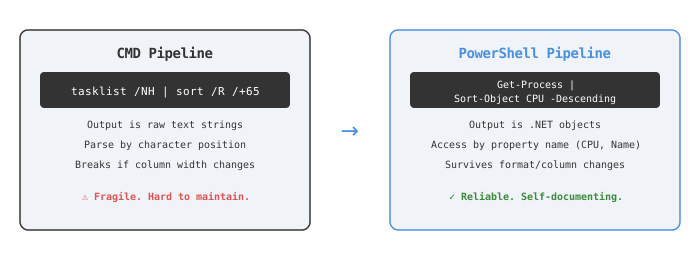
When you run Get-Process in PowerShell, you don’t get a string. You get a collection of System.Diagnostics.Process .NET objects — each one with properties like Name, Id, CPU, WorkingSet [7]. They have types. You can filter them, sort them, compare them, without ever touching string parsing.
Compare:
# PowerShell — reads like English, rock solid
Get-Process | Where-Object WorkingSet -gt 100MB | Sort-Object CPU -Descending
REM CMD — parsing text by character position, good luck
tasklist /NH | sort /R /+65
The CMD version counts character positions in the output. Change Windows version, change the column width — it silently breaks. The PowerShell version? It’ll work fine regardless.
It’s Built on .NET — Which Means It Can Do Almost Anything
PowerShell cmdlets are built on the .NET Framework (and later .NET Core). This means you can call .NET APIs directly from your shell. Want to interact with Active Directory, the Windows registry, Event Logs, COM objects, REST APIs, or WMI? PowerShell has native cmdlets for all of this [4].
CMD literally cannot do any of those things without external tools.
Remote Management at Scale
Invoke-Command lets you run a PowerShell script on 500 remote Windows machines simultaneously. That’s not an exaggeration — it’s what enterprise sysadmins actually use it for. CMD has no equivalent. Zero.
And Then Microsoft Created the Confusion
Here’s where things go sideways.
PowerShell 1.0 through 5.1 — called Windows PowerShell — was Windows-only, built on the old .NET Framework. Then in August 2016, Microsoft did something nobody expected: they open-sourced PowerShell and released it for Linux and macOS [8]. They rebuilt it on .NET Core and called the new thing PowerShell Core 6.0, eventually just PowerShell 7.
So now there are — and I’m not joking — two different PowerShells:
| Feature | Windows PowerShell 5.1 | PowerShell 7.x |
|---|---|---|
| Executable | powershell.exe | pwsh.exe |
| Built on | .NET Framework | .NET Core / .NET 5+ |
| Platform | Windows only | Windows, Linux, macOS |
| Status | Maintenance only | Actively developed |
| Pre-installed | Yes (Windows) | No, separate install |
Windows PowerShell 5.1 is no longer getting new features — Microsoft only patches it for security bugs [9]. PowerShell 7 is where all the new stuff happens. But Windows still ships with 5.1 pre-installed, and PowerShell 7 is a separate download.
So if you open the “PowerShell” that comes with Windows — that’s the old one. And some modules that work in 5.1 don’t work in 7 yet. And vice versa. Honestly, this is where it gets tricky.
And Then Windows Terminal Showed Up
In May 2019 at Microsoft Build, they announced Windows Terminal — a brand new tabbed terminal application [10]. It went stable in May 2020.
Here’s the thing though: Windows Terminal is not a shell. It’s just a host app — a pretty wrapper that can run CMD, PowerShell 5.1, PowerShell 7, WSL (Windows Subsystem for Linux), or SSH sessions — all in tabs, with GPU-accelerated text rendering, themes, custom fonts, and split panes.
Think of it this way:
- CMD = a shell (the engine, the interpreter)
- PowerShell = a shell (a more powerful engine)
- Windows Terminal = the window that runs those shells inside it
The problem is that when you open Windows Terminal on Windows 11, it defaults to PowerShell. So a lot of people think Windows Terminal is PowerShell. It’s not. It’s just wearing PowerShell as a default.
The mental model Microsoft expected people to figure out on their own:
Windows Terminal (the window)
├── PowerShell 7 tab    ← modern shell
├── Windows PowerShell 5.1 tab  ← legacy shell
├── Command Prompt tab  ← ancient shell
└── Ubuntu (WSL) tab    ← Linux shell on Windows
So Why Not Just Fix CMD?
Fair question. Why didn’t Microsoft just upgrade CMD instead of building something completely new?
The answer is backwards compatibility — the thing that haunts every Windows decision ever made. CMD is used by literally millions of batch scripts running in enterprises, hospitals, banks, government systems. Touch cmd.exe, and something critical breaks. The CMD engine is intentionally in maintenance mode because “every time a change is made, something critical breaks” [11].
There was also a strategic architectural reason: around 2002, Microsoft was moving from COM (Component Object Model) programming to the .NET Framework. Building a new shell on .NET made total sense. Retrofitting .NET onto a DOS-era interpreter would have been a nightmare.
So they built PowerShell as a parallel track — new users get it, old systems keep running CMD, eventually CMD fades out. In theory. In practice, CMD is still there 20 years later, confusing everyone.
Should You Actually Learn PowerShell?
If you’re a developer or sysadmin on Windows, the answer is yes, and specifically PowerShell 7 — the cross-platform one you install separately (pwsh.exe). It’s actively maintained, works on Linux and Mac, and is what Microsoft is investing in going forward [12].
If you’re just running quick one-off commands — finding a file, checking network config — CMD still works fine for that. Nobody’s stopping you.
The real trap is thinking these tools are interchangeable. They’re not. PowerShell is a proper scripting language with loops, functions, error handling, classes, and remote execution. CMD is a command runner with glorified batch files. Using CMD for automation in 2026 is like writing a web app in raw CGI — technically possible, practically painful.
Here’s a rough guide:
- Use CMD when: you’re running legacy
.batscripts, doing a quickipconfigorping, or working in a locked-down enterprise environment - Use Windows PowerShell 5.1 when: you need modules that aren’t yet on PS7, or you’re on a machine where installing PS7 isn’t an option
- Use PowerShell 7 when: everything else — automation, scripting, DevOps, cloud management, anything serious
- Use Windows Terminal when: you want all of the above in one nice tabbed window with themes
The Real Answer to “Why Did Microsoft Do This?”
Microsoft didn’t make it confusing on purpose. They made a genuinely good engineering decision (PowerShell is legitimately better than CMD for administration), but then layered on years of naming decisions, backwards compatibility constraints, an open-source pivot, two parallel product lines, and a new terminal host app — all without ever clearly explaining the mental model to end users.
CMD stuck around because it had to. PowerShell was created because CMD couldn’t scale. Windows Terminal arrived because the old console host was embarrassingly ancient. And PowerShell 7 exists alongside 5.1 because cross-platform was a bigger architectural change than a version bump could handle.
None of this is irrational — it’s just decades of accumulated decisions that nobody bothered to map into a simple picture for regular people. Which is very, very on-brand for Microsoft.
End
Sources
- Cmd.exe — Wikipedia
- Windows Command-Line: The Evolution of the Windows Command-Line — Microsoft DevBlogs
- Command prompt line string limitation — Microsoft Learn
- 2.1. Limitations of CMD.exe — O’Reilly Professional Windows PowerShell
- The Monad Manifesto — Microsoft Learn
- Monad Manifesto – the Origin of Windows PowerShell — PowerShell Team Blog
- PowerShell Object Pipelines vs. CMD Text Parsing — Windows News AI
- PowerShell is now open-source and cross-platform — .NET Blog
- Migrating from Windows PowerShell 5.1 to PowerShell 7 — Microsoft Learn
- Introducing Windows Terminal — Windows Command Line Blog
- CMD is in maintenance mode — The Register
- No future for Windows PowerShell — change to PowerShell Core — 4sysops