
Every request your app serves is a chance to do less work. Caching is just the art of not redoing work you already did. Sounds simple. It isn’t — there’s a whole stack of places you can stash data, each with its own rules, and picking the wrong layer (or the wrong expiry) costs you either stale bugs or a slow site.
I’ve spent enough hours staring at a page that “should have updated” but didn’t, only to realise the answer was cached three layers deep. So let me walk through every place you can cache — from the user’s browser all the way down to compiled bytecode on your server — and where each one bites you.
The mental model: caching is layered, top to bottom
Here’s the thing most tutorials skip. A single HTTP request passes through many caches before it ever touches your database. Each layer is closer to the user (faster, cheaper) or closer to the origin (fresher, more correct). Your job is to push work as far “up” toward the user as you safely can.
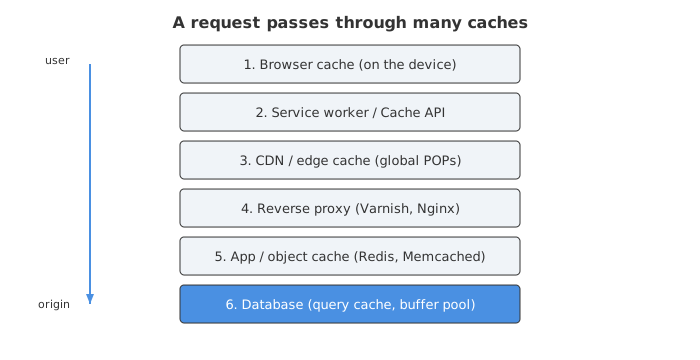
The higher a cache hit, the better. A hit in the browser costs zero network. A hit at the CDN costs one short network hop and never wakes your server. A hit in Redis still runs your app but skips the database. You get the idea.
Let’s go through them.
Browser caching (the free one you’re probably wasting)
The browser cache is local storage on the user’s own device, and a cache hit there has zero network cost [1]. It’s the cheapest win in web performance and also the one people configure worst.
Everything here is controlled by the response headers you send. The star of the show is Cache-Control. A few directives you actually need:
max-age=N— the response stays fresh for N seconds without contacting the server.max-age=3600means “reuse this for an hour, don’t even ask” [2].no-cache— badly named. It doesn’t mean “don’t cache.” It means “cache it, but revalidate with the server before using it.”no-store— this is the real “don’t cache anything” for sensitive data.privatevspublic—privatemeans only the user’s browser may store it (not shared proxies);publicmeans intermediary caches can too.immutable— tells the browser this file will literally never change, so don’t even bother revalidating.
Validation: ETag and 304s
What happens when max-age expires? The browser doesn’t blindly re-download. It revalidates. This is where ETag comes in — an arbitrary version token the server generates for a resource [2]. When the cached copy goes stale, the browser sends the token back in an If-None-Match header, and if nothing changed the server replies 304 Not Modified with an empty body [2]. You skip the download entirely and just refresh the freshness clock.
So Cache-Control decides whether to revalidate, and ETag decides whether the bytes actually changed. They’re a team.
The stale-while-revalidate trick
There’s a beautiful directive called stale-while-revalidate. It lets a cache serve a stale response immediately while it fetches a fresh copy in the background [2]. The user gets an instant response; the next user gets the updated one. For things like avatars or article lists that can be a few seconds out of date, this is the sweet spot — fast and eventually fresh.
Here’s a sane header for a fingerprinted asset that never changes:
Cache-Control: public, max-age=31536000, immutable
And for an HTML page that changes but should feel fast:
Cache-Control: public, max-age=0, s-maxage=60, stale-while-revalidate=300
Honestly, most “why won’t my CSS update?!” problems trace back to someone slapping a year-long max-age on a file whose name never changes. Which brings us to the trick that makes aggressive caching safe.
Cache busting with fingerprints
You can cache a file for a full year and still ship updates instantly if the filename changes whenever the content does. This is called content fingerprinting — a hash of the bytes goes into the filename, so app.a1b2c3.js becomes app.d4e5f6.js the moment a single byte changes [7]. New bytes, new URL, new cache entry. Old URL just… stops being referenced.
Every modern bundler (Webpack, Vite, Rollup, Parcel) does this for you and writes a manifest so your HTML points at the right hashed name [7]. Set max-age=31536000, immutable on anything fingerprinted and you’ll hit 90%+ cache ratios without fear [7].
Service workers and the Cache API (offline-grade caching)
The browser’s HTTP cache is passive — you set headers and hope. A service worker is active. It’s a script that sits between your app and the network like a programmable proxy, intercepting every fetch and deciding how to answer: from cache, from network, or both [3].
This is the backbone of Progressive Web Apps and offline support. The three tools you combine are the Fetch API, the Service Worker API, and the Cache API [3]. And there are a handful of named strategies you’ll reach for over and over:
| Strategy | How it works | Good for |
|---|---|---|
| Cache-first | Check cache; only hit network on a miss | App shell — HTML, core CSS/JS, logo |
| Network-first | Try network; fall back to cache if offline | Live data — feeds, messages |
| Stale-while-revalidate | Serve cache now, refresh in background | Avatars, lists that tolerate slight staleness |
| Cache-only | Never touch the network | Precached static assets |
| Network-only | Never cache | Non-idempotent POSTs, payments |
The service worker usually populates the cache in its install handler (precaching the shell) or lazily in the fetch handler [3]. One non-negotiable detail: service workers only run over HTTPS — because they can intercept all your traffic, browsers refuse to run them on insecure origins [3]. Localhost is the only exception.
The thing that trips people up: a service worker doesn’t respect your HTTP cache headers. It’s a separate cache with its own logic. So now you’ve got two browser-side caches to reason about. Powerful, but the surprise factor is real, which is why folks push for deterministic caching — versioned cache names, explicit cleanup — so you’re never guessing which copy a user has.
CDN and edge caching (the global shortcut)
A Content Delivery Network is a fleet of servers scattered around the world — Cloudflare, Fastly, CloudFront and friends — that sit between your users and your origin. When content is cached at an edge location (a “POP”) near the user, it’s served from there instead of making the round trip to your server [1]. Two wins at once: lower latency for the user, and dramatically less load on your origin.
The metric that matters here is cache hit ratio — the fraction of requests the edge answers without bothering your origin. Aim for 90%+ on static content [5]. Every percentage point is real money and real latency saved.
A few things that quietly wreck your hit ratio:
- Query string chaos. By default many CDNs treat
?utm_source=twitteras a different URL from?utm_source=email, fragmenting your cache. Strip or whitelist query params — cache on?page=but ignore tracking junk [5]. - Cold edges after deploy. A freshly purged edge has to refill, so testing right after a deploy hides whether your steady-state policy is actually healthy [7].
- One-size-fits-all TTLs. Static, fingerprinted files can live at the edge for 365 days; dynamic-but-cacheable HTML should get something modest like 5–10 minutes [5].
CDNs use Cache-Control too, but pay attention to s-maxage — it’s the max-age specifically for shared caches like CDNs, letting you tell the edge “cache for 60s” while telling browsers something different. When you deploy, you either wait out the TTL or issue a purge to evict content immediately, which is worth wiring into your CI/CD pipeline so releases and cache-busting happen together [7].
Some providers go further — Cloudflare’s tiered caching predicts content surges, and CloudFront’s Origin Shield adds a consolidating layer so your origin sees even fewer requests [5]. Edge is also increasingly where you run code, not just cache it, but that’s a rabbit hole for another day.
Reverse proxy caching (full-page caching on your own turf)
Before a request reaches your application code, you can park a reverse proxy in front of it that caches entire HTTP responses. Varnish is the classic example — a caching HTTP reverse proxy that sits between your app and the world [8].
Here’s why it’s so effective. Varnish caches the final rendered HTML after all your PHP (or whatever) has run. When it serves a page from cache, it doesn’t run your code at all — which means no database queries, no backend calls, no third-party requests for that page [8]. The request comes in, Varnish answers from RAM, done. Requests that would’ve hammered your database just… don’t.
The flow is dead simple:
- Request arrives at Varnish.
- Varnish tries to answer from cache.
- On a miss, it forwards to your backend, fetches the response, stores it, and delivers it [8].
Nginx does something similar with FastCGI page caching, and it’s the standard trick behind fast WordPress setups [8]. The catch with full-page caching is obvious: it’s brilliant for anonymous, mostly-static pages and terrible for anything personalised. A logged-in dashboard with the user’s name in the header can’t be blindly full-page cached — you’d serve Alice’s page to Bob. That’s why real setups layer caches: full-page cache for anonymous traffic, and finer-grained object caching underneath for the personalised bits [8].
Application and object caching (Redis, Memcached)
Now we’re inside your server. Application-level caching stores computed results — query results, serialized objects, rendered fragments — in a fast in-memory store so you don’t recompute them. The two names you’ll hear forever are Redis and Memcached.
They’re not the same tool:
| Redis | Memcached | |
|---|---|---|
| Data types | Strings, hashes, lists, sets, sorted sets, streams | Simple key/value only |
| Persistence | RDB snapshots + AOF log | None (pure memory) |
| Threading | Mostly single-threaded (per shard) | Multi-threaded, scales on multi-core |
| Extras | Pub/sub, Lua scripts, transactions, clustering | Lean and fast |
| Best when | You need structures, persistence, or atomic ops | Pure high-throughput get/set |
Use Redis when you need data structures, persistence, pub/sub or atomic operations beyond simple get/set; reach for Memcached when you just want simple, blisteringly fast get/set for HTML fragments or query results [4]. For most apps Redis is the default because it does more, but Memcached’s multi-threaded model genuinely scales better for the narrow get/set case [4].
The patterns matter more than the tool
How you read and write the cache is where the real decisions live. There are three big patterns [4]:
- Cache-aside (lazy loading). The app checks the cache first. On a hit, return it. On a miss, query the database, populate the cache, then return. This is the most common pattern and great for read-heavy workloads where the occasional miss is fine [4]. The downside: the first request for any key is always a miss, and stale data can linger if you don’t invalidate on writes.
- Write-through. Every write updates the database and the cache synchronously. The cache is always warm and consistent, at the cost of slower writes and caching data nobody may ever read [4].
- Write-behind (write-back). The app writes only to the cache, and the cache flushes to the database asynchronously [4]. Fastest writes by far — and the scariest, because a crash before the flush loses data.
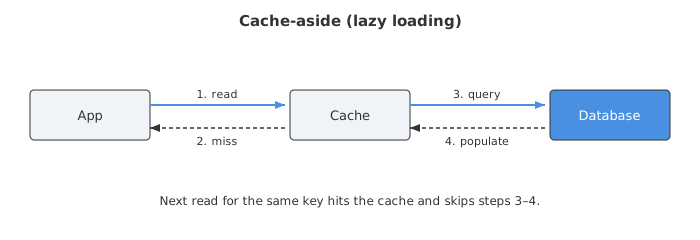
You can mix these. A read-heavy product page might use cache-aside; a shopping cart might use write-through so it’s never stale. Pick per data type, not per app.
Database-level caching (the layer you get for free)
Even if you add zero caching, your database is already doing it. Most engines keep a buffer pool — recently read pages held in RAM so repeat reads don’t hit disk. Some (older MySQL versions) had a full query cache that stored result sets keyed by the exact SQL string, though that’s fallen out of favour because invalidation was brutal on write-heavy tables.
The lesson: your database’s own memory is a cache, and starving it is a classic own-goal. Before you bolt Redis onto everything, make sure your database has enough RAM to keep its working set hot. Sometimes “add more buffer pool” beats “add another moving part.”
Materialized views and precomputed aggregate tables are a cousin of this idea — you’re caching the result of a query as physical rows, refreshed on a schedule. Not glamorous, but for expensive analytics rollups it’s often the right call.
Build-time and compiled caching
Some caching happens before a single user shows up.
- Opcode caching. For interpreted languages, parsing source on every request is pure waste. PHP’s OPcache compiles scripts to bytecode once and holds it in shared memory, so later requests skip the parse-and-compile step entirely [9]. For an app with hundreds of files this cuts execution time by roughly 40–70% and slashes CPU use [9]. It’s bundled with PHP 5.5+ and is basically mandatory in production. PHP 8’s JIT builds on top of it, compiling hot bytecode down to native machine code [9].
- Static site generation / ISR. Frameworks like Next.js, Astro and Hugo render pages to static HTML at build time so there’s nothing to compute at request time — it’s a cache baked into your deploy artifact. Incremental Static Regeneration takes it further, rebuilding individual pages in the background on a schedule so you get static speed with fresher content.
- Build caches. Your CI, your bundler, Docker layers — they all cache intermediate artifacts so rebuilds only redo what changed. Not user-facing, but it’s the same principle: don’t redo settled work.
Cache invalidation: the part that ruins your week
There’s an old joke that the two hardest problems in computer science are naming things, cache invalidation, and off-by-one errors. The cache invalidation part is not a joke.
Every cache needs an eviction and freshness story. The common eviction policies [6]:
- LRU (Least Recently Used) — evicts whatever hasn’t been touched longest. Sensible default, assumes recent = relevant [6].
- LFU (Least Frequently Used) — evicts the least-accessed items, keeping popular ones [6].
- FIFO — evicts the oldest inserted, ignoring usage. Rarely worth it; LRU almost always beats it [6].
- TTL — time-based expiry, the workhorse. But it needs tuning: too short and stable data churns pointlessly; too long and stale data lingers [6].
The cache stampede trap
Here’s the failure mode that gets people at 2 AM. It’s called a cache stampede or thundering herd. A hugely popular cache entry expires, and suddenly every concurrent request misses at the same instant and slams the backend all at once — overwhelming the very database the cache was protecting [6].
The sneaky version: you warm a cache in a loop, giving every key an identical TTL. Now every key expires in the same second, manufacturing a stampede on a timer [6]. Ask me how I know.
Fixes, roughly in order of effort:
- Add jitter. Randomise TTLs so entries don’t expire in lockstep. A base of 300s ± a random 60s spreads the load [6].
- Locking / single-flight. When a key is being refreshed, let one request rebuild it while the others wait or serve stale [6].
- Stale-while-revalidate, again — serve the expired value while one background task refreshes it, so nobody waits on a cold rebuild.
And the deeper problem: knowing when your data actually changed so you can invalidate proactively instead of waiting for a TTL. That’s genuinely hard, and it’s why so many teams accept a bit of staleness rather than chase perfect consistency. Some data — a user’s balance, a stock count — can’t tolerate that, and for those you write-through and invalidate on every mutation. Everything else, let TTL do the work.
So which ones do you actually use?
All of them, more or less, at different layers. A well-tuned setup usually looks like this:
- Fingerprinted static assets with a one-year, immutable browser cache.
- A CDN in front, doing 90%+ of the delivery.
- A reverse proxy or full-page cache for anonymous HTML.
- Redis (or Memcached) for query results and session data via cache-aside.
- A database with enough RAM to keep its buffer pool hot.
- Opcode/build caching so the server never redoes work it did last deploy.
The browser cache, CDN and server-side caches are each strong alone, but the real gains come from stacking them so a request has to fall through many layers before it does any real work [1]. Start at the top — the browser — because that’s the cheapest hit, and only push work down to the database when you truly have no choice.
Get the layering right and most of your traffic never wakes your origin at all. Get the invalidation wrong and you’ll spend a week explaining why the price on the page is from last Tuesday. Both are part of the deal.
Sources
- Caching Strategies: Browser Cache, CDN, and Server-Side Caching — GrabPerf
- Cache-Control header — MDN Web Docs
- Caching — Progressive web apps | MDN
- System Design: Distributed Caching — Redis vs Memcached, Cache-Aside, Write-Through
- CDN Cache-Hit Ratio Optimization Strategies — BlazingCDN
- How to Handle Cache Stampede (Thundering Herd) in Redis — OneUptime
- Cache Busting Strategies With CDNs And Browser Caching — DCHost
- The fundamentals of web proxy caching with Varnish
- PHP Performance: Everything You Need to Know About OpCode Caches — Engine Yard