
Everyone talks about HTTP/3 like it’s a free speed upgrade you flip on and forget. It mostly is — but “mostly” is doing a lot of work in that sentence. HTTP/3 is now used for roughly 35% of all web requests globally [1], so this isn’t a research toy anymore. The thing is, almost no one explains why it’s faster, where it actually loses to HTTP/2, and — the question nobody asks — whether your particular site even benefits. Let me walk through it the way I’d explain it to a friend over chai.
The one thing that actually changed
Here’s the part people get wrong. They think HTTP/3 is a new way of writing requests, new headers, new methods, new everything. It isn’t.
The HTTP semantics — methods, status codes, headers — are identical to HTTP/2 and HTTP/1.1 [2]. A GET is still a GET. A 404 is still a 404. What changed is the transport: how those bytes get shoved across the internet. HTTP/1.1 and HTTP/2 both ride on TCP. HTTP/3 throws TCP out and runs on a brand-new protocol called QUIC, which itself runs on UDP [3].
So the difference is the how, not the what [4]. That single swap — TCP out, QUIC in — is the whole story. Everything good and everything annoying about HTTP/3 flows from it.
To understand why anyone bothered, you have to understand the problem TCP couldn’t shake.
Head-of-line blocking: the bug that wouldn’t die
This is the villain of the whole story, so let’s actually get it.
How we got here
Back in HTTP/1.1, your browser opened a connection and sent one request at a time. Request, wait for response, next request. If you wanted parallelism, the browser opened 6 separate TCP connections per domain and juggled them. Wasteful, but it worked.
HTTP/2 fixed that with multiplexing: many independent “streams” sharing a single TCP connection. Your CSS, your JS, your images all flow over one pipe at once, interleaved. Brilliant on paper. And on a clean network, genuinely great.
But here’s the catch nobody mentions. HTTP/2 multiplexes streams at the HTTP layer, while TCP underneath still insists on delivering one strictly ordered byte stream. TCP doesn’t know or care that you have 100 independent streams. It sees one sequence of bytes that must arrive in order.
So what happens when a single packet gets lost?
The stall
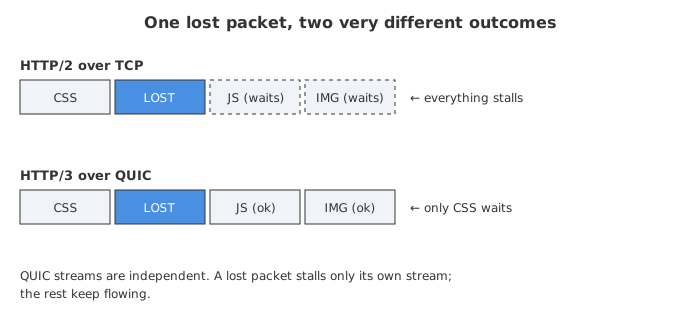
If one packet drops, TCP halts everything that came after it — including bytes for completely unrelated streams — until that lost packet is retransmitted and arrives [5]. Your image1.jpg might be sitting there fully downloaded, ready to render, blocked not by its own network issue but because styles.css lost a packet [5].
HTTP/2 didn’t actually solve head-of-line blocking. It just pushed it down a layer, from the application layer into the transport layer [5]. On a perfect network you’d never notice. On a flaky mobile connection with 2% packet loss? That one stall ripples across everything.
This is the part that genuinely surprised me when I first dug in. We spent years celebrating HTTP/2 multiplexing, and the dirty secret was that TCP could undo all of it with a single dropped packet.
How QUIC kills it
QUIC makes each stream genuinely independent. Each QUIC stream keeps its own packet ordering. So when stream #5 loses a packet, only stream #5 stalls — streams #1 to #4 and #6 onward keep delivering immediately [5]. QUIC still retransmits the lost packet after a timeout, just like TCP, but it doesn’t drag everyone else down with it [3].
That’s the headline win. On a clean network it barely matters. On a lossy network it matters a lot.
The other wins (they’re real too)
Head-of-line blocking gets the headlines, but QUIC bundles in a few more upgrades worth knowing.
Faster handshakes
With HTTP/2 over TCP, opening a secure connection means a TCP handshake and then a separate TLS handshake on top. QUIC folds the transport handshake and the cryptographic handshake into a single operation — connection established and encrypted in one flight [3].
The numbers people throw around: HTTP/3 offers 1-RTT connection setup and 0-RTT resumption, while HTTP/2 needs around 3 RTT for a secure connection [3]. Put plainly, HTTP/3 can set up connections up to ~50% faster than HTTP/2 [4]. If your users are far from your server — high latency — those saved round trips are real, felt time.
Encryption isn’t optional anymore
In HTTP/1.1 and HTTP/2, TLS sits on top as a separate layer you bolt on. In QUIC, TLS 1.3 is baked in as an integral component [3]. There’s no such thing as unencrypted HTTP/3. Honestly, I think that’s a good thing — it removes a whole class of “oops, plaintext” misconfigurations.
Connection migration (the underrated one)
This is my favorite feature and almost nobody talks about it.
TCP identifies a connection by the classic 4-tuple: source IP, source port, destination IP, destination port. Change any of those — say your phone hops from Wi-Fi to 5G — and the IP changes, so the TCP connection dies and has to be rebuilt from scratch.
QUIC uses a connection ID to identify a connection instead of relying on the 4-tuple [6]. So when your phone switches networks, QUIC just keeps the same connection ID and carries on [6]. Your video keeps playing, your download keeps downloading. Given how much of the internet is now mobile users walking around switching networks, this is a genuinely big deal.
A quick side-by-side
| HTTP/1.1 | HTTP/2 | HTTP/3 | |
|---|---|---|---|
| Transport | TCP | TCP | QUIC (over UDP) |
| Multiplexing | No (6 connections) | Yes | Yes |
| Head-of-line blocking | Yes (app layer) | Yes (transport layer) | Largely solved [5] |
| Encryption | TLS optional, bolted on | TLS optional, bolted on | TLS 1.3 mandatory, built in [3] |
| Handshake to secure | Multiple RTT | ~3 RTT [3] | 1-RTT / 0-RTT resume [3] |
| Survives network switch | No | No | Yes (connection migration) [6] |
So is HTTP/3 just… better? Not always.
Here’s where the marketing pages go quiet and I’ll be blunt. HTTP/3 is not always faster than HTTP/2 [7], and pretending otherwise sets you up for disappointment.
The CPU cost is real
TCP has had decades of kernel-level optimization. QUIC runs in userspace over UDP, which is exactly what makes it easy to update and deploy — but it comes at a performance cost [8].
Because QUIC lives in userspace, it has to read ACKs through system calls constantly, and QUIC packets are tiny (~1KB), so processing all those packet-wise ACKs eats a large chunk of CPU [8]. The result: on fast, low-loss networks with plenty of bandwidth, an HTTP/3 transfer can burn more CPU time than the same transfer over HTTP/2 [8]. In high-bandwidth scenarios where CPU becomes the constraint, HTTP/3 can even show lower throughput than HTTP/1.1 [8].
Read that again. On a fat, clean pipe, the “newer, faster” protocol can be slower because it’s CPU-bound. For a CPU-bound service, HTTP/3 can actually reduce your effective capacity [8].
UDP sometimes just doesn’t get through
QUIC rides on UDP, and some networks treat UDP as suspicious. Some firewalls and devices block unknown UDP protocols, so QUIC times out with no response from the server [9]. There are real reports of QUIC failing on certain carrier setups — like UDP being blocked on some 5G home internet [9]. Browsers handle this by quietly falling back to HTTP/2 over TCP, so users don’t usually break — but it does mean HTTP/3 isn’t a guaranteed win for everyone hitting your server.
There are also infrastructure gotchas. Some NAT devices don’t handle connection migration correctly, causing drops when the IP changes during a mobile handoff [6]. And for networks using anycast and ECMP routing, packets from the same QUIC connection can get routed to different backend servers after a NAT rebind or migration [6]. None of these are dealbreakers, but they’re the kind of thing that costs you an afternoon of debugging if you run your own edge.
The 0-RTT footgun
Remember that lovely 0-RTT resumption? It has a sharp edge. 0-RTT early data can be replayed [10].
The mechanism uses a pre-shared key from a previous session, and because the early data is sent before the server confirms it’s talking to a fresh, live client, an attacker can grab a copy of that encrypted 0-RTT data and send it to the server again — seconds or minutes later [10]. The server sees a repeated request when only one was actually made [10]. That quietly breaks the idempotency assumption the web is built on.
The fix isn’t exotic: don’t allow non-idempotent requests (like POST) over 0-RTT. Some CDNs like Cloudflare already block non-idempotent 0-RTT requests by default, but other implementations such as nginx may not protect you out of the box [10]. So if you’re hand-rolling HTTP/3, this is on you to get right. Honestly, this is where it gets tricky and where a lot of people will misconfigure things [10].
Who should actually use it?
Now the real question. Let me break it down by who you are, because the answer genuinely differs.
You run a normal website behind a CDN
Just turn it on. This is the easy case. If you’re on Cloudflare, Fastly, Cloudron, or similar, the CDN handles HTTP/3 at the edge — no recompiling, no kernel patches. On Cloudflare you literally toggle it in the dashboard and the edge starts advertising HTTP/3 to compatible clients via the Alt-Svc header [11].
That Alt-Svc header is how the whole thing bootstraps, by the way. The client first connects over HTTP/2, sees a response header like this, and knows it can try HTTP/3 next time [11]:
alt-svc: h3=":443"; ma=86400
The CDN absorbs the CPU overhead and the UDP-fallback headaches for you. There’s basically no downside. Do it.
You run your own nginx / origin server
Worth it, but do it with eyes open. You’ll need an nginx build that supports QUIC — which historically meant building from source with the QUIC patch or using a supported fork [11]. A minimal config adds a second listen line with the quic parameter and advertises support:
listen 443 quic reuseport;
listen 443 ssl;          # keep TCP for fallback
ssl_protocols TLSv1.3;

add_header alt-svc 'h3=":443"; ma=86400';
Keep the regular TCP listen 443 ssl line too — that’s your fallback for clients and networks that can’t do QUIC [9]. And think hard about 0-RTT before enabling early data [10]. If you serve a CPU-heavy, high-bandwidth API on a clean datacenter network, benchmark it — you might find HTTP/2 is actually cheaper for you [8].
Your users are mobile, far away, or on bad networks
This is where HTTP/3 shines brightest. High latency means the faster handshake actually saves felt time [3]. Lossy connections mean per-stream independence keeps your page moving while one stream recovers [5]. And mobile users switching between Wi-Fi and cellular benefit directly from connection migration [6]. If your audience is “people on phones in places with patchy networks” — much of the real world — HTTP/3 is a clear win.
You run a CPU-bound, high-throughput backend on a clean network
Pause. Benchmark before you commit. This is the one group that might not benefit. If your servers are CPU-constrained and your network is fast and reliable, the userspace QUIC overhead can eat into your throughput [8]. Measure with your real traffic, not someone’s blog benchmark (including this one).
Where adoption actually is
Just so you know this isn’t speculative: HTTP/3 sits at around 35% of global requests as of late 2025 [1]. Growth has slowed — HTTP/2 and HTTP/3 each gained only fractions of a percentage point in 2025 compared to 2024 [1] — and adoption varies a lot by region, with 15 countries pushing more than a third of their requests over HTTP/3 [1]. All the major browsers support it, and the big CDNs have it ready to flip on. It’s mainstream now, not bleeding edge.
The honest summary? HTTP/3 is a real improvement for the conditions it was designed for — lossy networks, mobile users, high latency, lots of small requests. It is not a magic “make everything faster” switch, and on a CPU-bound service over a pristine network it can quietly cost you. Turn it on at the CDN where it’s free and safe. Be deliberate about it on your own origin. And whatever you do, don’t enable 0-RTT for POST requests and walk away.
Sources
- HTTP/3 Is at 35% Adoption — DEV Community
- What is QUIC and HTTP/3? — GeeksforGeeks
- What is HTTP/3? — Cloudflare
- HTTP/3 vs HTTP/2 Performance — DebugBear
- TCP head of line blocking — HTTP/3 explained
- Connection Migration — quic-go docs
- TIL: HTTP/3 Is Not Always Faster Than HTTP/2 — Ian Duncan
- LiteQUIC: Reducing CPU Overhead of QUIC — OpenReview
- How to Troubleshoot QUIC Protocol Issues Over UDP — OneUptime
- 0-RTT Replay: The High-Speed Flaw in HTTP/3 — InstaTunnel
- The End-to-End Playbook: Enabling HTTP/2 and HTTP/3 on Nginx + Cloudflare — DCHost