
Every request you make to a website carries a small pile of metadata you never see. Headers. They decide whether your connection is encrypted, whether a page can be embedded in an iframe, which CDN edge served you, and whether the browser should remember a cookie for a year. I wanted to see what a real, busy production site sends, so I pointed curl at an Amazon endpoint and dumped the response headers. Turns out there’s a lot to unpack.
What I actually ran
I made a plain GET request to one of Amazon India’s internal “add to cart” config endpoints and asked curl to print only the response headers:
curl -s -D - -o /dev/null \
  "https://www.amazon.in/cart/add-to-cart/patc-config?clientName=SiteWideActionExecutor&ref_=ax_patc_cfg" \
  -A "Mozilla/5.0 (X11; Linux x86_64; rv:124.0) Gecko/20100101 Firefox/124.0"
The -D - dumps headers to stdout, and -o /dev/null throws away the body (I only care about headers here). Here’s roughly what came back:
HTTP/2 200
content-type: application/json;charset=UTF-8
date: Sun, 07 Jun 2026 18:55:58 GMT
server: Server
x-amz-rid: BE1Q4YXSQ0DKN83F4JYQ
set-cookie: session-id=259-8655047-0491149; Domain=.amazon.in; Expires=...; Path=/; Secure
set-cookie: session-id-time=2082787201l; Domain=.amazon.in; Expires=...; Path=/; Secure
set-cookie: i18n-prefs=INR; Domain=.amazon.in; Expires=...; Path=/
set-cookie: lc-acbin=en_IN; Domain=.amazon.in; Expires=...; Path=/
x-content-type-options: nosniff
x-xss-protection: 1;
accept-ch: ect,rtt,downlink,device-memory,...,sec-ch-ua-platform-version
accept-ch-lifetime: 86400
content-security-policy-report-only: default-src 'self' blob: https: data: ...;report-uri https://metrics.media-amazon.com/
content-encoding: gzip
content-security-policy: upgrade-insecure-requests;report-uri https://metrics.media-amazon.com/
strict-transport-security: max-age=47474747; includeSubDomains; preload
vary: X-Amazon-Wtm-Tag-...,Accept-Encoding,User-Agent
x-frame-options: SAMEORIGIN
x-cache: Miss from cloudfront
via: 1.1 db8e720c1e186c4a9d38db72ecaa0492.cloudfront.net (CloudFront)
x-amz-cf-pop: BOM78-P2
alt-svc: h3=":443"; ma=86400
x-amz-cf-id: 4UqtO1tdgZlbHdAUl2W47T2W4MGf7vb-mx2Y-KEevkHqCcCyhE_b0Q==
That’s a surprisingly dense response for what’s basically a config endpoint. Let me walk through them in groups, because some of these matter a lot more than others.
The boring-but-essential basics
content-type
content-type: application/json;charset=UTF-8 tells the client what kind of data the body holds and how to decode it. Sounds trivial, but it’s load-bearing. A browser uses this to decide whether to parse the response as JSON, render it as HTML, or treat it as a download. The charset=UTF-8 part specifies the character encoding so accented characters and non-Latin scripts come through correctly.
Here’s the thing — if a server lies or stays vague about content type, browsers used to “sniff” the body and guess. That guessing is exactly what x-content-type-options: nosniff (more on that below) exists to shut down.
date and server
date is just the server’s timestamp when it generated the response. Caches use it for freshness math.
server: Server is my favourite bit of dry humour in this whole dump. Most servers proudly announce themselves — Server: nginx/1.24.0 or Server: Apache/2.4. Amazon’s frontend instead returns the literal word Server. That’s deliberate obfuscation. Why hand an attacker a free version-number lookup against known CVEs? So they strip it down to something useless. Small thing, but it tells you someone thought about it.
content-encoding
content-encoding: gzip means the body was compressed with gzip before being sent. Your client transparently decompresses it. This is why the response is smaller on the wire than the actual JSON. Nothing exotic, but it pairs directly with the Vary header later — and that pairing is where people trip up.
x-amz-rid
x-amz-rid: BE1Q4YXSQ0DKN83F4JYQ is an Amazon-specific request ID. It’s an internal correlation token. If something breaks and you file a support ticket, this is the string their engineers grep their logs for. You’ll see a similar idea repeated with the CloudFront headers at the end — modern infra is obsessed with being able to trace one specific request through a dozen systems.
The security headers — the interesting part
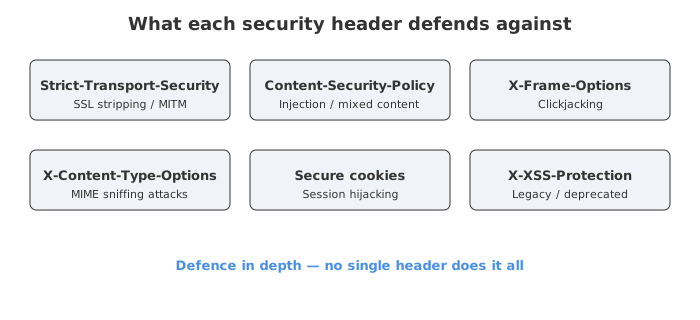
This is where the response gets genuinely worth studying, because Amazon ships a stack of defensive headers and a couple of them have history.
strict-transport-security
strict-transport-security: max-age=47474747; includeSubDomains; preload
HSTS tells the browser: “From now on, only ever talk to me over HTTPS. If anyone hands you an http:// link for me, upgrade it to HTTPS before the request even leaves the machine.” Three directives here:
max-age=47474747— remember this rule for ~550 days (that number is just47474747seconds; someone clearly enjoyed the repeating digits).includeSubDomains— the rule covers every subdomain too.preload— Amazon wants to be baked into browsers’ hardcoded HSTS lists, so even your very first visit is forced to HTTPS, with no insecure first request.
Why does this matter so much? Without HSTS, your first request to amazon.in might go out as plain HTTP and get hijacked before the redirect to HTTPS — the classic SSL-stripping attack. The OWASP HSTS cheat sheet explains this risk well. One catch: browsers ignore an HSTS header if it arrives over plain HTTP, specifically so a man-in-the-middle can’t inject a bogus one. It only counts when it comes over a connection that’s already secure.
Two Content-Security-Policy headers
This is the bit I found most telling. Amazon sends both an enforcing policy and a report-only policy:
content-security-policy: upgrade-insecure-requests;report-uri https://metrics.media-amazon.com/
content-security-policy-report-only: default-src 'self' blob: https: data: ...;report-uri https://metrics.media-amazon.com/
The enforcing one is deliberately tiny. upgrade-insecure-requests tells the browser to rewrite every http:// sub-resource (images, scripts, whatever) to https:// before fetching. On a site this old with this many legacy URLs floating around, manually fixing each one would be madness — so they let the browser upgrade them in bulk.
The second header is the clever part. Content-Security-Policy-Report-Only blocks nothing. It runs a stricter trial policy (default-src 'self' ...) and, whenever something would have been blocked, POSTs a JSON violation report to the report-uri. This is how you roll out a tight CSP without breaking the live site:
- Deploy the strict policy in report-only mode.
- Watch the violation reports roll into your metrics endpoint.
- Fix the legitimate things that trip it.
- Once it’s quiet, promote it to the enforcing header.
It’s basically running the strict policy in a wind tunnel before strapping it to the actual plane. The report-uri directive is technically deprecated in favour of report-to, but it’s kept around for the many browsers still relying on it.
x-content-type-options: nosniff
Short header, real teeth. nosniff tells the browser to trust the Content-Type and never guess. Without it, a browser might look at a file served as text/plain, decide it “looks like” HTML or JavaScript, and execute it — a MIME-confusion attack. If an attacker can upload a file that gets served back, content sniffing is how a harmless-looking upload turns into running script. nosniff slams that door.
x-frame-options: SAMEORIGIN
X-Frame-Options: SAMEORIGIN controls who’s allowed to load this page inside a <frame> or <iframe>. SAMEORIGIN means only Amazon pages can frame other Amazon pages — evil-site.com can’t. This is the core defence against clickjacking, where an attacker invisibly overlays your real page and tricks you into clicking “Buy now” or “Confirm” while you think you’re clicking something else. For a shopping cart endpoint, you can see exactly why they care.
x-xss-protection: 1
Now, x-xss-protection: 1 is the odd one out, and honestly it’s a bit of a relic. It was a feature of old Internet Explorer, Chrome and Safari that tried to detect reflected XSS and block the page. The catch — and security folks have been blunt about this — is that the filter itself could be abused to introduce vulnerabilities into otherwise-safe pages. Modern guidance is to either turn it off (0) or just not send it, and lean on a real Content-Security-Policy instead. Amazon still sends 1, probably for the long tail of ancient browsers. I wouldn’t copy this one into a new project.
Performance and protocol headers
accept-ch and accept-ch-lifetime
accept-ch: ect,rtt,downlink,device-memory,...,sec-ch-ua-platform-version
accept-ch-lifetime: 86400
This is Client Hints. With Accept-CH, the server is saying: “On your next requests, please also tell me your network speed (ect, rtt, downlink), how much device memory you have (device-memory), and some user-agent details.” Amazon can then tailor what it serves — lighter images on a slow 2g connection, for instance.
accept-ch-lifetime: 86400 says remember this preference for a day. Worth knowing: Accept-CH-Lifetime is no longer recommended and largely removed from the spec, but plenty of sites still send it for compatibility. Client Hints only work over a secure connection, and only get sent to the first-party origin — a privacy guardrail so random third parties can’t quietly fingerprint your device.
vary
vary: X-Amazon-Wtm-Tag-...,Accept-Encoding,User-Agent
The Vary header is the one that quietly breaks caches when people forget it. It tells every cache between Amazon and you: “This response depends on these request headers, so key your cached copies on them.”
Accept-Encoding— remember the gzip body and the Brotli body separately. Without this, a cache might hand a gzip blob to a client that asked for something else. Since the response is gzip-encoded, this entry is doing real work.User-Agent— the response can differ between a mobile and a desktop browser, so cache them apart.
A small caution the experts keep repeating: Vary: User-Agent is a blunt instrument. There are effectively infinite User-Agent strings out there, so this can shred your cache hit rate by storing a near-unique copy per browser version. Big sites with their own CDN logic can afford it; on a small site I’d think twice.
alt-svc
alt-svc: h3=":443"; ma=86400
Alt-Svc is the handshake that bootstraps HTTP/3. This request came back over HTTP/2, but this header is Amazon whispering: “Hey, I also speak h3 (HTTP/3 over QUIC) on port 443 — feel free to use it for the next 86400 seconds.” A capable browser will quietly try HTTP/3 in the background and, if it connects, switch over for faster, lower-latency requests. As bagder’s HTTP/3 guide puts it, this is how the upgrade happens without breaking anything for clients that don’t support it.
The CloudFront trail
The last cluster tells you Amazon is serving this through its own CDN, CloudFront:
| Header | Value | Meaning |
|---|---|---|
x-cache | Miss from cloudfront | Not in edge cache — fetched from origin |
via | 1.1 ...cloudfront.net (CloudFront) | A CloudFront proxy handled the request |
x-amz-cf-pop | BOM78-P2 | Served from the Mumbai (BOM) edge location |
x-amz-cf-id | 4UqtO1... | Opaque trace ID for this exact request |
A few things click into place here:
x-cache: Missmakes sense — a personalised cart-config endpoint shouldn’t be cached and served to everyone, so a miss is the correct behaviour, not a problem.x-amz-cf-pop: BOM78uses IATA airport codes.BOMis Mumbai. I’m in India, so CloudFront routed me to the nearest edge — exactly what a CDN is supposed to do. The-P2suffix indicates the cache tier.x-amz-cf-idis the CloudFront sibling ofx-amz-ridfrom earlier — an encrypted, opaque token that means nothing to me but lets AWS Support pull this precise request out of their logs. Notice the pattern: every layer stamps its own trace ID. That redundancy is how you debug a request that passed through the CDN, the frontend, and the backend without losing the thread.
So what’s the takeaway?
For one throwaway config request, Amazon sent back encryption enforcement, three flavours of XSS/clickjacking defence, two CSP strategies running side by side, cookie scoping, client-hint negotiation, HTTP/3 advertising, and a full CDN trace trail. None of it is exotic — every header here is documented on MDN and most are things you can switch on yourself. The difference is that Amazon turns on all of them, defence-in-depth style, and even ships a report-only CSP just to test the next tightening before it’s enforced.
If you run anything in production, this dump is a decent checklist. HSTS with preload, nosniff, a real CSP, X-Frame-Options, Secure cookies, and a sane Vary will get you most of the way. And maybe — like Amazon — set your Server header to something gloriously unhelpful while you’re at it.
Sources
- Strict-Transport-Security header - MDN Web Docs
- HTTP Strict Transport Security - OWASP Cheat Sheet
- Content-Security-Policy: upgrade-insecure-requests - MDN
- Content Security Policy (CSP) Guide - MDN
- Content-Security-Policy: report-uri directive - MDN
- HTTP Headers Cheat Sheet - OWASP
- X-Content-Type-Options HTTP Header - KeyCDN
- Accept-CH header - MDN Web Docs
- Set-Cookie header - MDN Web Docs
- RFC 6265 - HTTP State Management Mechanism
- Best practices for using the Vary header - Fastly
- Understanding The Vary Header - Smashing Magazine
- Alt-Svc header - MDN Web Docs
- Bootstrap with Alt-Svc - HTTP/3 explained
- X-Amz-Cf-Pop - http.dev
- X-Amz-Cf-Id - http.dev
- Amazon CloudFront Response Headers Policies - AWS