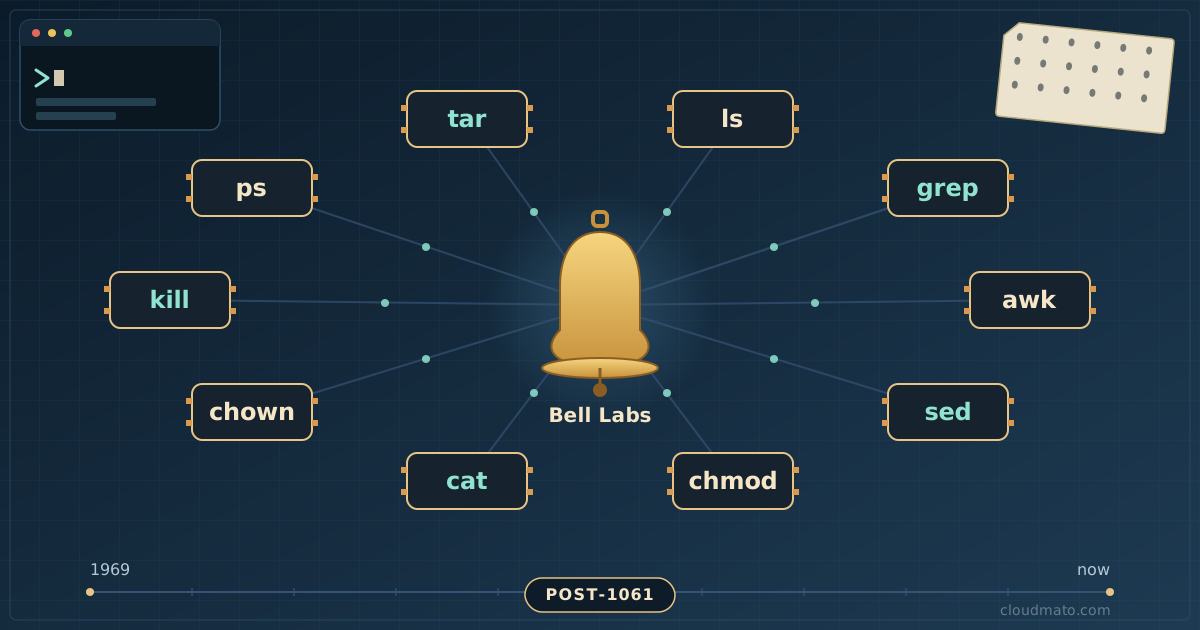
I type ls, cd, and grep probably a few hundred times a day. Never once, in 8+ years of doing this, did I stop to wonder where these tiny two-and-three letter words actually came from. Turns out, almost every single one of them has a story — some guy at Bell Labs in the early 1970s, working on a machine slower than your smartwatch, solving a problem he had that exact day. Let’s go through ten of the most-used Unix commands and dig into why they exist.
ls — the command that’s older than Unix itself
Here’s something that surprised me: ls is technically older than Unix. Its ancestor was a command called listf on MIT’s Compatible Time Sharing System (CTSS), which was already running by July 1961 [1]. When CTSS evolved into Multics, listf got renamed to list, which could be abbreviated to — you guessed it — ls [1].
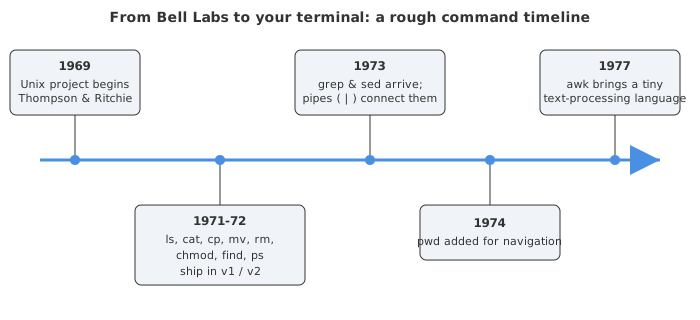
When Ken Thompson and Dennis Ritchie built the first version of Unix at Bell Labs, they borrowed a bunch of ideas from Multics, and ls came along for the ride [2]. By the time the first Unix Programmer’s Manual was published on November 3, 1971, ls was already documented with several of the same options we still use today [1].
So ls is short for “list,” not for anything cleverer. No hidden acronym, no inside joke. It’s just one of the oldest surviving commands in computing, quietly doing the same job for over 60 years.
cd and pwd — knowing where you are and how to get there
Navigating a filesystem feels so basic that it’s easy to forget someone had to invent it. cd (“change directory”) was baked into the shell from very early on — Thompson’s original shell already had a chdir-style command, since multi-directory filesystems were one of Unix’s actual selling points over flatter systems of the era.
pwd (“print working directory”) showed up a bit later, with an initial release around June 1974 [3]. Why did it need to exist separately from cd? Because once you start cd-ing around a deep tree of directories, your brain loses track fast — pwd just answers the question “okay, but where am I right now?”
One little detail I genuinely didn’t know until researching this: cd - toggles you back to your previous directory by swapping the PWD and OLDPWD environment variables [3]. It’s been there for decades and I only started using it a couple of years ago. If you jump between two directories a lot — say, a project folder and its build output — cd - will save you an absurd number of keystrokes over a career.
cat — concatenate, not just “dump this file”
cat is one of those commands everyone uses for the “wrong” reason. It shipped on November 3, 1971, written by Thompson and Ritchie as part of the original Unix toolset [4]. The name is short for concatenate, itself derived from the Latin catena, meaning “chain” [4].
The actual original purpose: take multiple files, chain them together, and write the result to standard output. cat file1.txt file2.txt > combined.txt is the command doing exactly what its name says. But here’s the thing — cat is used far more often to just dump a single file to the screen than to concatenate anything [4]. That’s not what it was built for, it’s just the cheapest possible “show me what’s in this file” command, and it stuck.
This is also where the famous “useless use of cat” debate comes from — people piping cat file | grep something when grep something file would do. Is it “wrong”? Not really. Is it doing extra work for no reason? Also yes. I still catch myself doing it out of habit.
cp, mv, and rm — the basic file-shuffling trio
By Unix’s second edition manual in 1972, the core file management commands were already all there: cp, mv, rm, alongside cat, chmod, find, ls, and others [5]. mv was written by Thompson and Ritching for renaming and relocating files, and rm — short for “remove” — for deleting them [6][7].
Why did these need to be separate commands instead of, say, one “file manager” program? Because that’s the whole Unix philosophy baked in from day one: small programs, each doing one job, that you combine yourself [8]. Copying a file is a different operation from deleting one, so they’re different tools.
The thing about rm that’s worth sitting with: there’s no trash can, no “are you sure?”, no undo. rm -rf does exactly what it says, immediately, forever. I’ve watched people nuke the wrong directory by being one folder off, and there’s no recovering from it short of backups. That’s not a flaw exactly — it’s the same design philosophy that makes Unix tools fast and scriptable. You’re just expected to know what you’re doing.
grep — built overnight because someone asked nicely
This one is my favorite story in the whole list. It’s 1973, and Doug McIlroy goes to Ken Thompson with a request: it would be really useful if you could search through files for a pattern without opening an editor [9]. Thompson’s reply, according to Brian Kernighan’s retelling: “Let me think about it overnight.” The next morning, he handed McIlroy a working program [9][10].
Here’s the clever part — Thompson didn’t write a regex engine from scratch. He’d already built one for his text editor ed, where you could run a command like g/re/p — global, regular expression, print — to find and print matching lines [10]. He just pulled that exact logic out of the editor and turned it into a standalone program. The name grep is literally those three characters from the ed command [10].
grep first appeared in Unix v4 around November 1973, in a much more limited form than the version you use today [10]. But the core idea — “search text for a pattern, fast, without an editor” — has barely changed in 50 years. Every time you run grep -r "TODO" . across a codebase, you’re using a regex engine whose lineage traces back to a 1960s line editor.
find — searching the filesystem before “search” was a feature
find is one of those commands people either love or quietly avoid because the syntax looks like ancient runes. But it’s been around since almost the very beginning — by the time Unix’s second edition manual was published in 1972, find was already sitting alongside ls, cp, and chmod as a standard tool [5].
Why did it need to exist when ls already lists files? Because ls only shows you one directory. As soon as you have a tree of directories — which Unix had from day one, unlike a lot of earlier systems — you need a way to ask “is there a file matching X anywhere under here?” find walks the entire tree recursively, testing every file against whatever conditions you give it (name, size, modification time, permissions, you name it).
The part that still impresses me is how composable it is. find . -name "*.log" -mtime +30 -delete is doing four jobs in one line: walk the tree, filter by name, filter by age, then act on the result. That’s the Unix philosophy again — find doesn’t need to know how to delete or compress or grep, it just needs to hand matching files off to whatever does.
chmod — three letters, fifty years of the same permission model
chmod — change mode — also dates back to November 3, 1971, as part of the original Unix release [11]. “Mode” here means the permission bits and special flags attached to a file [11].
What’s wild is how little this has changed. The same read/write/execute triad for owner, group, and “everyone else” that Thompson and Ritchie designed for a single shared lab computer in 1971 is the exact same model securing your servers, your laptop, and probably your phone right now [11]. Whether you write chmod 755 script.sh or chmod u+x script.sh, you’re using a permission scheme designed for a room full of researchers sharing one PDP-11.
Why did it need to exist at all? Because Unix was, from the start, a multi-user system — multiple people sharing one machine, one filesystem [2]. The moment you have more than one user, you need a way to say “this file is mine, you can look but not touch.” chmod is the answer to that, and honestly, the fact that it’s barely changed in five decades says something about how well they got it right the first time.
ps — fifty years of answering “what is this machine doing?”
ps, short for process status, turned 50 in January 2023 [12], which means it dates back to around 1973 — right in that same incredible stretch of Bell Labs history as grep and sed. Its job has stayed remarkably consistent: list the processes currently running, with their PIDs and other details [13].
Why was this needed on a system from the early ’70s? Because Unix was a time-sharing system — lots of users, lots of programs running concurrently on hardware with a tiny fraction of the resources your phone has. If your terminal felt sluggish, you needed a way to ask “okay, what’s actually eating the CPU right now, and whose process is it?” ps was that diagnostic tool.
Here’s a fun bit of trivia that explains why ps syntax feels so inconsistent compared to other commands: three different Unix lineages each invented their own flag conventions, and modern ps (the procps-ng package on most Linux distros) tries to support all of them at once [12][13]. That’s why ps aux (no dash, BSD-style) and ps -ef (System V style) both work and do almost the same thing — it’s not a design choice, it’s archaeology.
sed — the stream editor that grew out of a line editor
Last one: sed, the stream editor, developed between 1973 and 1974 by Lee E. McMahon at Bell Labs [16]. If you’ve ever run sed 's/foo/bar/g' file.txt to do a quick find-and-replace across a file, you’ve used something that’s almost exactly as old as grep.
sed is basically what happens when you take the editing commands from ed (and its predecessor, an even older editor called qed from the mid-1960s) and strip out the “interactive” part [16]. With ed, you sit at a terminal and type commands one at a time to edit a file. With sed, you write those same kinds of commands into a script, point it at a stream of text — a file, or more often the output of another program piped in — and it applies every edit automatically, with no human watching.
Why did this matter in 1974? Because not every computing task happens with a person sitting at a terminal. Batch processing — running a job unattended, often on a schedule, sometimes against output too large to scroll through by hand — was a huge part of how computers were used. sed let you describe an edit once and apply it to a million lines without touching a keyboard again. That’s still exactly why it’s useful in shell scripts and CI pipelines today.
Why all ten of these still feel “right” after 50 years
Here’s the quick-reference version, if you want the whole table at a glance:
| Command(s) | First appeared | Credited to | Why it exists |
|---|---|---|---|
ls | ~1971 (via Multics list) | Multics team / Bell Labs [1][2] | List what’s in a directory |
cd / pwd | ~1971 / 1974 | Bell Labs shell [3] | Navigate and locate yourself in the tree |
cat | Nov 1971 | Thompson & Ritchie [4] | Concatenate files / dump to output |
cp, mv, rm | 1971-72 | Bell Labs [5][6][7] | Copy, rename, delete — basic file admin |
grep | 1973 | Ken Thompson, for Doug McIlroy [9][10] | Search text without an editor |
find | by 1972 | Bell Labs [5] | Locate files across a directory tree |
chmod | Nov 1971 | Thompson & Ritchie [11] | Control read/write/execute access |
ps | ~1973 | Bell Labs [12][13] | See what’s running on a shared machine |
awk | 1977 | Aho, Weinberger, Kernighan [14][15] | Field-based text processing language |
sed | 1973-74 | Lee E. McMahon [16] | Apply ed-style edits to a stream, unattended |
What gets me about this list is that almost every command exists because one specific person hit one specific wall on one specific day — McIlroy wanted to search files, so Thompson built grep overnight. Researchers were sharing a machine, so chmod had to exist. Batch jobs needed automated edits, so McMahon built sed. None of this was designed top-down as a “platform.” It accumulated, tool by tool, each one solving a real problem for the people in that building.
And then Doug McIlroy’s idea from 1964 — that programs should connect “like a garden hose,” with one program’s output flowing straight into another’s input — got implemented by Thompson in 1973 as the | operator [17][18]. Suddenly all these small, separately-invented tools could be wired together in combinations nobody had specifically planned for. find . -name "*.log" | xargs grep ERROR | awk '{print $1}' | sort | uniq -c — every single piece of that pipeline was written by a different person, in a different year, for a different reason, and it still just works.
Fifty-plus years later, we’re all still using the same names, the same flags, mostly the same syntax. Maybe that’s the real story here — not that these commands are old, but that almost nobody felt the need to replace them.
Sources
- The Evolution of ’ls’: From Early Unix to Modern Linux
- Unix and Multics
- Pwd - Wikipedia
- Cat (Unix) - Wikipedia
- Technology history: Where Unix came from - All Things Open
- Mv (Unix) - Wikipedia
- Rm (Unix) - Wikipedia
- Basics of the Unix Philosophy
- Brian Kernighan Remembers the Origins of ‘grep’ - The New Stack
- Grep - Wikipedia
- Chmod - Wikipedia
- The history of the ps command
- ps – report process status - Unix Tutorial
- History - The GNU Awk User’s Guide
- AWK - Wikipedia
- Sed - Wikipedia
- Pipe: How the System Call That Ties Unix Together Came About - The New Stack
- features:pipes - Unix Heritage Wiki