
The browser is a hostile environment. That one sentence explains more about why SPA authentication goes wrong than any whitepaper ever has. You’re shipping your entire application — including your auth logic — to a machine you don’t control, in a runtime where malicious scripts, rogue browser extensions, and network-level attackers are all operating in the same sandpit. Get the design wrong and you’re not just leaking a JWT. You’re handing over session persistence, user identity, and trust — all at once.
Here’s how to build an auth system for a single-page application that actually holds up under real-world pressure: PKCE-based SSO, proper MFA, non-blocking token refresh, and defense against XSS and CSRF baked in from the start.
The Core Problem: A SPA Cannot Keep a Secret
Every auth decision in a SPA flows from one uncomfortable truth: a SPA is a public OAuth client. There’s no server-side runtime to hide your client secret. Your JavaScript ships to the browser, and anyone who opens DevTools can read it. This rules out the Client Credentials Flow and — correctly, since it was deprecated — the Implicit Flow entirely[1].
The OAuth 2.0 Security Best Current Practice (RFC 9700, published January 2025) puts it plainly: Authorization Code Flow with PKCE is now mandatory for browser-based applications[1]. Not recommended. Mandatory.
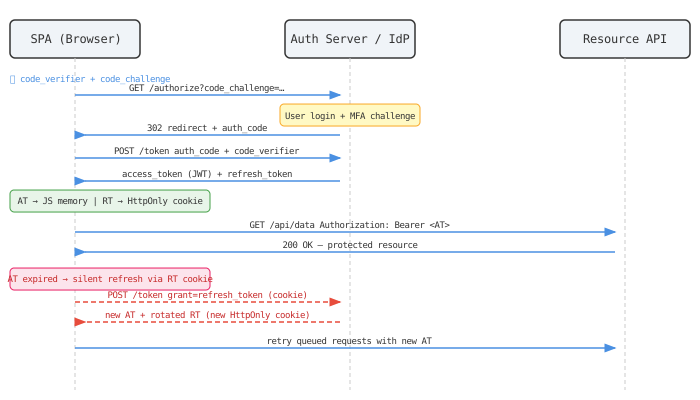
PKCE — Proof Key for Code Exchange — closes the gap where an attacker intercepts the authorization code before your SPA can exchange it for tokens. The SPA generates a cryptographically random code_verifier, hashes it into a code_challenge, sends the challenge to the authorization server with the initial request, and proves ownership of the original verifier at token exchange time[3]. An intercepted authorization code is useless to an attacker who doesn’t have the verifier. That’s the whole point.
Where to Actually Store Tokens
This is the question that produces more wrong answers than any other. Let me just say it directly.
Never store tokens in localStorage or sessionStorage. Both are readable by any JavaScript running on the page — including a script injected by an XSS attack. If an attacker gets arbitrary JS execution in your app, localStorage.getItem('access_token') gives them everything in one line[5].
The setup that actually works:
| Token | Storage Location | Why It Works |
|---|---|---|
| Access Token (~15 min TTL) | JS memory (module variable or React context) | Invisible to XSS scripts; cleared on reload |
| Refresh Token (hours–days TTL) | HttpOnly; Secure; SameSite=Strict cookie | Completely inaccessible to JS; sent only over HTTPS |
Yes, storing the access token in memory means it’s gone on page reload. That’s fine — the refresh token cookie survives the reload, and you silently exchange it for a new access token when the app initialises. The Auth0 refresh token rotation guide covers this pattern in depth[2].
The refresh token cookie should also be scoped to only your token refresh endpoint (path=/auth/token or similar), not to path=/. Scoping limits where the browser will attach that cookie, reducing its exposure window considerably.
One more thing: refresh token rotation is not optional. After every successful token refresh, the server issues a new refresh token and invalidates the old one[2]. This enables reuse detection — if a stolen refresh token gets used after the legitimate user has already rotated past it, the server detects the anomaly and can invalidate the entire token family, forcing re-authentication for everyone holding tokens in that lineage[12].
SSO with OpenID Connect: What’s Actually Happening
OpenID Connect (OIDC) sits on top of OAuth2 and handles the identity layer — the “who are you” part, not just “what are you allowed to do.” When you integrate with an IdP (Okta, Auth0, Keycloak, whatever), OIDC is the protocol running the SSO.
Here’s the elegant bit: after the first successful login, the IdP plants its own session cookie in the user’s browser. The next time your SPA sends the user to the IdP’s authorization endpoint, the IdP sees that session cookie, skips the login form entirely, and immediately issues a new authorization code. From the user’s perspective it’s seamless[14].
The nonce parameter is your protection against ID token replay attacks here. Your SPA generates a cryptographically random nonce, includes it in the authorization request, and then verifies that the same nonce appears in the ID token the IdP returns. An attacker who intercepts a valid ID token from a previous login and tries to replay it is dead in the water — the nonce won’t match[14]. Always validate the nonce. Always. It’s one of those skips that seems harmless until it isn’t.
Logout is where teams cut corners, and it bites them. A proper SSO logout has three steps:
- Call the IdP’s token revocation endpoint (
/oauth2/revoke) to kill the refresh token server-side - Clear in-memory tokens and local session state in the SPA
- Redirect the user to the IdP’s
end_session_endpointto kill the SSO session cookie too[11]
Skip step 3 and your user is “logged out” of your app but still has a live IdP session. Anyone who opens a browser on that machine — a colleague, a family member, an attacker with physical access — walks straight back in[11].
MFA in 2025: TOTP Is the Floor, Not the Ceiling
TOTP (those six-digit codes from Google Authenticator or Authy) has been the MFA workhorse for years, and it’s still a perfectly reasonable option as a fallback. But here’s the thing most security discussions don’t say clearly enough: TOTP is phishable. A real-time phishing proxy can intercept the code and replay it before the 30-second window closes. It’s better than nothing. It’s not the end state.
NIST SP 800-63-4 now distinguishes authentication assurance levels. For AAL2 — the level most production apps need — you should offer at least one phishing-resistant factor[15]. That means:
- FIDO2/WebAuthn hardware keys (YubiKey, etc.): the credential is cryptographically bound to the specific origin domain. A fake phishing site with a different domain gets a credential that’s useless for yours.
- Passkeys: synced through iCloud Keychain, Google Password Manager, or similar. Passkeys are now officially AAL2 under NIST SP 800-63-4[15]. Every major browser supports them. 2025 is the year they genuinely went mainstream[15].
Implementing MFA in a SPA doesn’t require building your own challenge flow. OIDC handles it transparently: you request a higher acr_values in the authorization request, the IdP challenges the user for the appropriate second factor, and you get back an ID token that attests to the authentication strength. Verify the amr (Authentication Methods References) claim to confirm MFA actually ran — don’t just trust that it did[3].
Token Refresh Without Blocking the UI
Honestly, this is where most implementations have subtle but nasty bugs.
The naive approach: when an API call returns 401, refresh the token and retry. The problem? In a real SPA you have dozens of concurrent API requests. If three of them hit 401 at the same moment, you end up with three concurrent refresh calls — a race condition that can trigger rotation failures and boot the user out completely.
The correct approach uses a single in-flight refresh promise and a subscriber queue.
let isRefreshing = false;
let refreshSubscribers = [];

function subscribeToRefresh(callback) {
  refreshSubscribers.push(callback);
}

function notifySubscribers(newToken) {
  refreshSubscribers.forEach(cb => cb(newToken));
  refreshSubscribers = [];
}

// Inside your HTTP interceptor (Axios, fetch wrapper, etc.)
async function onRequestUnauthorized(failedRequest) {
  if (!isRefreshing) {
    isRefreshing = true;
    try {
      const newToken = await refreshAccessToken(); // POST /auth/token
      notifySubscribers(newToken);
      return retryRequest(failedRequest, newToken);
    } finally {
      isRefreshing = false;
    }
  }

  // Already refreshing — queue this request
  return new Promise(resolve => {
    subscribeToRefresh(token => resolve(retryRequest(failedRequest, token)));
  });
}
The isRefreshing flag acts as a gate[13]. The first 401 triggers the refresh; every subsequent 401 that arrives while the refresh is running just appends a callback to the queue. When the refresh completes, notifySubscribers fires every queued callback simultaneously with the new token, and all those pending requests retry without the user seeing anything unusual[13].
Proactive refresh is even cleaner. Instead of waiting for a 401, schedule a background refresh roughly 60 seconds before the access token’s exp claim elapses. You can decode the JWT client-side (just atob the payload — no signature validation needed here, since you got it from your own server) to know exactly when it expires[8]. The refresh happens invisibly, before any request fails. The UI never stalls.
Session Management Across Tabs and Devices
Syncing State Across Browser Tabs
Here’s a scenario that’s easy to overlook: a user logs out in Tab A. Tab B still has a valid in-memory access token. Until it expires, Tab B continues making authenticated requests as if nothing happened.
The BroadcastChannel API fixes this. It’s essentially a pub/sub channel between tabs of the same origin[10]:
const authChannel = new BroadcastChannel('auth_events');

// When the user logs out:
authChannel.postMessage({ type: 'LOGOUT' });

// In every tab, on startup:
authChannel.onmessage = ({ data }) => {
  if (data.type === 'LOGOUT')        clearSessionAndRedirectToLogin();
  if (data.type === 'TOKEN_REFRESH') setAccessToken(data.token);
};
Broadcasting TOKEN_REFRESH events is useful too — when one tab silently refreshes the access token, it can broadcast the new token to all other tabs. Those tabs update their in-memory token without making their own redundant refresh calls[10].
Revoking Sessions Across Devices
Multi-device session management is a different surface area. Each device holds its own refresh token. For “log out of all devices” functionality:
- Track token families server-side. Each refresh token belongs to a lineage; rotating means each use issues a new token in the same family.
- Expose a
/sessionsendpoint listing active devices (with metadata: user-agent, last-seen IP, approximate location). Let users revoke individual sessions. - On password change or security event, invalidate all refresh token families for that user at the authorization server. This instantly kills every active device session[11][12].
Most OAuth2/OIDC servers implement RFC 7009 token revocation. You just need to call it. The important detail is that revoking a refresh token should cascade — the server kills all tokens in that family, including any short-lived access tokens issued from it.
Defending Against XSS and CSRF
XSS
Storing refresh tokens in HttpOnly cookies removes the biggest XSS prize — a persistent, stealable credential. But XSS can still do damage even without stealing tokens: it can make authenticated requests from within the victim’s active session. Defense-in-depth is the only honest approach.
A strict Content Security Policy is your second line of defence[9]. The modern approach uses server-generated nonces:
Content-Security-Policy:
  default-src 'self';
  script-src 'nonce-{fresh-random-per-request}' 'strict-dynamic';
  object-src 'none';
  base-uri 'none';
strict-dynamic lets your bundled scripts load dynamic code chunks (code-splitting, lazy routes) without needing to whitelist every CDN URL. nonce-{random} means only scripts the server explicitly trusts can execute — an injected <script> tag without the nonce goes nowhere[9].
The rest is table stakes: sanitize every piece of user-generated content before rendering (DOMPurify is the standard library for this), avoid dangerouslySetInnerHTML in React unless you’ve sanitized the input yourself, and turn on Trusted Types if your stack supports it.
CSRF
If your access token lives only in JS memory (never in a cookie), then CSRF against your API is largely a non-issue — the browser has nothing to automatically attach to cross-origin requests[4].
But your refresh token is in a cookie, so the token refresh endpoint needs protection. The Double Submit Cookie pattern is the OWASP-recommended approach[4]:
- Generate a CSRF token (random string, not the refresh token itself).
- Store it in a non-HttpOnly cookie (so your JS can read it).
- Your SPA reads it and sends it as a custom request header (
X-CSRF-Token) on every call to the refresh endpoint. - The server validates that the header value matches the cookie value.
A cross-origin attacker can’t read your cookies (same-origin policy), so they can’t forge the header value, so the forged request fails[4]. Combined with SameSite=Strict on the refresh token cookie itself — which prevents the browser from sending it on cross-site requests in the first place — you’ve covered the main CSRF vectors.
The BFF Pattern: When You Want Zero Token Exposure
If you want the most hardened architecture possible, the Backend for Frontend (BFF) pattern removes tokens from the browser entirely[6].
The BFF is a thin server — a Node.js/Go/whatever process — that sits between your SPA and your APIs. It runs the full OAuth2/OIDC flow server-side, stores all tokens there, and exposes a session cookie to the browser. Your SPA makes API calls to the BFF; the BFF adds the Authorization: Bearer header before forwarding to downstream services. The browser never sees an access token[7].
The security upside is real: an XSS attack on your frontend can’t steal tokens that were never in the browser. The BFF can also implement DPoP (Demonstrating Proof of Possession) — RFC 9449 — to cryptographically bind access tokens to the server’s key pair, making stolen tokens useless even if intercepted in transit[1].
| Architecture | Token Exposure in Browser | Complexity | Best For |
|---|---|---|---|
| AT in memory + RT in HttpOnly cookie | AT briefly in JS memory | Medium | Most SPAs |
| BFF (tokens server-side only) | None | Higher | Enterprise, high-compliance |
AT + RT in localStorage | Full exposure | Low | Never |
The IETF’s current browser-app security recommendations explicitly endorse the BFF pattern for high-security applications[7]. The cost is real: you’re adding a network hop and an additional service to deploy, monitor, and scale. For most apps, the in-memory AT plus HttpOnly cookie RT approach is the right tradeoff. For banking, healthcare, or anything touching regulated data, BFF removes a whole category of risk.
A Production Checklist
Getting the individual pieces right matters. Getting them right together matters more. Here’s what a properly wired SPA auth system looks like:
- Auth flow: Authorization Code + PKCE. Reject implicit flow configurations at code review.
- Token storage: AT in JS memory; RT in
HttpOnly; Secure; SameSite=Strictcookie, scoped to/auth/tokenonly. - Token refresh: Single in-flight promise with subscriber queue; proactive refresh before expiry.
- Refresh token rotation: Every use of a refresh token must issue a new one and invalidate the old one. Server-side reuse detection as a tripwire.
- SSO: OIDC with nonce validation; implement
end_session_endpointlogout — not just local state clearing. - MFA: TOTP as minimum floor; WebAuthn/passkeys for phishing resistance. Verify
amrclaim in ID token server-side. - Cross-tab sync: BroadcastChannel for logout propagation and token updates.
- Multi-device revocation: Server-side session tracking; expose a sessions UI; revoke all on password change.
- XSS defense: HttpOnly cookies + strict nonce-based CSP + sanitize all user input.
- CSRF defense: Double-submit cookie pattern on cookie-touching endpoints +
SameSite=Strict. - Nuclear option: BFF if you need zero token exposure in the browser.
The piece teams consistently skip is logout — specifically the IdP session kill. Your “log out” button is security theater if it only clears local state while the SSO session at the identity provider stays alive. A complete logout revokes the refresh token at the server, clears local state, and redirects to end_session_endpoint. Three steps. All three are required.
End
Sources
- Using OAuth for Single Page Applications — Best Practices | Curity
- Securing Single Page Applications with Refresh Token Rotation | Auth0
- How Authentication and Authorization Work for SPAs | Okta Developer
- Cross-Site Request Forgery Prevention Cheat Sheet | OWASP
- The Developer’s Guide to JWT Storage | Descope
- The Backend for Frontend Pattern (BFF) | Auth0
- A Guide to Backend-for-Frontend (BFF) Auth | FusionAuth
- What Are Refresh Tokens and How to Use Them Securely | Auth0
- Mitigate Cross-Site Scripting with a Strict Content Security Policy | web.dev
- Comparison of Data Transfer Methods Between Browser Tabs in SPA Context | Intspirit
- Implementing OIDC Logout and Session Management: A Complete Guide | Logto
- Refresh Token Security: Best Practices for OAuth Token Protection | Obsidian Security
- JWT and Refresh Token Design for SPA with Multiple HTTP Requests Using Axios Interceptors | Medium
- OIDC Best Practices for Single-Page Applications | MojoAuth CIAM Q&A
- Passwordless Authentication in 2025: The Year Passkeys Went Mainstream | Authsignal