
Module Federation is one of those concepts everyone name-drops the moment “micro frontends” comes up in a meeting. Cool, share code at runtime, deploy teams independently, sounds great. Then someone on the team says “we’re on Vite, not webpack” and the whole conversation gets awkward. So what actually happens when you try to bring Module Federation into a Vite project? Some of it works beautifully. Some of it… really doesn’t, at least not yet.
Okay, so what is Module Federation again?
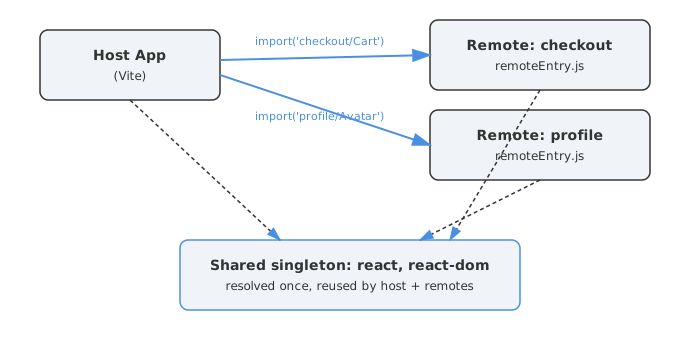
Quick refresher because this matters for understanding the Vite story. Module Federation lets one JavaScript application load code from another application at runtime, not at build time. One app (the “remote”) exposes some modules — a component, a utility, a whole page — and bundles them into a small entry file, usually called remoteEntry.js. Another app (the “host”) imports that entry file dynamically and uses the exposed code as if it were a normal import.
This was originally a webpack 5 feature, baked deeply into webpack’s chunk-loading runtime. Webpack treats it as a first-class concept — its whole module graph, code-splitting, and async chunk loader were designed with this in mind.
Vite, on the other hand, was never built around this idea. Vite’s dev server serves native ES modules directly to the browser, and its production builds go through Rollup. Neither of those has any concept of “load a remote module graph at runtime and merge it with mine.” So Vite doesn’t have Module Federation built in — full stop. Everything you do here is bolted on by community (or community-turned-official) plugins.
Vite doesn’t have this built in — here’s who fills the gap
There are two main players, and honestly, picking between them is the first real decision you’ll make.
The older and more battle-tested one is @originjs/vite-plugin-federation [1]. It ships its own runtime built around a virtual module (virtual:__federation__), and it was explicitly designed to feel familiar to people coming from webpack’s Module Federation — same mental model of exposes, remotes, and shared.
The newer one is @module-federation/vite [2], maintained by the same team behind Module Federation 2.0. Instead of inventing its own runtime, it wires Vite directly into @module-federation/runtime, the same runtime that powers the webpack and Rspack implementations. That matters because Module Federation 2.0 was rebuilt specifically to decouple the runtime from any particular bundler — the goal being that a remote built with Rspack and a host built with Vite can talk to each other using the same protocol [3].
There’s also a third name floating around now: a standalone vite-plugin-federation package that hit a 1.0 release positioning itself as the “production era” option, with a manifest-first approach (mf-manifest.json, mf-stats.json, mf-debug.json) and built-in governance features like circuit breakers and SRI verification [4]. Worth knowing it exists, but I’d treat anything this new with a healthy dose of “let’s see how it holds up in the wild.”
Here’s how I’d frame the choice:
@originjs/vite-plugin-federation | @module-federation/vite | |
|---|---|---|
| Runtime | Its own, webpack-MF-inspired | @module-federation/runtime (shared with webpack/Rspack) |
| Maturity | Older, widely used, lots of GitHub issues already triaged | Newer, fewer battle scars, actively developed |
| Cross-bundler interop | Mostly Vite-to-Vite | Designed to interoperate with Rspack/webpack remotes [3] |
| TypeScript type sharing | Limited | Built around MF 2.0 features like dynamic type hints [3] |
| Best fit | Existing OriginJS-style setups, simple host/remote pairs | New projects, especially ones already touching the wider Module Federation ecosystem |
If you’re starting fresh today and there’s any chance you’ll mix bundlers down the line, lean toward @module-federation/vite. If you just want the simplest possible “host imports a button from a remote” setup and don’t care about the bigger ecosystem, @originjs/vite-plugin-federation still works fine and has more Stack Overflow answers written about it.
Setting up a basic host + remote (the part that actually works)
This is the part that genuinely just works, and honestly it’s kind of magical the first time you see it. Here’s a minimal remote app exposing a component:
// remote/vite.config.ts
import { defineConfig } from 'vite'
import react from '@vitejs/plugin-react'
import federation from '@originjs/vite-plugin-federation'

export default defineConfig({
  plugins: [
    react(),
    federation({
      name: 'remote_app',
      filename: 'remoteEntry.js',
      exposes: {
        './Button': './src/components/Button.tsx',
      },
      shared: ['react', 'react-dom'],
    }),
  ],
  build: {
    target: 'esnext',
    minify: false,
    cssCodeSplit: false,
  },
})
And the host that consumes it:
// host/vite.config.ts
import { defineConfig } from 'vite'
import react from '@vitejs/plugin-react'
import federation from '@originjs/vite-plugin-federation'

export default defineConfig({
  plugins: [
    react(),
    federation({
      name: 'host_app',
      remotes: {
        remote_app: 'http://localhost:5001/assets/remoteEntry.js',
      },
      shared: ['react', 'react-dom'],
    }),
  ],
  build: { target: 'esnext' },
})
Then in the host, you consume it like any lazy component:
const RemoteButton = React.lazy(() =>
  import('remote_app/Button')
)
You build the remote first (vite build), serve the dist folder somewhere, and then run the host. That’s the whole magic trick — the host fetches remoteEntry.js over the network, figures out what’s exposed, and pulls in the code on demand. No iframe, no separate React root mounted weirdly — it’s just… there, as a component.
What you CAN do with Module Federation in Vite
Once it’s wired up, a surprising amount of the webpack-era promise holds true. Here’s what genuinely works in practice:
- Expose and consume components, hooks, and utilities at runtime across separately built and deployed apps — the core use case, and it works.
- Share singleton dependencies like React, Vue, or a design-system package so the host and remotes don’t each ship their own copy [7]. The
sharedconfig withsingleton: trueresolves to one shared instance. - Lazy-load remotes only when needed, which is great for things like an admin panel or a checkout flow that most users never touch.
- Mix frameworks — a Vue host can technically load a React remote (or vice versa) by mounting it into a wrapper component, since federation just hands you a module, not a framework contract.
- Generate manifests (
mf-manifest.jsonand similar) that describe what each remote exposes, which is genuinely useful for CI pipelines that want to verify compatibility before deploying [4]. - Use TypeScript type hints across remotes, a Module Federation 2.0 feature that generates and downloads
.d.tsfiles for remote modules so your editor isn’t just guessing atany[3]. - Runtime plugins — hooks into the loading lifecycle (before request, after resolve, on error) that let you add logging, retries, or fallback URLs without touching application code [3].
- Independent deploys — once both apps agree on the federation contract, you really can ship the remote without redeploying the host, which is the whole point of this exercise.
That last one is the actual payoff. If your org has multiple teams stepping on each other in one monorepo, being able to deploy “checkout” on Tuesday and “profile” on Thursday without coordinating a release is a real win — when it works.
Where it falls apart: dev mode is the elephant in the room
Here’s where it gets tricky, and honestly, this is the thing that trips up almost everyone the first time.
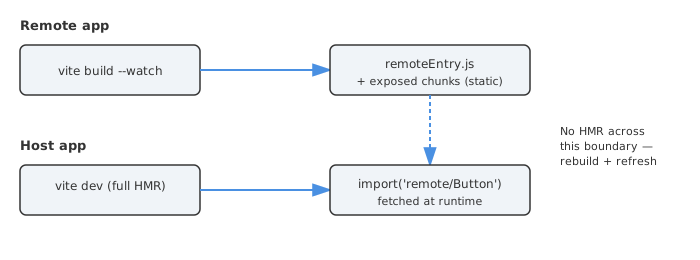
Only the host side gets a proper Vite dev server experience. The remote has to be built first — its remoteEntry.js and exposed chunks need to exist as static files before the host can import them [5]. There’s no equivalent of “both apps running vite dev with full HMR talking to each other live.”
What this means day to day:
- You change something in the remote’s exposed component.
- Vite’s dev server (running just for the remote, for your own convenience) doesn’t help the host at all.
- You have to run
vite buildon the remote again. - The host then needs a hard refresh to pick up the new
remoteEntry.js.
That’s not “fast feedback loop,” that’s “context switch every time you touch shared code.” Some teams work around this by running the remote’s vite build --watch in one terminal and just living with the refresh — it’s not elegant, but it’s workable for the host team. For the remote team actively developing their own UI, they typically just run their app standalone (without federation) using normal Vite dev, and only test the federated integration occasionally.
A few other things that don’t work, or only half-work:
build.rollupOptions.output.manualChunksis effectively off-limits. The federation plugin manages the chunk graph itself, and custom chunk grouping can break the bootstrap order the federation runtime relies on [2].- Mixing Vite/Rollup remotes with webpack hosts (or vice versa) is fragile. There’s no guarantee Rollup and webpack will produce the same chunk shape for CommonJS dependencies, which can quietly break
sharedresolution [1]. baseUrl/ custom base paths have had real bugs. If your remote is served from a subpath (common in enterprise setups behind a reverse proxy), there have been issues where the federation plugin doesn’t resolveremoteEntry.jscorrectly under Vite 5+ [6].- Non-ESM output formats are second-class. The plugin docs are upfront that ESM is the well-tested path; UMD/CJS-style remotes “lack complete test cases” [1].
The CSS mess nobody warns you about
This one bit me hard the first time, and it seems to bite basically everyone eventually. In dev mode, your remote’s styles load fine because Vite injects them via its dev server. In production, Vite does CSS code-splitting by default — each chunk gets its own CSS file, loaded via a <link> tag that the page needs to know about.
The problem? When a host dynamically imports a remote’s component, nothing tells the host’s HTML to load the remote’s CSS file. So you get a perfectly functional, completely unstyled component. One developer described it exactly right: it “looked like an unstyled wireframe” in production despite working fine locally [10].
The fixes people land on:
- Set
build.cssCodeSplit: falseon the remote so all its CSS bundles into a single file you can reliably reference. - Use a plugin like
vite-plugin-css-injected-by-jsto inline the CSS directly into the JS bundle — ugly, but it guarantees the styles travel with the component [10]. - Some teams go further and use CSS Modules or
:host/Shadow DOM-style scoping to make sure a remote’s styles can’t accidentally leak into (or get clobbered by) the host’s global styles — a separate but related headache, since Vite’s own CSS Modulescomposeshandling has had its own duplication quirks.
None of this is exotic, but it’s exactly the kind of thing that works perfectly on your machine and falls over the moment QA opens the deployed build.
Should you even bother? Alternatives worth knowing
This is the question I’d ask before writing a single line of federation config: do you actually need this, or do you need independent deploys and a simpler tool would do?
A few alternatives that come up a lot in 2026 conversations:
- Import Maps. A real web standard (Chrome since 2021) that lets the browser itself resolve module specifiers to versioned URLs via a JSON map — no bundler-specific runtime required [11]. If your “micro frontends” are really just a handful of independently versioned ES modules, import maps can get you most of the way there with far less tooling.
- Native Federation. Built by the Angular Architects team specifically for Vite/esbuild-style toolchains, it implements the Module Federation concept using import maps and native ESM rather than a custom runtime [12]. Framework-agnostic, and notably lighter weight than the webpack-derived approach.
- Module Federation 2.0 via Rspack. If your team is open to switching bundlers (not just adding a plugin), Rspack’s native Module Federation support is more mature than anything in the Vite ecosystem right now, and it speaks the same MF 2.0 protocol that
@module-federation/viteuses — meaning a gradual Vite-to-Rspack migration for specific remotes is realistic [13][3]. - A monorepo with shared packages and no runtime federation at all. Sometimes the actual requirement is “stop duplicating this Button component,” and a published internal npm package solves that without any of the runtime complexity. Boring, but boring is a feature.
I’d genuinely consider import maps or Native Federation first if your main goal is “independently deployable” rather than “must work exactly like our old webpack setup.” The Vite federation plugins are solving a harder problem than they need to in a lot of cases, purely because teams want API parity with webpack.
My honest checklist before you commit to this
If you’re about to start this, here’s the stuff I’d nail down before writing the first federation() config:
| Question | Why it matters |
|---|---|
| Do remotes need to be deployed independently of the host’s release cycle? | If not, you might not need federation at all — a monorepo package may be simpler |
| Can your team tolerate “rebuild remote, refresh host” during development? | This is the dev-mode reality with both major plugins right now [5] |
Are you on target: 'esnext' and avoiding manualChunks? | Both plugins require/expect this; fighting it causes obscure build failures [2] |
| Do you have a plan for shared dependency versions across teams? | singleton: true helps but doesn’t replace version discipline [8][9] |
| Will remotes be served from a subpath/CDN with a non-root base? | Known source of remoteEntry.js resolution bugs [6] |
| Have you tested production builds, not just dev, for CSS? | Styles that work in dev silently vanish in prod for many people [10] |
| Could Native Federation or import maps cover your actual requirement? | Sometimes the simpler standard does 80% of the job for 20% of the complexity [11][12] |
The honest summary of where things stand: Module Federation does work with Vite, and for the core “load a remote component at runtime, share a singleton dependency” use case, it works well. The rough edges show up the moment you push toward production — CSS, dev-mode parity, version drift, and non-root deployments. None of these are dealbreakers, but every single one of them will eat a debugging session if you don’t know they’re coming. Module Federation 2.0’s push toward a bundler-agnostic runtime [3] is the most promising sign that the Vite story will keep improving — but “improving” and “solved” are still two different words.
Sources
- originjs/vite-plugin-federation on GitHub
- @module-federation/vite on npm
- Module Federation 2.0 Reaches Stable Release with Wider Support outside of Webpack - InfoQ
- vite-plugin-federation 1.0: Bringing Module Federation Into the Production Era for Vite - DEV Community
- Support dev server remote entry file · Issue #525 · originjs/vite-plugin-federation
- Module Federation + base url · Issue #580 · originjs/vite-plugin-federation
- Shared configuration - Module Federation docs
- Getting Out of Version-Mismatch-Hell with Module Federation - ANGULARarchitects
- Module Federation Fails to Share Singleton Dependencies with Version Postfixes · Issue #4078 · module-federation/core
- How I Finally Got My Vite + Module Federation Styles to Load in Production
- You Might Not Need Module Federation: Orchestrate your Microfrontends at Runtime with Import Maps - Mercedes-Benz.io
- Announcing Native Federation 1.0 - ANGULARarchitects
- Module Federation 2.0: webpack vs Rspack vs Vite 2026 - PkgPulse Guides
- module-federation/vite on GitHub
- Bug Report: Multiple Instances of React and React-Router-DOM in Host and Remote · Issue #650 · originjs/vite-plugin-federation