
At some point in a large enough frontend codebase, the build itself becomes the bottleneck. Thousands of components, dozens of teams, one monolithic bundle — something has to give. Module Federation is one of the more interesting solutions people have reached for, and it’s worth understanding properly before you commit to it.
What Is Module Federation?
Module Federation is a feature introduced in Webpack 5 that lets JavaScript applications dynamically load code from other JavaScript applications at runtime — not at build time [1]. That single distinction is what makes it different from everything else.
Think about how code sharing normally works. You want to share a React component between two apps, so you publish it to npm. The other app installs it, both apps bundle that code into their own output, and every time the component changes you bump the version, publish, the other app updates its dependency, and rebuilds. It works. At scale, it gets tedious fast.
Module Federation flips this entirely. The app that owns the component exposes it as a remote module. Any other app — called the host — can consume that component directly at runtime over the network, without ever installing it as a dependency [7]. The code arrives when it’s needed, not baked in at build time.
Zack Jackson, a Webpack maintainer, invented Module Federation, and it shipped as a flagship feature of Webpack 5 in 2020 [1]. What started as a Webpack-specific feature has since grown into something much bigger — but we’ll get to that.
How It Actually Works
Three core concepts you need to understand before anything else makes sense:
- Host — the application that consumes remote modules. This is your shell or container app. It knows about remotes and loads them when needed.
- Remote — the application that exposes modules for others to consume. It publishes a
remoteEntry.jsfile that describes what it exposes and what it needs. - Shared — dependencies that are shared across host and remotes to avoid loading the same library twice. React, ReactDOM, and any context-heavy library typically go here.
Here’s what the runtime interaction looks like:
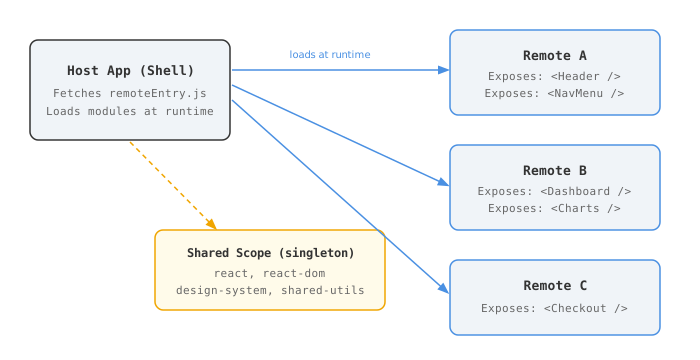
The host reaches out to each remote’s remoteEntry.js — a manifest of what that remote exposes and what shared dependencies it needs. Modules are loaded on demand, not all at once. Shared dependencies like React are loaded once and made available to all remotes through a global shareScope [1]. If Remote A and Remote B both declare react as shared, only one copy of React runs in the browser.
One thing that catches people off guard early: your host’s index.js must be async. You need a bootstrap file that dynamically imports the actual entry point, because the shared scope has to initialise before any module code runs [7]. Skip this and you’ll spend an afternoon staring at cryptic “module loaded before container initialised” errors.
The Advantages (And Why They Actually Matter)
Independent Deployment
This is the core value proposition, and it’s real. Each remote is its own independently deployable application. Team A ships the checkout remote, Team B ships the product catalog remote, and neither has to coordinate a release with the other [3].
At Walmart, this drove their micro-frontend journey with Module Federation — giving teams complete flexibility to develop and deploy independently while presenting users with a seamless single-page experience [3]. When you’re running 50+ engineers on a shared UI, waiting for a coordinated deploy across a dozen teams is a real, measurable cost.
No More Internal npm Publish Loops
One of the most underappreciated advantages: you don’t need to publish npm packages for internal component sharing. The standard workflow for internal libraries goes: change the component → bump version → publish → consuming app updates its dependency → rebuilds. On a fast-moving project, this loop gets old fast.
PayPal moved to Module Federation exactly for this reason — to publish and consume UI components without a centralised package repository, sharing React components with just a few lines of configuration sprinkled into each app [2]. When you update the remote, the host picks up the change on next load. No version bumps. No publish pipeline. No “which version is production running again?”
Technology Flexibility
This is where it gets genuinely interesting. Remotes don’t have to use the same framework as the host. A Vue remote can live inside a React host. An Angular micro-frontend can be loaded by a vanilla JS shell [5]. You set up the interoperability layer, but Module Federation doesn’t enforce technology uniformity.
This matters most during migrations. If you’re slowly moving a legacy Angular app toward React (or vice versa), Module Federation lets both coexist in production simultaneously, rather than forcing a big-bang rewrite. Not something you’d want forever — but extremely practical as a transition strategy.
Runtime Composition and Dynamic Loading
The host doesn’t need to know about all its remotes at build time. You can load different remotes based on user roles, feature flags, A/B test cohorts — all without redeploying the host [7]. Zalando built their modular portal using exactly this pattern, loading different sections of the UI on demand as users navigate [10].
Combine this with lazy loading and you get real improvements to initial load time. The host ships lean; remotes load only when a user actually navigates to that section. The web performance benefits are genuine — just not automatic, which brings us to the other side.
The Disadvantages You’ll Hit Eventually
Most articles get vague here. I’ll try to be more useful.
Runtime Failures Are Harder to Catch
When you import an npm package and it breaks, it breaks at build time or immediately on app startup — visible, loud, caught by CI. With Module Federation, failures happen at runtime, when the host tries to fetch and evaluate a remote module [5]. If a remote is down, or a team deployed a breaking change, users see errors in production that your CI never caught — because each app passed its own tests in isolation.
Debugging these failures is genuinely harder. You’re not dealing with a local dependency. You’re dealing with a network request, a version negotiation, and a module evaluation step that can each fail independently, often with unhelpful error messages. You need canary deployments, defensive fallbacks, and proper observability set up before you hit this in production — not after [14].
Dependency Version Conflicts
Honestly, this is where it gets tricky. The shared configuration lets you declare which packages should be shared, but semantic versioning ranges don’t always resolve cleanly at runtime. Each remote is built by a separate Webpack process at a different point in time, so they can only rely on semver ranges to deduplicate — there’s no lockfile enforced across remotes [8].
You might build and test a remote against React 18.2.0, but at runtime the host is serving 18.3.0 (it matches ^18.0.0), and there’s a subtle API difference. Or worse — a prerelease version tag like 2.2.2-release.99 breaks singleton matching entirely, causing each remote to load its own separate instance of the library GitHub issue module-federation/core #4078. Multiple copies of React in the browser is not a fun debugging session.
Libraries that depend on global state — React context, Angular’s dependency injector, any singleton store — are especially sensitive. Two instances of @angular/core or two React roots with mismatched context is not recoverable without a page reload. Nx has solid documentation on managing library versions in federated setups, and it’s worth reading carefully before you design your shared config [12].
Performance Is Not Automatic
The intuition is that splitting code across remotes reduces bundle size. That’s partly true — but there’s a catch that catches most people off guard: exposing a module disables tree shaking for that module [11]. Webpack can’t know ahead of time which exports the remote consumer will use, so it bundles everything the remote exposes. An exposed module that’s only partially consumed ships dead code.
There’s also the latency of fetching remoteEntry.js files for each remote before the app becomes interactive. On a fast connection this is negligible. On slower networks, or with many remotes, it adds up visibly. Lazy loading — where remotes load on route change rather than app start — is the right default, but it requires deliberate configuration. It doesn’t happen automatically [9].
Testing Gets Complicated Fast
Unit tests for individual remotes are fine. Integration testing is where the complexity surfaces. To test how Remote A behaves inside the Host when Remote B is also loaded, you need all three running together. Contract testing — making sure a remote’s exported API doesn’t silently break its consumers — becomes a necessity, not a nice-to-have [6].
Most teams underestimate this. Their remote tests pass, their host tests pass, and then something breaks in the combined runtime because nobody tested the combination. Building a proper end-to-end test environment for federated apps takes real investment in tooling and process.
Who’s Actually Using This in Production?
Module Federation isn’t a toy. Companies running it in production include PayPal, Walmart, Netflix, Shopify, Adidas, JPMorgan Chase, Cloudflare, Amazon, Expedia, Cisco, Alibaba, and Housing.com [13]. The pattern across all of them is consistent: large engineering organisations, multiple teams owning distinct UI domains, a hard requirement for independent deployment without fragmenting the user experience.
The feature-sliced design team’s 2025 analysis is fairly blunt about the scale threshold: micro-frontends are an organisational solution, not a technical one [9]. If your entire app is built by five people, a monolith is significantly more efficient. The calculus starts changing around 50+ engineers shipping to the same UI.
Module Federation vs the Alternatives
| Approach | Integration Point | Independent Deploy | Framework Freedom | Complexity |
|---|---|---|---|---|
| Module Federation | Runtime | ✅ Yes | ✅ Yes | High |
| npm packages | Build time | ❌ No | ✅ Yes | Low |
| Iframes | Runtime | ✅ Yes | ✅ Yes | Medium |
| Monorepo (shared code) | Build time | ❌ No | Limited | Medium |
| Server-side composition | Server | ✅ Yes | ✅ Yes | High |
The honest read: Module Federation is the most powerful option, and the most complex. If your real requirement is “share components between two apps owned by the same team,” npm packages or a well-structured monorepo will serve you better and sleep more soundly. Module Federation’s complexity pays off specifically when independent deployment across team boundaries is a hard requirement — not a preference [6].
The Module Federation 2.0 Era
In April 2026, Module Federation 2.0 reached stable release, and it’s a meaningful step forward [4]. The 2.0 release decouples the runtime entirely from the build tool, standardising the implementation across bundlers. This means consistent module loading behaviour regardless of whether teams use Webpack, Rspack, Rollup, Rolldown, or Vite.
That Vite support is significant. Most greenfield projects in 2026 are on Vite, and Module Federation being a Webpack-only concept was a real adoption blocker. Framework coverage now includes Next.js, Modern.js, React, Vue, and React Native [4].
Key additions in 2.0 that are worth knowing about:
- TypeScript type sharing across remotes — you can now share types without publishing a separate package. This alone solves a serious DX problem.
- Manifest-based dynamic host discovery — the host doesn’t need to hardcode remote URLs at build time. Dynamic resolution at runtime.
- First-class Node.js runtime support — remote modules can now be consumed by SSR layers, BFF services, and Node microservices, not just browsers.
- A unified runtime API that works consistently regardless of bundler, so switching a team from Webpack to Rspack doesn’t break federation [4].
If you’re evaluating Module Federation today, start with 2.0 and the official documentation at module-federation.io rather than the Webpack 5 docs — the configuration API has changed enough that older tutorials will send you in circles [11].
Should Your Team Actually Use It?
Module Federation solves an organisational problem, not a technical one. It exists because large companies have many teams that need to ship independently to the same UI surface. If that’s not your situation, the complexity it introduces isn’t worth it.
The checklist before committing:
- Do you have multiple teams that genuinely need independent deployment pipelines?
- Are your UI domains loosely coupled enough that one team can ship without testing another team’s work?
- Do you have the capacity to invest in contract testing, observability, and canary rollouts?
- Can your teams maintain disciplined shared-dependency configs across independently built apps?
If the answer to most of those is yes, Module Federation is a serious option with real precedent at scale. If you’re mostly answering “not really” — stick with a monorepo and npm packages. You’ll ship faster and debug less.
End
Sources
- Module Federation — webpack
- Decentralizing UI Development with Module Federation — PayPal Tech Blog
- Module Federation using Webpack 5: The Micro-frontend Journey — Walmart Global Tech Blog
- Module Federation 2.0 Reaches Stable Release with Wider Support outside of Webpack — InfoQ
- Solving micro-frontend challenges with Module Federation — LogRocket Blog
- Should Your Team Be Using Micro Frontends and Module Federation? — Bitovi
- What Is Webpack Module Federation and Why Does It Matter? — Syncfusion Blogs
- Pitfalls with Module Federation and Angular — ANGULARarchitects
- Micro-Frontends: Are They Still Worth It in 2025? — Feature-Sliced Design
- Building a Modular Portal with Webpack Module Federation — Zalando Engineering Blog
- Module Federation Official Documentation
- Manage Library Versions with Module Federation — Nx
- Module Federation for the Business — Valor Software
- Unlocking Team Efficiency with Module Federation: A Strategic Approach to Micro Frontends — NextSteps