
Everyone setting up a Kubernetes cluster eventually hits the same wall: how do I actually get traffic into this thing? Then the docs mention ClusterIP, NodePort, LoadBalancer, Ingress, Gateway API, MetalLB — and it spirals. Worse, there’s a Service type called “LoadBalancer” and there are actual load balancers, and they are not the same thing. Let me go through the real options, where each one sits in the stack, and what genuinely makes sense to reach for.
The Two Kinds of Traffic
Before picking any load balancer mechanism, it helps to know which problem you’re actually solving.
East-west traffic is pod-to-pod communication inside the cluster — your auth service calling your user service. Kubernetes handles this natively. Every Service gets a stable virtual IP and a DNS name, and kube-proxy running on each node programs iptables (or IPVS in larger clusters) to round-robin packets across healthy pods [1]. You do not need an external load balancer for east-west traffic at all.
North-south traffic is external clients reaching your app from the internet. Kubernetes deliberately does not provision the external networking layer itself — it hands that off to a cloud provider integration or whatever you plug in [1]. This is where all the options below come in.
The Five Options
There’s no single right answer. Each mechanism targets a different layer of the problem.
| Option | OSI Layer | Gets External IP? | Best For |
|---|---|---|---|
| ClusterIP | L4 (internal) | No | Pod-to-pod inside the cluster |
| NodePort | L4 | Via node IP (hack) | Local dev and quick tests only |
| Service type LoadBalancer | L4 | Yes — one per Service | Small number of critical Services |
| Ingress + Controller | L7 (HTTP/HTTPS) | Shared, one for all | Multiple HTTP services, single IP |
| Gateway API | L4 + L7 | Shared | New clusters, replaces Ingress |
ClusterIP
The default Service type [1]. Assigns a cluster-internal virtual IP that only pods inside the cluster can reach. For microservices talking to each other this is all you need. Default to ClusterIP unless you have a concrete reason to expose something externally. Most services in a real cluster don’t need an external IP — they just need other services to be able to find them.
NodePort
Opens a port in the 30000–32767 range on every node [2]. Traffic hitting that port on any node gets forwarded to the Service. Technically reaches external clients but it’s a hack — you’re exposing non-standard ports, relying on node IPs that change, and bypassing any real infrastructure-level load balancing. I’ve used NodePort on kind or minikube to quickly check if something works. Never in production.
Service type LoadBalancer
When you set type: LoadBalancer on a Service, Kubernetes asks the underlying cloud provider to provision an actual load balancer and assign an external IP [1][3]. On AWS you get an NLB or ALB (depending on annotations), on GCP a regional TCP/UDP load balancer, on Azure a public IP with an Azure LB.
The problem: each LoadBalancer Service provisions its own separate cloud load balancer. On a 20-service application that’s 20 provisioned load balancers and 20 external IPs. Costs add up quickly, and the operational overhead is real [3]. Use this type for a small handful of services where you genuinely need a dedicated external endpoint. Not as the default pattern for every service in the cluster.
Ingress + Controller
This is where most teams land for HTTP workloads. An Ingress resource defines routing rules — route /api/* to service-a, route /web/* to service-b — and an Ingress Controller (nginx, Traefik, HAProxy, etc.) implements them inside the cluster [3].
You still need exactly one external load balancer in front of the Ingress Controller, but then all your HTTP/HTTPS routing happens inside the cluster behind a single external IP. TLS termination happens at the controller. Much cheaper than a load balancer per service.
Two real limitations though. First, Ingress is HTTP-only. For TCP/UDP routing most controllers require custom annotations, which are vendor-specific and not portable [4]. Second, the Kubernetes project has frozen the Ingress API. No new features are being added [5]. It still works fine for existing setups, but new features are going into Gateway API.
Gateway API
Gateway API is the proper successor to Ingress, now GA for both Layer 4 and Layer 7 as of 2026 [4][5]. It fixes the main frustrations:
- Native TCP, UDP, and gRPC support — not just HTTP/HTTPS
- Role-oriented design — cluster operators own the
Gatewayresource (infrastructure); app developers ownHTTPRouteorTCPRoute(routing rules). Separate objects, separate RBAC. No more coordination nightmares [4] - Portable — the spec is consistent across implementations: Envoy Gateway, Istio, NGINX, Cilium, Kong, Traefik. No more vendor-specific annotations [4]
If you’re starting a new cluster today, use Gateway API. The major cloud providers support it directly. Ingress will work for years but it’s just accruing technical debt [5].
What About Bare Metal?
Cloud providers wire up the LoadBalancer Service plumbing for you transparently. On bare metal — self-managed VMs, an on-prem rack, a home lab running k3s — there’s no cloud provider. Your type: LoadBalancer Services will sit in <pending> state indefinitely [6].
MetalLB is the standard fix. It gives your cluster its own IP pool and advertises those IPs either via Layer 2 (ARP) or BGP [7]. You carve out a range of IPs on your local network, configure MetalLB with an IPAddressPool, and it takes over IP assignment for LoadBalancer Services.
The typical bare-metal stack:
- MetalLB assigns one IP from your pool to the Ingress Controller’s Service
- The Ingress Controller (nginx-ingress, Traefik) handles HTTP routing and TLS
- Internal services stay on ClusterIP
# carve out IPs for MetalLB — don't reuse node IPs or DHCP-managed addresses
apiVersion: metallb.io/v1beta1
kind: IPAddressPool
metadata:
  name: local-pool
  namespace: metallb-system
spec:
  addresses:
  - 192.168.1.200-192.168.1.210
---
apiVersion: metallb.io/v1beta1
kind: L2Advertisement
metadata:
  name: default
  namespace: metallb-system
MetalLB also handles failover — if the node advertising the IP goes down, it re-advertises from another node. The IP stays stable for clients [7].
Cloud Clusters: The AWS EKS Example
On EKS, you install the AWS Load Balancer Controller which reconciles Kubernetes Service and Ingress objects into real AWS resources [8]. The mapping is straightforward:
| K8s Object | AWS Resource | What It Does |
|---|---|---|
Service (type LoadBalancer) | AWS Network Load Balancer (NLB) | L4, static IP, TCP/UDP |
Ingress | AWS Application Load Balancer (ALB) | L7, WAF, Cognito, path routing |
HTTPRoute (Gateway API) | ALB via Gateway API controller | L7, modern declarative config |
One thing that bit me: never modify the service.beta.kubernetes.io/aws-load-balancer-type annotation on an existing Service. If you need to change it, delete the Service and recreate it. Modifying in place causes leaked AWS resources that don’t get cleaned up [8].
EKS Auto Mode now handles NLB provisioning automatically when you create a LoadBalancer Service — no extra controller installation needed [8]. For anything beyond basic NLB needs, the Load Balancer Controller is still the right tool.
Inside or Outside? Both.
The question itself is a bit of a false choice. Production Kubernetes load balancing is always layered, not a pick-one decision:
- Outside the cluster — A cloud LB or MetalLB provides the stable external endpoint and handles raw L4 traffic
- At the cluster edge (inside) — An Ingress Controller or Gateway API handles HTTP routing, TLS termination, rate limiting, and path-based rules
- Deeper inside — ClusterIP Services handle all east-west traffic between pods, invisible to anything outside
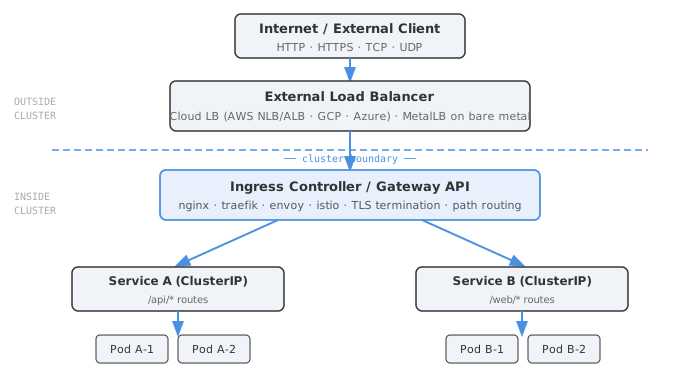
Trying to collapse all of this into one mechanism always leads to pain. One external LB per Service is expensive. Trying to do complex L7 routing directly on a cloud NLB is awkward. Treating an Ingress Controller as your L4 TCP router requires hacks. The layers exist for a reason.
NodePort is really only for local dev or CI environments. If someone tells you to “just use NodePort in production to keep it simple” — push back. You’re bypassing infrastructure-level load balancing, locking yourself to node IPs, and opening non-standard firewall ports. It doesn’t actually simplify anything past the first week.
End
Sources
- Services, Load Balancing, and Networking | Kubernetes
- Kubernetes Load Balancer: What Are the Options? | Komodor
- The Ultimate Guide to Kubernetes Services, LoadBalancers, and Ingress | Robusta
- Understanding Kubernetes Gateway API: A Modern Approach to Traffic Management | CNCF
- Gateway API | Kubernetes
- Bare-metal considerations - Ingress-Nginx Controller
- How to Deploy MetalLB with Nginx Ingress Controller | OneUptime
- Load Balancing - Amazon EKS Best Practices