
Run git log on any project that’s more than a year old and you’ll find the truth about a team. Half the messages say “fix”, “update”, “wip”, “asdf”, or my personal favourite — “stuff”. And then one day production breaks, you run git blame on the offending line, and the commit that introduced it just says “minor changes”. Cool. Very helpful. Thanks, past me.
I’ve been writing code for over a decade and I’ll be honest: for the first few years my commit messages were garbage. It wasn’t until I had to debug someone else’s six-month-old code (and then realised the someone else was me) that the penny dropped. A diff tells you what changed. Only the commit message can tell you why. That’s the whole game.
Why bother? Nobody reads them anyway
That’s the lie we tell ourselves. People absolutely read commit messages — just not at the moment you write them. They read them later, under pressure, when something is on fire.
Here’s where a good message actually earns its keep:
git blame— someone points at a weird line of code and the commit explains the reasoning so you don’t “fix” a deliberate workaround.git logduring onboarding — a new dev reads the history to understand how a feature evolved.git bisect— when you’re hunting a regression, small well-described commits let you find the culprit in minutes instead of hours.git revert— when you need to undo a change cleanly without dragging unrelated stuff with it.- Release notes and changelogs — increasingly auto-generated straight from commits.
A diff shows you the what. The commit message is the only place the why survives [1]. Code can explain itself; intent cannot. Six months from now nobody remembers that you removed that retry loop because the upstream API started double-charging customers. Unless you wrote it down.
So no, this isn’t bureaucracy. It’s leaving a trail of breadcrumbs for the person who has to maintain this — who is, statistically, going to be you.
The seven rules everyone quotes (and should)
Most modern advice traces back to two people. Tim Pope popularised the 50/72 formatting convention in a 2008 blog post [2], and Chris Beams later wrote them up as “the seven rules of a great commit message” on cbea.ms, which has basically become the canonical reference [1]. Here they are, and they’re worth memorising:
- Separate the subject from the body with a blank line
- Limit the subject line to 50 characters
- Capitalize the subject line
- Do not end the subject line with a period
- Use the imperative mood in the subject line
- Wrap the body at 72 characters
- Use the body to explain what and why, not how
Looks like pedantry until you understand the reasoning behind each one. Let me dig in, because honestly the why behind these rules is more useful than the rules themselves.
The subject line is special — Git treats it differently
That first line isn’t just convention; Git itself treats it as the commit’s title. Tools like git log --oneline, git shortlog, git rebase, and pretty much every GitHub/GitLab UI use only that first line in summaries [1]. The blank line after it is how Git knows where the title ends and the body begins. Skip the blank line and your nicely written body gets mashed into the subject in half the tools you use.
Why 50 characters?
It’s not arbitrary and it’s not a hard limit — think of it as a strong nudge. GitHub warns you at 50 characters and truncates at 72 with an ellipsis [1]. More importantly, the constraint forces clarity. If you can’t describe your change in 50 characters, that’s usually a hint that your commit is doing too many things (more on that later). The body wraps at 72 so that Git’s default indentation still fits inside an 80-column terminal without wrapping ugly [3].
The imperative mood thing — yes it actually matters
This is the rule people roll their eyes at the most, so let me make the case. Write “Fix login redirect loop”, not “Fixed”, not “Fixes”, not “Fixing”.
The test that makes it click: your subject should complete the sentence “If applied, this commit will ___” [4].
- ✅ If applied, this commit will Fix login redirect loop
- ❌ If applied, this commit will Fixed login redirect loop
The second one reads like nonsense. There’s a deeper reason too — Git itself writes in the imperative. When you merge, Git generates “Merge branch ‘feature’”. When you revert, it writes “Revert …”. Your commits should read as commands to the codebase, consistent with Git’s own voice [4]. Funny enough, despite all the preaching, only around 44% of commits on GitHub actually use the imperative mood [5]. So following this puts you in a minority that looks like it knows what it’s doing.
A quick before/after:
| ❌ Don’t | ✅ Do |
|---|---|
fixed the bug. | Fix null check in user serializer |
Updating README | Document the env setup steps |
changes to api | Add pagination to /orders endpoint |
WIP | Add failing test for expired tokens |
What goes in the body
The subject says what. The body is where you explain why this change, why now, and what you considered. Don’t narrate how — the diff already shows how. Explain the problem you were solving and the reasoning behind your approach [1].
A real-ish example of a full message:
Cap retry attempts on payment webhook

The webhook handler retried indefinitely on a 5xx from the
billing provider. During their outage last Tuesday this hammered
their API and triggered duplicate charge attempts for ~30 users.

Limit retries to 3 with exponential backoff, and log the final
failure so support can reconcile manually. Refunds for the
affected accounts are tracked in TICKET-4821.
Notice there’s not a single line about how the backoff is implemented. The code shows that. The message captures the stuff you’d otherwise lose forever — the outage, the duplicate charges, the ticket. That’s the irreplaceable part.
One practical tip: stop using git commit -m for anything non-trivial. The -m flag quietly trains you to write one-liners because writing a proper body with it is painful [6]. Just run git commit, let your editor open, and write like a human. Set your editor with git config --global core.editor "code --wait" (or vim, or whatever) and you’re set.
Write atomic commits — this is the real secret
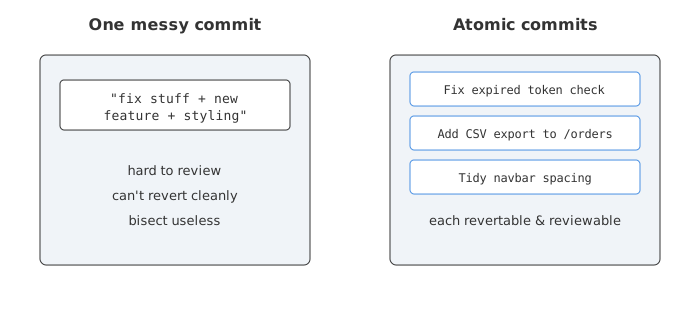
Here’s the thing almost nobody tells beginners: the quality of your commit message depends almost entirely on the quality of your commit. If your commit changes fifteen unrelated things, no message on earth can summarise it well. You’ll end up writing “various fixes” because that’s genuinely the only honest description.
An atomic commit is the smallest change that makes sense on its own and leaves the codebase in a working state [7]. One logical change. Don’t mix a bug fix with a formatting cleanup with a new feature.
There’s a dead-simple smell test for this: if your subject line needs the word “and”, your commit is probably two commits [8]. “Add search filter and fix navbar styling” — that’s two commits wearing a trench coat.
Why this is worth the discipline:
git bisectbecomes a superpower. Small focused commits let bisect zero in on the exact change that introduced a bug [9].- Reverts are clean. You can undo one feature without accidentally reverting an unrelated fix that rode along with it [9].
- Code review gets easier. Reviewers understand a small, single-purpose change far faster than a 600-line grab-bag.
- The history reads like a story. Each commit is one chapter in how the project got here [9].
The flow that works for me: stage selectively with git add -p (patch mode) so you commit only the related hunks, even if your working directory has a bunch of unrelated changes going on. And if you’ve already made a mess locally, that’s what interactive rebase is for — squash and split before you push.
Conventional Commits: structure for machines and humans
Once you’ve nailed the basics, there’s a popular convention that adds a light structure on top: Conventional Commits. The format is dead simple [10]:
<type>[optional scope]: <description>

[optional body]

[optional footer(s)]
So your subject line starts with a type. The common ones:
| Type | When to use it |
|---|---|
feat | A new feature |
fix | A bug fix |
docs | Documentation only |
style | Formatting, whitespace — no logic change |
refactor | Code change that neither fixes a bug nor adds a feature |
perf | A performance improvement |
test | Adding or fixing tests |
build / ci | Build system or CI config |
chore | Routine maintenance, deps, tooling |
Examples in the wild:
feat(auth): add passwordless email login
fix(api): handle empty cart on checkout
docs: clarify env setup in README
refactor(parser): extract token validation
Breaking changes get flagged two ways: a ! before the colon, or a BREAKING CHANGE: footer [10]:
feat!: drop support for Node 16

BREAKING CHANGE: minimum supported runtime is now Node 18.
Why teams adopt it
The payoff isn’t aesthetic — it’s automation. Because the type is machine-readable, tooling can:
- Generate changelogs automatically from your commit history.
- Bump your semantic version correctly —
fix→ patch,feat→ minor,BREAKING CHANGE→ major [10]. - Trigger releases and publish steps in CI without a human deciding the version.
This isn’t a niche thing either. One review of 381 top NPM libraries found nearly 95% used Conventional Commits formatting, with over half hitting 80%+ compliance across their history [11]. If you maintain a library, this is close to table stakes now.
Honestly, though — is it for everyone? On a solo project or a small internal app where you’re not auto-releasing anything, the feat:/fix: prefixes can feel like ceremony for ceremony’s sake. The seven rules from earlier matter far more than the prefix. Use Conventional Commits when the automation pays for the discipline. Don’t cargo-cult it because a popular repo does.
The anti-patterns — what makes a commit message bad
Let me name names. These are the ones I see constantly, and why they hurt [12][8]:
- “Fix bug” — which bug? You will not remember. Name the bug.
- “Update”, “changes”, “stuff”, “wip” — zero information. The diff already told us something changed.
- Listing files: “Update user.rb and helper.js” —
git showalready lists the files. The message should explain the meaning of the change, not duplicate the file list [12]. - “and” in the subject — almost always means the commit should be split [8].
- Past tense / wrong mood — “Fixed”, “Added”, “Changing”. Pick imperative and stay consistent.
- A wall of one-liners — ten commits all saying “updates”. This is what
git commit -moveruse produces [12]. - The subject restating the obvious — “Make changes to the changes file”. Say what and why.
Here’s a gut-check before you hit enter: read your subject line back as “If applied, this commit will ___” and ask whether someone who wasn’t there would understand it in six months. If the answer is no, spend the extra thirty seconds. It’s the cheapest investment in your future sanity you’ll ever make.
Tooling that keeps you honest
Discipline is hard to sustain by willpower alone, so let the machines nag you instead:
- Commit message template — set a reminder of your own rules:
Put a skeleton in that file (subject reminder, blank line, body reminder) and it shows up every time you commit.git config --global commit.template ~/.gitmessage.txt - commitlint + Husky — a git hook that rejects commits that don’t follow Conventional Commits. Great for teams.
- Commitizen — an interactive prompt that walks you through building a properly formatted commit.
- Editor integration — most editors (and tools like GitKraken) highlight when your subject runs past 50 characters [13].
None of these write a good message for you — they just enforce the shape. The thinking is still your job. And these days an AI assistant can draft a decent message from your diff, which is genuinely useful, but treat it like a junior’s first draft. It can see what changed; it can’t see the outage last Tuesday or the ticket number. That context only lives in your head, and putting it in the message is the entire point.
A workflow you can actually stick to
Pulling it together, here’s what a sane commit habit looks like day to day:
- Make one logical change. If you drifted into unrelated edits, stage selectively with
git add -p. - Run
git commit(no-m) so your editor opens. - Write a subject under ~50 chars, imperative mood, capitalised, no period. Add a type prefix if your team uses Conventional Commits.
- Blank line, then a body explaining the why — but only if the change needs context. Trivial commits don’t need a body.
- Reference tickets or issues in the footer (
Refs #421,Closes #88). - Re-read it with the “If applied, this commit will ___” test before saving.
That’s it. It adds maybe a minute per commit and saves hours later. For a deeper walkthrough with more examples, freeCodeCamp’s step-by-step guide is a solid companion read [14].
The best commit message isn’t the cleverest or the longest. It’s the one that answers the question your future teammate is going to be screaming at the screen: “Why on earth was this changed?” Answer that, and you’ve done the job.
End
Sources
- How to Write a Git Commit Message - Chris Beams
- Mastering Git Commit Messages: Tim Pope’s 50/72 Formatting Guide
- The 50/72 Rule of Git – DevIQ
- Imperative Git commit messages in the active tense or mood - TheServerSide
- What % of Git commit messages use the imperative mood? - InitialCommit
- Best Practices for Git Commit Message - Baeldung on Ops
- Mastering Atomic Commits - LeanIX Engineering
- “and” as anti-pattern in git commit subject - Kosta Harlan
- How atomic Git commits dramatically increased my productivity - DEV Community
- Conventional Commits v1.0.0
- Conventional Commits Specification - Wikipedia
- Git Commit Message Anti-Patterns - AMC
- How to Write a Good Git Commit Message - GitKraken
- How to Write Better Git Commit Messages – freeCodeCamp