
India is the world’s second-largest smartphone market — and one of its most targeted by cybercriminals. In 2025 alone, Indians filed 28.15 lakh cybercrime complaints and lost a staggering ₹22,495 crore to digital fraud [2]. If you use a smartphone for banking, UPI payments, or even just WhatsApp, you are a target. Here is your complete, no-nonsense guide to locking down your phone before the next scam call reaches you.
The Scale of the Problem
The numbers paint a grim picture. Cybercrime cases in India jumped 24% in 2025 compared to the previous year [2], and the Indian government has had to block over 7.81 lakh SIM cards and 2,08,469 phone IMEIs linked to fraudulent activity [3]. UPI fraud alone accounted for more than ₹805 crore in just the first eight months of FY26 — and that only counts what was actually reported, since an estimated 51% of UPI fraud victims never file a complaint [1].
The fraud is not random. Scammers run organised operations, use AI voice-cloning, fake government portals, and convincing deepfake videos to squeeze money out of ordinary people every single day.
The Most Common Phone Scams Targeting Indians
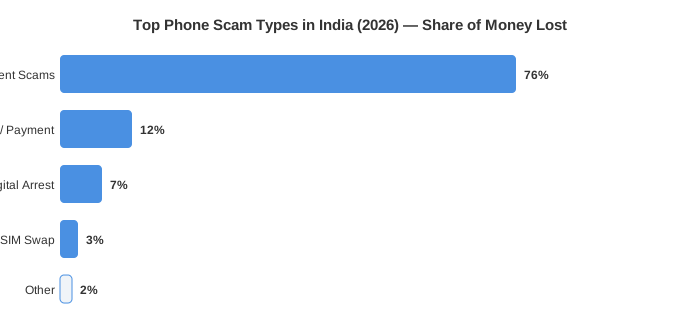
Digital Arrest & Impersonation Scams
“Digital arrest” is the fastest-growing psychological fraud in India [1]. A caller — often via WhatsApp video — poses as a CBI officer, customs official, or TRAI representative. They claim your phone number is linked to money laundering or drug trafficking and put you on a fake “digital arrest,” demanding you stay on the call until you pay a fine or share bank credentials [5].
Key red flags:
- The caller demands secrecy and urges you to stay connected for hours
- They ask you to transfer money to a “safe government account”
- They use official-looking screen backgrounds and fake ID cards
- They threaten immediate arrest if you hang up
Reality check: No government agency in India — not the CBI, ED, TRAI, or police — arrests citizens over a phone or video call [5].
UPI, OTP & Payment Fraud
Fraudsters send fake payment-request QR codes, counterfeit PhonePe/GPay screens, and phishing links disguised as bank SMS messages [7]. Once you scan or click, your OTP is captured and your account is drained within minutes.
Common UPI attack vectors:
- Fake collect requests — you receive a ₹1 “test” payment request; accepting it triggers a larger debit
- Screenshare scams — a fake “bank support” agent asks you to install AnyDesk or TeamViewer; they watch your OTP in real time [8]
- Impersonation apps — lookalike PhonePe/GPay APKs downloaded outside the Play Store that harvest your credentials [7]
eSIM Hijacking & SIM Swap Fraud
As India adopts eSIMs, a new attack has emerged. Fraudsters call your telecom operator pretending to be you, convince them to issue an eSIM, then intercept every OTP that arrives on your number [6]. Within minutes they control your bank account, email, and UPI. South Indian Bank warns that eSIM scams are rising sharply in 2025–26 and that the whole heist can complete in under ten minutes [6].
How to Fortify Your Phone Against Scammers
Lock Down Your SIM Card
Your mobile number is the master key to your entire digital life. Treat it accordingly.
- Set a SIM PIN (Settings → SIM card → SIM PIN on Android; Settings → Cellular → SIM PIN on iPhone). Anyone who steals your phone cannot make calls or receive OTPs without this PIN [4].
- Enable SIM lock with your carrier — call Airtel, Jio, or Vi and ask for a port-block or an eSIM activation freeze so no one can port or duplicate your number without visiting a store in person.
- Check your registered SIMs at sancharsaathi.gov.in — India’s official Sanchar Saathi portal lets you see all SIM cards registered under your Aadhaar and instantly block any you don’t recognise [3].
Secure Your UPI and Banking Apps
| Threat | Wrong behaviour | Safe behaviour |
|---|---|---|
| Fake collect request | Approve thinking it’s a refund | Reject all incoming requests you did not initiate |
| Screen-share demand | Install AnyDesk for “bank support” | End the call; banks never ask for remote access |
| QR code payment | Scan merchant QR without checking name | Verify merchant name matches before paying |
| Unknown APK | Download PhonePe from a link | Download only from Google Play / Apple App Store |
| OTP request | Share with “bank executive” | OTPs are yours alone — never share with anyone |
Additional steps to take right now:
- Enable biometric lock (fingerprint/face) inside every UPI and banking app [8].
- Set a daily UPI transaction limit in your bank’s app — most allow limits as low as ₹5,000.
- Turn on SMS/email alerts for every transaction, no matter how small.
- Remove saved cards from websites you no longer use regularly.
Harden Your Device Settings
- Keep your OS and apps updated. Security patches close the exact vulnerabilities scammers exploit [4].
- Never connect to public Wi-Fi for any banking or payment task. Use mobile data or a trusted VPN instead [4].
- Audit app permissions monthly. Revoke microphone, camera, and contacts access from any app that has no genuine need for them.
- Enable Google Play Protect (Android) or keep Lockdown Mode available (iPhone) for high-risk situations.
- Use strong, unique passwords and a reputable password manager. Enable two-factor authentication (2FA) on all email and social accounts [4].
- Do not side-load APKs. Disable “Install unknown apps” permission on Android — most banking trojans arrive this way [7].
What to Do If You Have Already Been Scammed
Speed is everything. Every minute you wait gives fraudsters more time to move the money.
- Call 1930 immediately — India’s 24×7 National Cyber Crime Helpline can freeze the recipient account before funds are transferred [1].
- File a complaint at cybercrime.gov.in with all transaction IDs, screenshots, and the fraudster’s number.
- Call your bank’s fraud line and request an immediate transaction dispute.
- Report the phone number/WhatsApp account on Sanchar Saathi’s Chakshu portal to get it blocked nationally [3].
- Do not transfer more money to “recover” what was lost — a second scammer often appears offering to help.
Government Tools Every Indian Should Bookmark
India has built several free resources to fight back against phone fraud:
| Resource | Purpose | Link |
|---|---|---|
| Helpline 1930 | Report cyber fraud, freeze accounts | Call 1930 |
| Cybercrime Portal | File formal FIR-level complaint | cybercrime.gov.in |
| Sanchar Saathi | Manage/block your SIM cards | sancharsaathi.gov.in |
| Chakshu (Sanchar Saathi) | Report spam calls, SMS, WhatsApp fraud | sancharsaathi.gov.in/sfc |
| Cyber Fraud Risk Indicator | RBI + Govt real-time transaction monitoring | Automatic (no action needed) |
The government’s I4C initiative has already blocked fraudulent transactions worth over ₹8,031 crore since launch [3]. These systems work — but only if you report quickly.
The Golden Rule
Scammers rely on urgency and fear. The moment a call creates panic — “your number will be blocked,” “you are under digital arrest,” “your bank account is compromised” — that is your cue to hang up, breathe, and verify independently by calling the official number of the agency being impersonated. No legitimate institution will punish you for double-checking.
Securing your phone is not a one-time task; it is a weekly habit. Set a monthly reminder to review app permissions, update passwords, and check sancharsaathi.gov.in for unfamiliar SIM registrations. The scammers are persistent — your vigilance must be too.
Sources
- Digital Fraud in India 2026: Rising Threats, Common Scams & How to Protect Yourself
- Cybercrime in India 2025: 24% Spike, ₹22,495 Crore Lost
- Curbing Cyber Frauds in Digital India — Press Information Bureau
- 10 Common Mobile Phone Scams in India and How to Avoid Them
- Protect Yourself from Digital Arrest Scams: A Must-Read Guide
- The Rise of eSIM Fraud in India and What You Can Do About It
- UPI Scam 2026: How Hackers Steal Money Using OTP and Fake Apps
- UPI Frauds: How to Secure Your Account — The Complete Guide