Ever clicked a button in a React app and just… trusted that the UI would update correctly? Yeah, me too, for years. I never really stopped to think about what happens between setState and the pixels changing on screen — until I started debugging a component that was re-rendering five times for a single click. That rabbit hole led me straight into Fiber, lanes, and the surprisingly long history of how React decides when to actually re-render your app.
This article is that rabbit hole, organized. We’ll go through how React actually works under the hood, what React Fiber is and why it exists, and then walk through how batching — the thing that controls how many times your component re-renders — has changed release after release.
What Actually Happens When You Call setState?
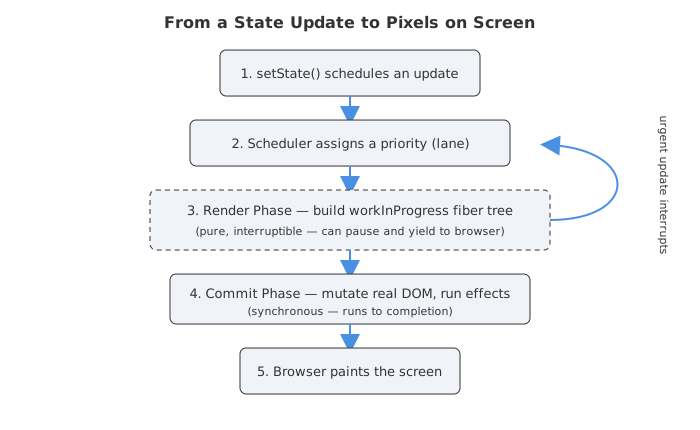
Here’s the thing almost nobody explains clearly: calling setState (or a state setter from useState) doesn’t immediately change anything on the screen. It just tells React “hey, something changed, you might want to look at this again.”
What follows is a multi-step process:
- Trigger — something happens (an event, a network response, a timer) that calls a state setter.
- Render — React calls your component functions again to figure out what the new UI should look like. This produces a tree of React elements (often loosely called the “virtual DOM”).
- Reconciliation — React compares the new tree with the previous one and figures out the minimal set of changes needed.
- Commit — React applies those changes to the actual DOM, runs effects, and the browser paints the result.
The term “virtual DOM” gets thrown around a lot, and honestly it’s a bit of a misnomer at this point. What React actually maintains internally these days is a tree of Fiber nodes — which is a much richer structure than a simple snapshot of the DOM. We’ll get to that in a second, because it’s really the heart of this whole article.
Reconciliation: React’s Diffing Trick
Before Fiber even comes into the picture, it helps to understand why React can update the DOM efficiently at all. Comparing two arbitrary trees node-by-node is, in computer science terms, an expensive problem — naive tree diffing is roughly O(n³) for n nodes. That’s way too slow for a UI library that needs to run on every keystroke.
So React uses a heuristic-based algorithm with a couple of simplifying assumptions [5]:
- Different element types produce different trees. If a
<div>becomes a<span>, React doesn’t bother diffing their children — it just tears down the old one and builds the new one from scratch. - Same element type, same position? React keeps the underlying DOM node and just updates the changed attributes/props.
- Lists need keys. When you render a list with
.map(), React uses thekeyprop to match items between renders. Without stable keys (or worse, using array index as a key when the list can reorder), React can get confused about which item is which — leading to weird bugs like form inputs retaining the wrong value after a reorder.
This is the part of React’s reconciliation process that most tutorials cover [5]. But reconciliation by itself doesn’t explain how React manages to do all this work without freezing the browser on a big update. That’s where Fiber comes in — and it’s a much bigger deal than most people realize.
Enter Fiber: The Rewrite That Changed Everything
Back before React 16, React used what’s now called the “stack reconciler.” It worked, but it had one fundamental problem: it was recursive and synchronous. Once React started rendering a tree, it couldn’t stop until it was done — the JavaScript call stack just kept growing until the whole tree was processed [3][4].
For small apps, that’s fine. You’d never notice. But for big component trees — think a data grid with thousands of rows, or a complex dashboard — that synchronous render could take long enough to block the main thread for tens of milliseconds. Animations would stutter, scrolling would jank, and typing into an input could feel sluggish because the browser couldn’t process anything else until React finished its work.
In September 2017, React 16 shipped with a complete rewrite of this core algorithm, called Fiber [2]. Meta’s engineering team described it as an “API-compatible rewrite” — meaning your component code didn’t need to change, but everything happening underneath it did [2].
What Is a Fiber, Really?
The cleanest way I’ve seen it described (from React core contributor Andrew Clark’s own notes) is that a fiber is a “virtual stack frame” [3]. Instead of relying on the JavaScript call stack — which executes top to bottom with no pausing — React builds its own data structure that mimics a stack, but one it fully controls.
Each fiber is a plain JavaScript object representing a unit of work — a component, basically — and it holds:
- type and key — what kind of component or DOM element this is
- child, sibling, and return pointers — forming a linked-list representation of the tree (instead of a typical nested-array tree)
- pendingProps and memoizedProps — the new props coming in vs. the props from last time, used to check if anything actually changed
- alternate — a pointer to the “other version” of this fiber (more on this in a second)
That alternate pointer is honestly the cleverest part. React keeps two trees in memory at once: the current tree (what’s actually on screen right now) and the workInProgress tree (what React is currently building for the next update) [4]. When the work-in-progress tree is complete, React just swaps a pointer — the work-in-progress becomes the current tree. This is sometimes called “double buffering,” and it’s the same trick video games use to avoid showing half-drawn frames.
Because each fiber is its own little unit of work, React can process the tree node-by-node, and after finishing each node, stop and ask: “do I have time to keep going, or should I yield back to the browser?” [3][4]. That single ability — to pause, yield, and resume — is what makes everything else (concurrent rendering, transitions, automatic batching) possible.
Render Phase vs. Commit Phase
React splits all this work into two phases with very different rules:
- Render phase — React walks the workInProgress tree, calls your components, and figures out what changed. This phase is pure (no DOM mutations, no side effects) and interruptible — React can pause it, throw away the work, or restart it if a more urgent update comes in [3][4].
- Commit phase — React takes the finished work and actually mutates the real DOM, runs layout effects, and updates refs. This phase is synchronous and cannot be interrupted — once it starts, it runs to completion so the user never sees a half-updated UI [1][4].
The Scheduler: Giving Every Update a Priority
Once Fiber made interruptible rendering possible, React needed a way to decide what gets interrupted and what gets priority. That’s the job of the scheduler — a separate package that React ships alongside its core [14].
The scheduler defines priority levels, each with an internal timeout that determines how long a piece of work can be deferred before React forces it through [14]:
| Priority | Timeout | Example use case |
|---|---|---|
| Immediate | -1ms (now) | Synchronous, critical updates |
| User-blocking | 250ms | Typing, clicking, dragging |
| Normal | 5,000ms | Data fetch results, non-urgent updates |
| Low | 10,000ms | Analytics, background sync |
| Idle | effectively never | Offscreen content, hidden tabs |
In React 18, this priority system got even more granular with lanes — a bitmask-based model with up to 31 separate priority “lanes” that updates can be assigned to [9]. The practical upshot: if you’re in the middle of rendering a big, low-priority update (say, filtering a huge list) and the user clicks a button, React can pause the low-priority render, handle the click immediately, and come back to the filtering work afterward [9]. Before Fiber, that simply wasn’t architecturally possible — once React started rendering, it couldn’t stop.
This is also the foundation for useTransition and useDeferredValue, which we’ll get to shortly. They’re essentially developer-facing levers for “please treat this particular update as low priority” [10].
Batching: The Quiet Optimization 10 Years in the Making
Okay, here’s where it gets genuinely interesting — and where most articles either oversimplify or skip the history entirely. Batching is React’s strategy of grouping multiple state updates together so they trigger one re-render instead of many. It sounds simple. The implementation, though, has quietly evolved across nearly every major React release.
Before React 18: Batching Only Worked Inside Event Handlers
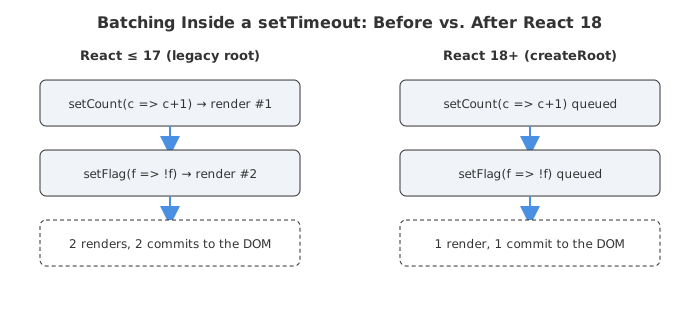
For years, React’s batching was tied to its synthetic event system. If you called multiple state setters inside a React event handler (onClick, onChange, etc.), React batched them into a single re-render. But step outside that context — into a setTimeout, a Promise.then(), or a raw addEventListener — and batching stopped working entirely [1][7].
// React 17 and earlier
function handleClick() {
  setTimeout(() => {
    setCount(c => c + 1); // triggers a re-render
    setFlag(f => !f);     // triggers ANOTHER re-render
  }, 1000);
}
That’s two full render-and-commit cycles for what is conceptually one logical update. Not a huge deal for two setState calls, but I’ve seen real apps where a single async callback fired six or seven state updates — each one re-rendering a moderately heavy component tree. That adds up.
This limitation is why unstable_batchedUpdates existed. It was an undocumented (hence the scary unstable_ prefix) API exported from react-dom that manually wrapped a callback in React’s batching context [6]:
import { unstable_batchedUpdates } from 'react-dom';

setTimeout(() => {
  unstable_batchedUpdates(() => {
    setCount(c => c + 1);
    setFlag(f => !f);
  }); // now only ONE re-render
}, 1000);
If you’ve ever used Redux, MobX, or Zustand, you’ve benefited from this without knowing it — those libraries wrapped their store update notifications in unstable_batchedUpdates specifically to avoid the “multiple renders from external state” problem [6]. It was a workaround baked into half the ecosystem because the framework itself couldn’t do it consistently.
React 18: Automatic Batching, Everywhere
React 18 (released March 2022) finally fixed this at the root [1]. With the new createRoot API, every state update gets batched by default, no matter where it originates — timeouts, promises, native event listeners, you name it [1][8].
// React 18+ with createRoot
function handleClick() {
  setTimeout(() => {
    setCount(c => c + 1);
    setFlag(f => !f);
    // Only ONE re-render, automatically
  }, 1000);
}
A few important details that trip people up:
- You have to opt in via
createRoot. If your app still calls the legacyReactDOM.render(), you don’t get automatic batching — React keeps the old behavior for backward compatibility [1]. unstable_batchedUpdatesbecomes a no-op. Since everything is batched automatically now, that old API just… doesn’t do anything special anymore [6][7].- You can still opt out using
flushSyncfromreact-dom, for the rare cases where you genuinely need the DOM updated synchronously before the next line of code runs (measuring layout right after a state change, for example):
import { flushSync } from 'react-dom';

function handleClick() {
  flushSync(() => {
    setCount(c => c + 1);
  });
  // DOM has already updated here
  setFlag(f => !f); // this one batches normally
}
I’ll be honest — in years of writing React, I’ve reached for flushSync maybe twice, both times for measuring DOM nodes immediately after a state-driven layout change. It’s a real escape hatch, but if you’re using it often, that’s usually a sign something else in your architecture needs rethinking.
React 18’s Concurrent Features: Transitions and Deferred Values
Automatic batching reduces the number of renders. But React 18 also introduced tools to control the priority of renders — which is a related but distinct optimization [1].
startTransition/useTransition— lets you mark a state update as “non-urgent.” React will render it in the background and can interrupt it if something more urgent (like a keystroke) comes in [1][10].useDeferredValue— takes a value and gives you back a version that “lags behind” during urgent renders, similar in spirit to debouncing but without an arbitrary timer [1].
const [query, setQuery] = useState('');
const [isPending, startTransition] = useTransition();

function handleChange(e) {
  setQuery(e.target.value); // urgent: keep the input snappy

  startTransition(() => {
    setSearchResults(filterHugeList(e.target.value)); // low priority
  });
}
The difference from batching is subtle but important: batching is about combining updates into fewer renders, while transitions are about deprioritizing a render so it doesn’t block more urgent ones [9][10]. Both ultimately exist because Fiber made rendering interruptible in the first place — without that foundational rewrite, neither would be possible.
React 19 and 19.2: Actions, the Compiler, and SSR Batching
React 19 (December 2024) didn’t overhaul batching the way React 18 did, but it kept building on the same foundation [11]:
- Actions API (
useActionState,useFormStatus,useOptimistic) — these let you pass async functions directly to<form action={...}>. Under the hood, React automatically manages the pending state, batches the resulting updates, and resets the form on success — all without you manually tracking loading flags [11].
const [error, submitAction, isPending] = useActionState(
  async (previousState, formData) => {
    const error = await updateName(formData.get('name'));
    if (error) return error;
    return null;
  },
  null,
);
React Compiler — this one’s a bigger deal for rendering performance overall, even if it’s not strictly “batching.” It reached version 1.0 in October 2025 [13]. The compiler runs at build time and automatically inserts memoization — the kind of optimization you used to hand-write with
useMemo,useCallback, andReact.memo— so components skip re-rendering when their inputs haven’t actually changed [13]. It’s been running in production at Meta, and the React team has partnered with Vite, Next.js, and Expo so new projects can turn it on by default [13]. Honestly, this feels like the natural endpoint of everything Fiber set up: first make rendering interruptible and schedulable, then make it batch efficiently, and finally — just skip unnecessary work entirely.React 19.2 (October 2025) extended batching into server rendering too. During streaming SSR, Suspense boundary reveals now get batched for a short window, so multiple boundaries that resolve close together can be sent to the client together instead of trickling in one at a time — which also better matches how the client behaves [12]. This release also shipped the new
<Activity />component (for hiding/restoring UI while preserving state),useEffectEvent, and “Performance Tracks” — a Chrome DevTools integration that visualizes the scheduler’s priority decisions directly in the Performance panel [12].
Putting It All Together: The Evolution at a Glance
| Version | Year | What changed for rendering/batching |
|---|---|---|
| ≤ React 15 | — | Stack reconciler — synchronous, non-interruptible recursion [3][4] |
| React 16 | 2017 | Fiber rewrite — interruptible render phase, double-buffered tree, priority-aware scheduling [2][3] |
| React 16–17 | 2017–2020 | Batching only inside React event handlers; unstable_batchedUpdates as a manual workaround [6][7] |
| React 18 | 2022 | Automatic batching everywhere (via createRoot), flushSync opt-out, lanes-based concurrent rendering, useTransition/useDeferredValue [1][9] |
| React 19 | 2024 | Actions API auto-manages pending/optimistic state around async updates [11] |
| React 19.2 | 2025 | SSR batches Suspense boundary reveals; <Activity />, Performance Tracks for visualizing scheduler priorities [12] |
| React Compiler 1.0 | 2025 | Build-time automatic memoization — skips re-renders without manual useMemo/useCallback [13] |
Why Any of This Should Matter to You
If you’re just building forms and dashboards, you might be thinking “okay, but I’ve never needed flushSync or unstable_batchedUpdates, so why does this matter?”
Fair point. But here’s where it actually bites people in practice:
- Debugging “why did this render twice?” is a rite of passage for every React developer, and the answer is almost always rooted in batching behavior — Strict Mode double-invoking effects in development, or an update happening outside a batched context.
- Migrating from
ReactDOM.render()tocreateRootisn’t just a version bump — it silently changes how your app batches updates. If your app relied on synchronous re-renders somewhere (intentionally or not), automatic batching can expose those assumptions. - Performance debugging makes a lot more sense once you know about lanes and priorities. When you open React DevTools’ profiler — or now, the Performance Tracks in Chrome DevTools [12] — and see renders getting interrupted or deferred, that’s not a bug. That’s the scheduler doing exactly what it’s designed to do.
useTransitionanduseDeferredValueonly make sense once you understand that React’s render phase is interruptible. Without Fiber, neither hook could exist — there’d be nothing to “interrupt.”
What strikes me most, looking back at this whole arc, is how much of it is invisible by design. You don’t write code that says “use Fiber.” You don’t explicitly invoke “lanes.” The entire point of this decade-long rewrite was to make React feel faster without asking developers to think about scheduling at all — and for the most part, it succeeded. The stuff that used to require careful manual batching (unstable_batchedUpdates, debounced inputs, manual shouldComponentUpdate checks) increasingly just… works, automatically, release after release.
Maybe with the React Compiler maturing further, the next “decade-long arc” is about removing manual memoization the same way React 18 removed manual batching. We’ll see.
Sources
- React v18.0 – React Blog
- React 16: A look inside a rewrite of our frontend UI library – Meta Engineering
- React Fiber Architecture – acdlite/react-fiber-architecture (GitHub)
- Inside Fiber: an in-depth overview of the new reconciliation algorithm in React – AG Grid Blog
- ReactJS Reconciliation – GeeksforGeeks
- Do you know unstable_batchedUpdates in React? – DEV Community
- React 18 adds automatic batching – Saeloun Blog
- What is Automatic Batching in React 18 – GeeksforGeeks
- Concurrent Rendering and Lane Prioritization in React 18 – Jim’s Blog
- useTransition – React Reference Documentation
- React 19 – React Blog
- React 19.2 – React Blog
- React Compiler v1.0 – React Blog
- packages/scheduler/src/forks/Scheduler.js – facebook/react (GitHub)