
Every day your phone buzzes with news alerts, chat messages, and ride updates — all while the apps responsible for them are closed. But how exactly does a message originating on some remote server find its way to your locked screen in milliseconds? And no, your phone is not constantly asking “got anything for me?” — the answer is far more elegant than that.
The Big Question: Does the Phone Poll for Notifications?
The short answer is no. Modern mobile operating systems do not repeatedly poll (pull) a server to check for new messages [8]. Instead, both iOS and Android maintain a single, long-lived persistent connection to a centralised gateway run by Apple or Google. When a notification is ready, the gateway pushes it down that open channel to your device [8]. This fundamental push model means:
- No app needs its own polling loop running in the background
- Network and battery usage are dramatically reduced
- Notifications arrive nearly instantly, regardless of what the device is doing
The Three-Party Architecture
Both platforms share the same high-level three-party model [9]:
- Your app’s backend server — detects an event (new message, order shipped, etc.) and prepares a notification payload
- The platform push gateway — Apple Push Notification service (APNs) for iPhone, Firebase Cloud Messaging (FCM) for Android
- The user’s device — receives the notification through the OS and displays it
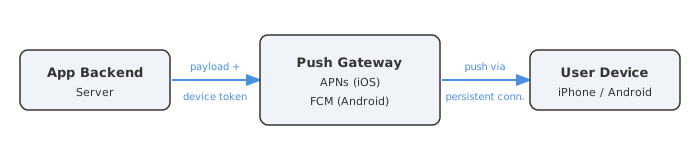
At registration time, the app asks the OS for a unique device token — a cryptographically signed identifier that tells the gateway exactly which device (and which app on that device) should receive a given notification [1][4]. The app then sends this token to its own backend, which stores it for later use.
How Apple’s APNs Works (iPhone)
Device Registration and the Token
When an iOS app calls registerForRemoteNotifications(), the OS contacts Apple’s APNs servers and receives a device-specific push token [1]. This token encodes the device identity and the app identifier and is refreshed by iOS whenever it changes (e.g., after a restore). The token is then forwarded to the developer’s server, which uses it to address future notifications.
The Persistent TLS Connection
The iPhone maintains a single, always-on, encrypted TCP connection to Apple’s APNs servers [2][3]. Key technical details:
- Primary port: TCP 5223 — a dedicated APNs port [3]
- Fallback port: TCP 443 (HTTPS) — used on restricted Wi-Fi networks [3]
- Encryption: TLS (Transport Layer Security) throughout
- Keepalive packets: The device regularly sends lightweight heartbeat packets to prevent the server from closing the idle connection [3]
Because this connection is maintained at the OS level — not by any individual app — it persists even when every app on your phone is suspended or closed. All apps on the device share the benefit of this single pipe.
Delivering the Notification
When your app’s backend has something to send, it authenticates with APNs (using a JWT or certificate) and POSTs a JSON payload containing the notification title, body, badge count, and any custom data [1]. APNs then routes this payload down the persistent connection to the target device. iOS receives it, wakes the relevant app briefly (if needed), and displays the notification.
iOS Intelligence: Smart Notification Ranking
iOS 26 introduced Apple Intelligence-powered priority ranking that automatically promotes relevant notifications (a delivery arriving, a meeting starting, a direct reply needed) and demotes generic ones — surfacing the most important alerts at the top of the stack without any developer action needed [7].
How Android’s FCM Works
Device Registration
Similarly, on Android, when an app first calls FirebaseMessaging.getInstance().getToken(), the device registers with Google’s FCM infrastructure and receives a registration token [4]. This token is forwarded to the app’s backend and stored for later targeting.
Message Priority and Doze Mode
Android’s Doze mode aggressively restricts background activity when the device is idle and unplugged to save battery [6]. FCM handles this with two distinct priority levels [5][6]:
| Priority | Behaviour in Doze | Typical Use Case |
|---|---|---|
| Normal | Batched and delivered at the next Doze maintenance window | Newsletter, social feed update |
| High | Bypasses Doze; can wake a sleeping device immediately [6] | Incoming call, chat message, alarm |
Developers set priority in the FCM payload. High-priority messages are strictly for user-visible, time-sensitive alerts — abusing this priority can result in Google throttling an app’s ability to wake the device [5].
Android 16: AI-Powered Notification Organizer
Released in mid-2025, Android 16 introduced a Notification Organizer that uses on-device AI to automatically categorise incoming notifications and silence lower-priority ones (such as promotions) without user intervention [7]. This mirrors Apple Intelligence’s approach on iOS and represents a convergence of both platforms toward smarter, less overwhelming notification experiences.
iOS vs Android: Side-by-Side Comparison
| Feature | iOS (APNs) | Android (FCM) |
|---|---|---|
| Gateway service | Apple Push Notification service | Firebase Cloud Messaging |
| Connection protocol | Proprietary binary over TLS/TCP | HTTP/2 or XMPP over TLS |
| Primary port | 5223 (fallback: 443) [3] | 443 (HTTPS) |
| Connection owner | iOS kernel / system daemon | Google Play Services process |
| Permission required | Explicit opt-in dialog required [7] | Granted by default (Android 13+ requires opt-in) |
| Global opt-in rate | ~56% [7] | ~67% [7] |
| Priority levels | Normal, Time-Sensitive, Critical | Normal, High |
| AI notification ranking | Apple Intelligence (iOS 26+) | Notification Organizer (Android 16+) |
| Doze/Low-power bypass | Silent push + background fetch APIs | High-priority FCM flag [6] |
Why Not Just Poll? The Case for Push
Before centralised push gateways existed, apps had to implement their own polling loops — waking up every few minutes to ask a server “anything new?” The costs were steep [8]:
- Battery drain: Each polling cycle wakes the radio, which is expensive
- Network overhead: Thousands of apps each making independent HTTP requests
- Latency: A notification could arrive up to the polling interval late
- Scalability: Backend servers fielding constant polling requests at scale
The persistent-connection push model eliminates all of these. One open socket per device handles millions of potential notifications. The radio only wakes when there is actually something to deliver. And the gateway handles all the complexity of queuing, retrying failed deliveries, and expiring stale notifications [9].
The Takeaway
Your phone is never blindly polling the internet for alerts. Both iPhone and Android take a sophisticated, battery-conscious approach: a single OS-managed persistent connection to Apple or Google’s global gateway sits quietly in the background. When a server anywhere in the world wants to reach your device, it posts a message to that gateway, which instantly pushes it down the open channel to your screen. The result is near-real-time delivery with minimal impact on battery life — a genuine engineering feat hiding behind every buzz and banner.
Sources
- Registering Your App with APNs — Apple Developer Documentation
- Apple Push Notification Service: How APNs Works in MDM — Fleet
- Does iOS maintain a constant connection? — Apple Developer Forums
- Firebase Cloud Messaging — Official Firebase Documentation
- Ensure your FCM Notifications Reach Users on Android — Firebase Blog, April 2025
- Optimize for Doze and App Standby — Android Developers
- Push Notifications on iOS vs Android: How They Work in 2026 — MobiLoud
- Pull vs Push Architecture for Mobile — Microsoft Mobile Engineering, Medium
- Push Notifications Deep Dive: The Ultimate Technical Guide to APNs & FCM — Spritle
- Scaling Push Notifications to 50 Million Devices — Design Gurus Substack