
The cable behind your monitor has a more dramatic history than most people realize. Every decade or so, some group of companies decides the current standard is holding them back, invents something new, and the industry spends the next ten years transitioning — leaving everyone with a drawer full of adapters they’ll never use again. Here’s why that happened, and why it’ll probably keep happening.
The Analog Jungle: Composite, S-Video, and Component
Before there was HDMI or DisplayPort, there was a mess of analog standards that ran televisions and early home electronics for decades. Each one existed because the previous one was genuinely not good enough.
Composite video is where this all starts. When the United States introduced color television in 1954, engineers faced a real constraint: how do you broadcast color without breaking every black-and-white TV already in someone’s living room? The solution was to multiplex everything — brightness (luminance), color (chrominance), and sync signals — into a single combined signal [2]. That’s composite video. The iconic yellow RCA connector on the back of every VCR, PlayStation 2, and budget television set you ever owned? That’s your composite connection carrying all of that mashed-together information.
It worked. For decades, it was good enough. But combining luminance and chrominance into a single signal causes interference between them. The visual result is color bleeding, smearing, and a particular artifact called “dot crawl” — that shimmering distortion you’d notice on fine patterns like a striped shirt on TV. Engineers knew this was fundamentally a design flaw, not something you could fix by tweaking the signal.
S-Video (Separate Video) was the answer. By splitting luma and chroma onto two separate pins within the same 4-pin mini-DIN connector, it eliminated the crosstalk that caused dot crawl [3]. The concept was developed in the late 1970s but didn’t find wide consumer adoption until JVC introduced the S-VHS format in 1987 and bundled the connector with it. If you ever connected a higher-end VCR or a capture card to a computer in the early 2000s using S-Video instead of composite, you’d have seen a noticeably cleaner image — colors stayed within their edges, fine detail was crisper.
But S-Video still topped out at standard definition. As high-definition television started materializing in the 1990s, neither format could carry the signal bandwidth required. Component video (those three RCA jacks — typically color-coded red, green, blue but actually carrying a Y/Pb/Pr luma-difference signal) solved the bandwidth problem by splitting the signal across three separate cables entirely [1]. DVD players, cable boxes, and game consoles like the PS2 and original Xbox used component extensively. It was the best analog video quality available to consumers before the digital era fully arrived — capable of carrying 1080i and even some 1080p signals cleanly.
Then computers showed up and created an entirely separate problem.
VGA: IBM’s Accident That Lasted 30 Years
In 1987, IBM introduced the Video Graphics Array connector alongside its PS/2 line of computers [4]. The 15-pin D-sub connector supported resolutions up to 640×480 pixels. For 1987, that was impressive. Nobody in the room that day was thinking “this will still be on laptops in 2013.”
VGA is purely analog. Your graphics card generates a digital signal internally, converts it to analog voltage, sends it down the cable, and your monitor converts it back to digital to display it on the LCD panel. Every analog-to-digital conversion introduces noise and imprecision. At low resolutions on CRT screens that were themselves analog, this was invisible. At 1920×1200 on an LCD panel, it produced the characteristic soft-focus blur that anyone who’s connected a laptop to a projector via VGA will remember.
So why did it survive so long? A few reasons. It was cheap to implement. It was on everything. Replacing it required everyone to simultaneously agree on something new, and the corporate IT world — projectors, conference rooms, desk monitors — had zero urgency to move [17]. Intel and NVIDIA officially dropped hardware VGA support from their chipsets in the early 2010s, but the connectors kept appearing on budget laptops and AV equipment for years after that [4].
VGA’s fundamental problems weren’t solvable by incremental improvement:
- Analog only — incompatible with modern digital LCD and OLED panels without conversion
- No audio — always required a separate cable
- No content protection — HDCP wasn’t possible over an unencrypted analog signal
- No HDR or color metadata — the signal carries no information about color space or dynamic range
- Physical size — 15 fragile pins in a wide D-sub shell, impractical for slim devices
Something had to replace it.
DVI: The Almost-Revolution That No One Loved
By the late 1990s, LCD monitors were rapidly displacing CRTs. The problem was stark: LCD panels are digital by nature, but VGA was feeding them an analog signal that the monitor then had to digitize again. More conversions, more signal degradation, especially at higher resolutions where every pixel matters.
In 1999, the Digital Display Working Group — a consortium including Intel, IBM, HP, Compaq, Fujitsu, Silicon Image, and NEC — released the Digital Visual Interface (DVI) standard [5]. It was the first digital video connection for consumer computers. A pure digital bitstream from the GPU to the display, no analog conversion in the path. The image sharpness difference was real and visible.
DVI came in multiple flavors (DVI-D for digital only, DVI-A for analog only, DVI-I for both, and dual-link versions that doubled the bandwidth), which already made it more confusing than it needed to be. But the bigger issues were elsewhere.
- No audio whatsoever. VGA didn’t carry audio either, but by 1999 this was an increasingly large omission.
- The connector was enormous. That wide rectangular plug with the cross-shaped pin array was practical on a desktop but laughable on anything portable.
- Content protection was absent. DVI could transmit an entirely unencrypted digital signal — meaning a perfect, lossless digital copy of video was technically trivial to make. Hollywood studios saw this and panicked [6].
- The thumbscrews were a nightmare. They hooked on nearby cables when you moved equipment. This sounds minor. It’s not.
- No 4K. Even dual-link DVI maxes at 2560×1600.
By 2008, DVI was already fading from the market [6]. Intel and AMD formally announced in 2010 that they’d phase out DVI support by 2015 in favor of HDMI and DisplayPort. DVI had solved the core analog problem — digital signal end-to-end — but everything around that core was wrong. It took two successors, coming from two completely different directions, to actually replace it.
HDMI: When Hollywood Joined the Standards Committee
Here’s something most people don’t know about HDMI: the content industry was a driving force behind its design, not just the electronics manufacturers.
Seven companies — Hitachi, Panasonic, Philips, Silicon Image, Sony, Thomson, and Toshiba — started developing the High-Definition Multimedia Interface (HDMI) specification in April 2002. The spec was finalized by December 2002, and first consumer products arrived in 2003 [7].
The engineers wanted a cleaner replacement for the tangle of component cables in living rooms. The studios wanted HDCP (High-bandwidth Digital Content Protection) baked into the standard at the hardware level so that encrypted premium content couldn’t be copied at the connector. HDMI delivered both. That’s why studios and content platforms immediately mandated HDMI support — Blu-ray players, streaming boxes, and TVs all had it from early on [9].
The other killer feature was simpler: one cable carries both video and audio. Component video for HD picture, separate optical or RCA cables for sound, SCART adapters in Europe — all of it went away. One cable, everything.
HDMI has been through a lot of versions since then:
| Version | Year | Bandwidth | Key Capability |
|---|---|---|---|
| 1.0 | 2002 | 4.95 Gbps | 1080p, 8-channel audio |
| 1.3 | 2006 | 10.2 Gbps | xvYCC wide color, Dolby TrueHD |
| 1.4 | 2009 | 10.2 Gbps | 4K@30Hz, Audio Return Channel, 3D |
| 2.0 | 2013 | 18 Gbps | 4K@60Hz, Rec.2020 color space |
| 2.0a | 2015 | 18 Gbps | HDR (High Dynamic Range) |
| 2.1 | 2017 | 48 Gbps | 4K@120Hz, 8K@60Hz, Variable Refresh Rate |
[8]
One thing HDMI never became: free. Manufacturers who adopt HDMI pay annual licensing fees of $5,000–$10,000 plus $0.04–$0.15 per device shipped [10]. For consumer electronics companies selling televisions in the millions, this is manageable. For PC graphics card and monitor manufacturers — who care about cost-per-unit much more tightly — it was irritating. Which is why DisplayPort exists.
DisplayPort: The Port That Said “No Licensing Fees”
VESA (the Video Electronics Standards Association) published DisplayPort 1.0 in May 2006 [11]. The explicit goal was to replace VGA and DVI in the PC monitor space, and to do it without burdening manufacturers with per-device royalties.
DisplayPort is a royalty-free open standard. No annual fees, no per-unit costs. That’s the single most important thing to understand about why it took hold in the PC industry while HDMI dominated the living room [10].
Technically, it’s also architecturally different from HDMI in a meaningful way. HDMI uses a traditional parallel signal approach. DisplayPort uses packet-based data transfer — similar in concept to how network protocols work — which makes it more scalable. Adding bandwidth in future versions is a matter of adding lanes or increasing per-lane speeds, not redesigning the encoding scheme from scratch.
DisplayPort 1.2, released in 2010, added a genuinely useful feature HDMI has never properly matched: daisy-chaining. A single DisplayPort output could drive one monitor, which then passed the signal to a second monitor, and so on — no hub required, no extra GPU outputs needed.
DisplayPort 2.0 (2019) and 2.1 (2022) pushed bandwidth to 80 Gbps — nearly double HDMI 2.1’s 48 Gbps at the time. That’s enough for a single 16K display, or three 4K displays at 144Hz simultaneously from one port [1].
The practical split ended up being: DisplayPort for gaming monitors, professional workstations, and PC graphics cards; HDMI for televisions, projectors, and consumer AV gear. Both are still around, both are still being actively developed.
USB-C and Thunderbolt: One Port to Rule (Almost) Everything
Around 2014, the industry started asking a different question. Laptops were getting thinner. Every port was expensive chassis real estate. What if you didn’t need a dedicated video output port at all?
The answer was USB-C Alt Mode. USB-C is a connector shape — not a protocol — and Alt Mode is the mechanism that lets a USB-C port completely reassign its internal high-speed lanes to carry a different signal entirely [12]. DisplayPort Alt Mode, introduced in 2014, made it possible to route a DisplayPort signal through a USB-C connector. Suddenly, a single USB-C cable could simultaneously carry video to a display, USB data for peripherals, and up to 100W of charging power [12].
This sounds complicated — and honestly, it is, which is why some USB-C ports support video output and others don’t. The physical connector looks identical either way.
Then Thunderbolt entered the picture. Intel and Apple had been co-developing Thunderbolt since 2011, originally over a Mini DisplayPort connector. Thunderbolt 3, released in 2015, moved to USB-C and offered 40 Gbps of bidirectional bandwidth — carrying PCIe data, DisplayPort video, and USB data simultaneously [13]. It could drive dual 4K monitors or a single 5K display from a single port. One cable to your desk, and your laptop suddenly had monitors, peripherals, power, and fast storage.
In 2019, Intel contributed the Thunderbolt 3 specification to the USB standards body, which led directly to USB4 — making similar capabilities available royalty-free to any manufacturer, a move that significantly accelerated adoption.
Thunderbolt 5, announced in 2023 with shipping products through 2024, doubled the baseline again: 80 Gbps standard bandwidth with a “Bandwidth Boost” mode that can push 120 Gbps when you’re primarily sending data in one direction [15]. It carries DisplayPort 2.1 at the full UHBR20 spec, which means it can drive three 4K displays at 144Hz each, or a single 8K display at 120Hz, from one USB-C port [13].
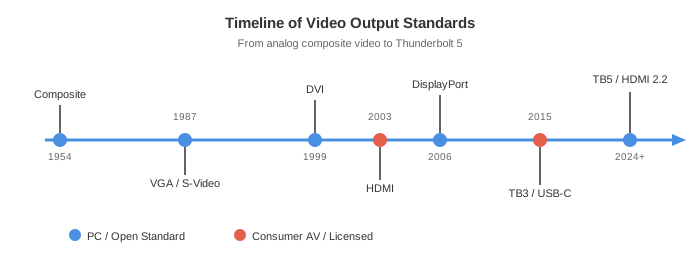
What’s Coming Next
This is where it gets interesting. Both HDMI and DisplayPort are actively pushing their next generations, and the numbers involved feel almost absurd for anything you’d actually plug into right now.
HDMI 2.2 was formally announced and doubles HDMI 2.1’s bandwidth to 96 Gbps [14]. What does that enable? Theoretically: 8K at 240Hz, 10K at 120Hz, or 4K at 480Hz. The first HDMI 2.2-certified products are expected to reach shelves before the end of 2026, though the devices that actually operate at the full 96 Gbps spec are pushed to 2027 [16]. The initial 2026 wave focuses on implementing a new Latency Indication Protocol (LIP) for better audio-video sync between displays and soundbars — a real-world problem that’s surprisingly annoying [16].
DisplayPort 2.1b takes a deliberately different approach. Rather than chasing raw bandwidth, it focuses on cable practicality [14]. High-bandwidth DisplayPort cables (UHBR20, the 80 Gbps spec) were previously limited to about 1 meter for passive cables — which is fine for a monitor on a desk, but terrible for VR headsets tethered to a PC across a room, or any setup where the GPU isn’t immediately adjacent to the display. DisplayPort 2.1b introduces a new active cable design that extends that range to 3 meters at full bandwidth. For gaming setups and professional workstations, this is a more meaningful upgrade than the next resolution tier most people can’t perceive anyway.
The Nvidia RTX 50 series cards, shipping in 2025 and 2026, support DisplayPort 2.1 at UHBR20, and one major TV manufacturer (Hisense) is adding DisplayPort input to their 2026 lineup — a USB-C port with full DisplayPort support, making it the first major TV to support the standard natively.
What about wireless? Honestly, it’s not replacing cables for high-performance use anytime soon. Miracast, the Wi-Fi Alliance’s wireless display standard from 2012, supports up to 1080p via Wi-Fi Direct. Wi-Fi 6E and 7 have the theoretical bandwidth to push higher resolutions. But latency is the killer — competitive gaming and professional video production need sub-millisecond precision that radio transmission can’t consistently guarantee. Wireless stays a convenience feature for casual screen mirroring, not a cable replacement.
The broader trend is clear though. USB-C with Thunderbolt or USB4 is becoming the universal physical connector for laptops, portable displays, and docking stations. HDMI stays on TVs — the licensing economics work there and the installed base is enormous. DisplayPort stays dominant on gaming monitors, graphics cards, and workstations. But for anything portable, the industry is converging on “one USB-C port, everything flows through it.”
Whether that’s actually simpler than the old world of dedicated ports is debatable. You now get a single connector that might or might not support video output, might or might not be Thunderbolt, might or might not have enough lanes for USB data and DisplayPort simultaneously — depending entirely on the device you bought. The adapter drawer is still full. It just has a different shape of adapter in it now.
End
Sources
- History of Display Interfaces — XDA Developers
- Composite Video — Wikipedia
- S-Video — Wikipedia
- What is VGA? Comprehensive Guide — HP Tech Takes
- Digital Visual Interface — Wikipedia
- Obsolete Technology: DVI — Solid Signal Blog
- HDMI History and Versions Guide — ViewPlayTek
- What is HDMI? — Cable Matters
- The Sordid History of HDMI — Solid Signal Blog
- Why DisplayPort — VESA
- History of DisplayPort Technology — CableWholesale
- USB-C DisplayPort Alt Mode Explained — BenQ
- Thunderbolt 5 — What You Need to Know — Kensington
- HDMI 2.2 vs. DisplayPort 2.1b Explained — PCWorld
- Thunderbolt 5 for Gaming — Intel
- HDMI 2.2 Devices Arrive This Year — Guru3D
- VGA Ports Bowing Out of Home Computers — Computerworld