
You see it in the browser tab. You see it next to the site name in search results. You think of it as the logo of a website. So why is it called a favicon? That doesn’t sound like it has anything to do with tabs or logos at all. And you’re right — it doesn’t. The name is a relic of what the icon was originally built for, not what it does today.
It Was Never Meant for Tabs
The name “favicon” is a squash of two words: favorite + icon [1]. As in, the icon that appears next to a website in your browser’s favourites list — what most people call bookmarks.
That’s the entire story behind the name. It was a bookmarks icon. Not a tab icon. Not a site logo. The browser tab use came much later, and by then the name had already stuck.
One Developer, One Late Night, One Sneaky Approval
It’s 1999. The browser wars are in full swing. Microsoft is hammering out Internet Explorer 5 and a developer named Bharat Shyam is working on the Favorites feature [2].
His idea was simple: when you bookmark a site, wouldn’t it be nicer to see a tiny icon next to the URL instead of a plain text link? So he built it — a 16×16 pixel icon, loaded from a file called favicon.ico placed in the root of a website’s server [3].
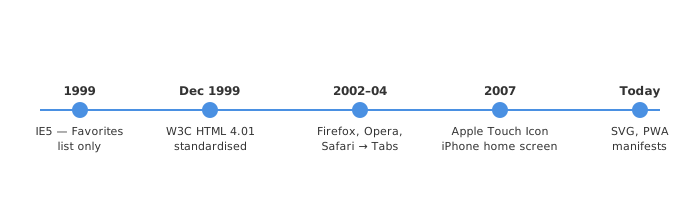
Here’s the fun part. Shyam apparently knew this addition might not get approved through normal channels, so he waited until late in the evening when a less experienced project manager was on duty — junior PM Ray Sun. He showed Sun the feature and got the code checked in [4]. That’s how favicon.ico quietly made it into IE5, released in March 1999 [5].
Honestly, a lot of good web features probably made it through the same way.
The File Format Choice
Because IE5 ran on Windows, Shyam used the .ico format — a Windows-native icon format that Microsoft already had full support for [2]. Drop a favicon.ico file at the root of your web server, and IE would automatically pick it up before adding the site to a user’s favorites list. No HTML tag needed. Just a convention.
This is also why favicon.ico at the root is still a thing in 2026. Browsers still look there by default, even though HTML gives you a proper way to declare it explicitly now.
W3C Got Involved Quickly
Within the same year, the W3C baked favicon support into the HTML 4.01 specification in December 1999 [6]. The standard way to declare one was:
<link rel="shortcut icon" href="/favicon.ico" type="image/x-icon">
Notice shortcut icon — two words. “Shortcut” was Microsoft’s terminology for bookmarks (they used “shortcuts” on the Windows desktop). So even the HTML syntax carried forward the bookmarks origin. The W3C eventually clarified that shortcut isn’t a valid keyword and rel="icon" is the correct form [7], but you’ll still see shortcut icon all over the internet because old habits die hard.
When Did It Jump to Browser Tabs?
This is the part that actually makes the name feel misleading.
IE5 only showed favicons in the favourites list and in the address bar when you were on a site. The browser tab usage came when tabbed browsing became mainstream in the early-to-mid 2000s — Firefox, Opera, Safari all picked up the favicon and started rendering it on the tab itself [2].
At that point, the favicon had escaped its original context entirely. It was now a persistent visual identity for every visit — bookmark or not. But nobody renamed it. “Favicon” just kept going, even though calling it a “tab icon” or “site icon” would’ve made far more sense by then.
The Mobile Expansion
When Apple shipped the first iPhone in 2007, they introduced something called the Apple Touch Icon — a higher resolution icon that shows up when you save a webpage to your iOS home screen [2]. It looks just like an app icon.
Android followed suit around 2010. Then Progressive Web Apps arrived, requiring icons in a whole manifest.json for install scenarios.
So now a single website is expected to maintain:
favicon.icofor legacy browsers- A PNG favicon (typically 32×32 or 96×96) for modern browsers
- Apple Touch Icons (180×180 for current iOS)
- Web App Manifest icons (192×192, 512×512) for PWAs
All of them are “the favicon” in common language. None of them are bookmarks icons anymore.
Is the Name Misleading?
Kind of, but not really — it’s just outdated.
When Bharat Shyam coined “favicon” in 1999, the name was perfectly accurate. It was literally an icon for your favorites. The problem is that the function of the icon expanded massively over 25 years while the name froze in 1999. This happens a lot in tech — “wireless” used to mean radio, “desktop” still means your computer even though phones do the same work.
The name favicon is not misleading, it’s anachronistic. There’s a difference. Nobody was trying to confuse you — the use case just grew way past the original intent.
The Format Evolution
| Era | Format | Size | Where |
|---|---|---|---|
| 1999 | .ico | 16×16 | Favourites list |
| 2000s | .ico / .png | 16×16, 32×32 | Address bar, tabs |
| 2007+ | .png | 57×57 – 180×180 | iOS home screen |
| 2010s | .png | 192×192, 512×512 | Android, PWA |
| Now | .svg | Scalable | All modern browsers |
SVG favicons are the cleanest option today — one file, infinitely scalable, works on retina screens without any pixel-hunting [2]. But .ico at the root is still not going anywhere. Browsers keep looking for it.
The One-File Convention That Outlived Its Reason
The favicon.ico convention — drop a file at the web root and browsers find it automatically — was never formally standardised. It was just what IE5 did, and everyone else copied it [3]. To this day, a huge number of browsers will silently make a GET /favicon.ico request when you visit any page, even if no <link rel="icon"> is declared in the HTML.
That’s a 1999 implementation detail that every web server in the world still handles in 2026. Pretty remarkable.
End