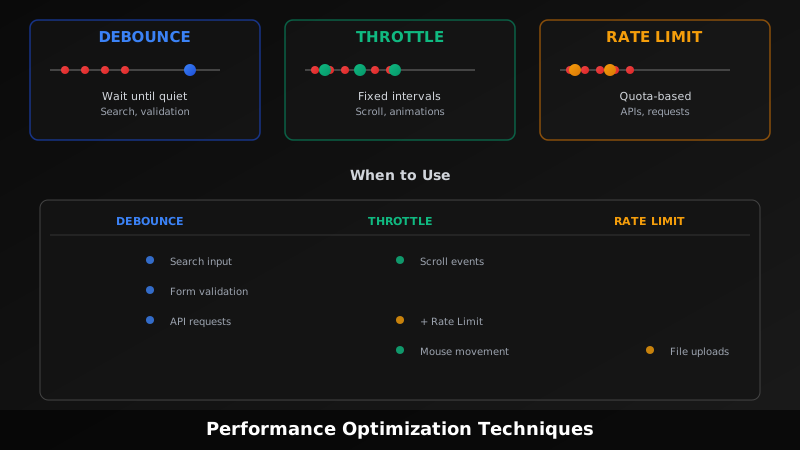
Everyone conflates these three concepts. You see them mentioned together constantly, people use the words interchangeably, and most articles mix them up or bury the differences in jargon. Here’s what they actually are, why they’re different, and when to use them. [1]
Debouncing: Wait Until The Storm Passes
Debouncing delays execution until after a period of inactivity.
Imagine someone typing into a search box. Every keystroke is an event. Without debouncing, you’d fire an API request with every single keystroke — character 1, character 2, character 3, and so on. That’s wasteful.
With debouncing, you set a timer. When the user types a character, the timer starts. If another character comes in before the timer expires, you restart the timer. This repeats until the user stops typing for the full duration. Only then does the function execute. [2]
Example: User types “react”. Keystrokes happen at times 0ms, 50ms, 100ms, 150ms. If your debounce delay is 300ms, the function runs at 450ms (300ms after the last keystroke at 150ms).
Use debouncing when you care about the final result, not every intermediate state. Common cases:
- Search field autocomplete (wait until user stops typing)
- Form validation (check validity after user stops editing)
- Window resize handlers (update layout once resize is done)
- API calls triggered by user input
Throttling: Steady The Stream
Throttling limits execution to a fixed interval, no matter how often the event fires.
Imagine scrolling down a webpage. The scroll event fires continuously — dozens of times per second. Without throttling, you’d update the page layout or track analytics dozens of times per second, which is overkill.
With throttling, you say “execute this function at most once every 300 milliseconds.” If the event fires 50 times in 1 second, only 3-4 executions actually happen, spaced 300ms apart. The intermediate events are ignored. [3]
Example: Scroll event fires 50 times in 1 second. Throttle delay is 300ms. Function executes at 0ms, 300ms, 600ms, 900ms — roughly 3-4 times total.
Use throttling when you need ongoing updates while the user is actively interacting. Common cases:
- Scroll tracking (analytics or infinite scroll)
- Window resize (reflow layout responsively)
- Mouse movement (drag handlers, animations)
- Real-time API polling
The Key Difference
Debouncing is coalesce-based — burst of events → single execution at the end.
Throttling is rate-based — steady stream of executions at fixed intervals.
Not the same thing. Not even close. [4]
Rate Limiting: The Server’s Bouncer
Rate limiting sets a hard maximum: X requests per time window.
This is different from debounce and throttle. Those are about controlling your own code’s execution frequency. Rate limiting is about controlling who can access your system.
Rate limiting says: “You can make 100 requests per minute. That’s it.” The 101st request gets rejected, usually with an HTTP 429 error. It’s a policy enforced by the server (or API gateway) to protect resources and prevent abuse. [5]
Rate Limiting vs Throttling: The Confusion
Here’s where people get confused. Some use “throttling” to mean rate limiting. Some sources use the terms interchangeably. But they operate at different layers:
- Throttling (in performance context): Client-side technique to reduce function call frequency
- Rate limiting (in API context): Server-side rule that rejects or queues excess requests
- API throttling: Server-side technique that slows down request processing instead of rejecting them
| Concept | Layer | Action | Effect |
|---|---|---|---|
| Debounce | Client | Delay execution | Waits for silence |
| Throttle | Client/Server | Limit frequency | Steady rate |
| Rate Limit | Server | Reject or queue | Hard ceiling |
Can You Use Them Together?
Yes. Actually, you should, in the right scenarios. [6]
Debounce + Throttle: This is rare but valid. Imagine a text editor that saves drafts. Debounce captures that the user stopped typing, then throttle ensures you don’t hammer the server even if the user types continuously. Debounce waits for silence, throttle provides a safety net during activity.
Debounce/Throttle + Rate Limiting: This is where it matters most. Frontend throttling and debouncing optimize your own requests, but they don’t protect you if a user hammers your API directly (e.g., via curl, or a bug sends requests). Rate limiting on the backend ensures no single user or client can overwhelm your system regardless of their frontend code. Think of it as defense in depth.
Example: A search field uses debouncing (wait until user stops typing) + backend rate limiting (max 10 searches per minute per user). The debounce prevents noise. The rate limit prevents abuse.
Common pattern: Debounce on frontend for UX, throttle for heavy computation or animations, rate limit on backend for protection. Each solves a different problem.
Real-World Example
Building a user search feature:
- Debounce the input — wait 300ms after the user stops typing before making the API call. Reduces noise from every keystroke.
- Throttle the API response handler — if responses arrive quickly, process them at most once per 200ms. Avoids UI thrashing.
- Rate limit on backend — allow max 30 search requests per user per minute. Prevents someone spamming your database.
All three working together, each addressing a different concern.
Not Interchangeable
The worst mistake is treating these as options for the same problem. They’re not. If you need to wait for the user to stop typing, debounce is the answer — throttling won’t do it. If you need to protect your API from abuse, rate limiting is the answer — debouncing won’t do it.
Pick the right tool. They solve different problems, even though they all involve timing.
End
Sources
- Difference between Debouncing and Throttling - GeeksforGeeks
- Debounce - Glossary - MDN Web Docs
- Throttling vs. Debouncing Explained | Built In
- Debounce and Throttling: What They Are and When to Use Them | Medium
- API Throttling vs. API Rate Limiting - GeeksforGeeks
- Understanding the Differences Between Rate Limiting, Debouncing, and Throttling - Inngest Blog