
Every few years the “right” way to do layout in CSS changes completely. If you started writing CSS before 2015, you probably have a small trauma response every time someone mentions clearfix. Let me walk through how we got here — and what you should actually reach for in 2026.
The Table Era (1990s – mid 2000s)
HTML tables were never designed for layout. They existed to display tabular data. Then web designers discovered that <table>, <tr>, and <td> gave you something CSS couldn’t yet deliver: predictable column control [1].
So the entire web was built with nested tables. Not just one layer deep — multi-level nesting, tables inside tables inside tables. And to control spacing? A transparent 1×1 pixel GIF image (spacer.gif) with an explicit width attribute [2]. I’m not joking. That was the technique.
This worked because it was consistent. CSS support in the late 90s was laughably patchy. Internet Explorer and Netscape rendered the same CSS differently. Tables rendered the same everywhere. Predictability won. [3]
Tables were never meant for layout. The fact that they became the default was entirely an accident of browser inconsistency.
By the early 2000s, when CSS support matured and “separation of concerns” became mainstream thinking, the community collectively agreed to move on. Except the codebase your company maintains from 2004 — that one still has them.
The Float Era (early 2000s – ~2012)
CSS float was designed to wrap text around an image — think a newspaper photo with text flowing around it. That’s it. That was the intended use [4].
Someone figured out that if you float multiple <div> elements left, they sit side by side. Multi-column layout achieved. And so the entire web shifted from table hacks to float hacks.
The problems were immediate:
- A floated element is removed from the document flow, so the parent container collapses
- You had to add
overflow: hiddenor empty<div class="clear"></div>elements to fix this - The famous clearfix hack — a CSS pseudo-element trick — became a standard copy-paste snippet every developer carried around [4]
/* The clearfix hack — you've seen this a thousand times */
.clearfix::after {
  content: "";
  display: block;
  clear: both;
}
inline-block got some use too, for horizontal navigation items. It sort of worked until you discovered the whitespace issue — any space or newline between your HTML tags would render as a visible gap between the elements. The “fix” was to put your closing </li> on the same line as the opening <li> of the next item. Genuinely miserable.
This era lasted longer than it should have, mostly because browser support for alternatives was slow.
Flexbox (2012 – present)
The CSS Working Group proposed the Flex layout model in 2008, published the first working draft in 2009, and then rewrote the entire spec in 2011 to remove the dependency on float/table/inline-block hacks [1].
display: flex started shipping in browsers around 2012. It took until ~2014-2015 to be safe for production without vendor prefix juggling.
What Flexbox actually solved:
- Vertical centering — finally. This alone justified the migration.
- One-axis alignment of items with gap control
- Items that grow and shrink proportionally to fill available space
- Reversing order without touching HTML
.nav {
  display: flex;
  align-items: center;
  gap: 1rem;
}
That’s a navigation bar. No float. No clearfix. No spacer GIF. Just works.
But Flexbox is one-dimensional. It handles a row or a column — not both simultaneously. Try to build a page layout with header, sidebar, content, and footer using only Flexbox and you’ll see what I mean. You end up nesting flex containers inside flex containers, and it gets messy fast.
CSS Grid (2017 – present)
This one came from Microsoft. Engineers at Microsoft wanted a proper layout system for their browser and submitted a Grid Layout proposal to the W3C in 2012. They actually shipped an implementation in IE10 that year using the -ms- vendor prefix [1].
The spec was refined for years. In 2017, Chrome, Firefox, and Safari all shipped CSS Grid within weeks of each other in a rare coordinated release. It was a genuinely big moment.
CSS Grid is two-dimensional. Rows and columns at the same time.
.page {
  display: grid;
  grid-template-areas:
    "header header"
    "sidebar content"
    "footer footer";
  grid-template-columns: 250px 1fr;
}
That’s your entire page layout in six lines. No floats. No clearfix. No nested nonsense.
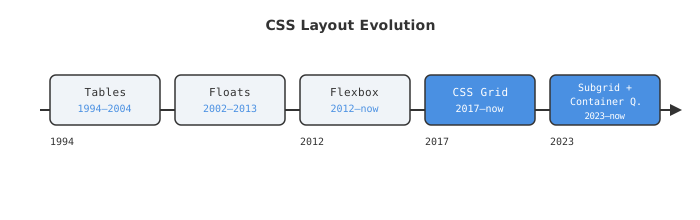
Subgrid and Container Queries (2023 – present)
These two features are the current frontier. Both are now safe to use in production.
Subgrid
The classic Grid problem: you have a grid of cards. Each card has a title, body text, and a button. The titles have different lengths. The buttons in each card end up at different vertical positions. You can’t align them across cards without JavaScript hacks — because each card is its own stacking context.
Subgrid fixes this. A child element can inherit the parent grid’s track sizing. [5]
.card-grid {
  display: grid;
  grid-template-rows: auto 1fr auto; /* title / body / button */
}

.card {
  display: grid;
  grid-row: span 3;
  grid-template-rows: subgrid; /* inherits parent tracks */
}
Every button is now aligned. No JavaScript. No position: absolute gymnastics.
Browser support as of 2026: 97%+ globally [6]. Firefox shipped it in 2019, Safari in 2022, Chrome 117 in September 2023. It’s done — use it.
Container Queries
Media queries respond to the viewport. Container queries respond to the parent container. This matters a lot when you have the same component appearing in a sidebar and in a main content area.
.card-container {
  container-type: inline-size;
}

@container (min-width: 400px) {
  .card {
    flex-direction: row;
  }
}
Container queries are now supported across all major browsers [7]. This is the right way to build truly reusable, responsive components that don’t need to know where on the page they’ll be placed.
The Actual Recommendation in 2026
People still argue “Flexbox vs Grid” like it’s a competition. Use both. They solve different problems.
| Use case | Tool |
|---|---|
| Page structure (header, sidebar, content, footer) | CSS Grid |
| Component internals (nav items, button groups, form rows) | Flexbox |
| Cards that need cross-item alignment | CSS Grid + Subgrid |
| Responsive components with no viewport context | Container Queries |
| Actual tabular data | <table> — for real data only |
| Float for layout | Never again |
The mental model is simple:
- Grid = you are thinking in two dimensions. You know your rows AND columns.
- Flexbox = you are thinking in one dimension. A row of things, or a column of things.
If you catch yourself writing display: flex; flex-wrap: wrap to create a grid of cards — stop. That’s Grid’s job. Flexbox wrapping is fine for nav items that should reflow. It’s awkward for structured multi-column cards where alignment across rows matters.
And please — float: left for layout is done. Has been done since 2017. If you’re still doing it, that codebase needs a refactor, not a Stack Overflow answer.
End
Sources
- History of CSS Grid and CSS Flexbox — Medium
- Tables for Layout? Absurd. — The History of the Web
- Tableless web design — Wikipedia
- Clearfix: A Lesson in Web Development Evolution — CSS-Tricks
- CSS Subgrid — web.dev
- CSS Subgrid Browser Support: Full Coverage Guide — FrontendTools
- Container queries in 2026: Powerful, but not a silver bullet — LogRocket Blog
- CSS Grid vs. Flexbox 2026: When to Use Which — StudioMeyer