
Cloud computing is reshaping how the world runs software — the global market is on track to approach $1 trillion in 2026 [1], powered by AI workloads, SaaS expansion, and enterprise digital transformation. Yet if you already deploy your apps on a DigitalOcean Droplet or a similar VPS, you might be asking: do I actually need to change anything? Here is an honest, practical answer.
What Is Cloud Computing?
Cloud computing is the delivery of computing resources — servers, storage, databases, networking, software, and analytics — over the internet on a pay-as-you-go basis [1]. Rather than owning physical hardware, you rent capacity from a provider and access it from anywhere. The three dominant players are AWS (~33% market share), Microsoft Azure (~23%), and Google Cloud (~12%), collectively controlling more than 60% of the global cloud infrastructure market [3].
The term “the cloud” is essentially shorthand for someone else’s computers, managed at massive scale, made available to you on demand [2].
The Three Cloud Service Models
Not all cloud services are the same. Providers structure their offerings in three distinct layers [4][5]:
IaaS — Infrastructure as a Service
IaaS hands you virtual machines, networking, and storage while the provider owns and maintains the physical hardware. You still install and manage your OS, runtime, and application. AWS EC2, Azure Virtual Machines, and Google Compute Engine are the canonical examples [5].
- Full control over the software stack
- You are responsible for OS patching and security hardening
- Best for teams with DevOps expertise who need flexibility
PaaS — Platform as a Service
PaaS adds a fully managed runtime on top of IaaS. You push code; the platform handles deployments, OS updates, and scaling. Heroku, Google App Engine, and Vercel are popular PaaS options [4].
- Developers skip server configuration entirely
- Faster from
git pushto production - Reduced operational overhead — ideal for small teams
SaaS — Software as a Service
SaaS is the finished product: ready-to-use software in a browser, fully managed by the vendor. Gmail, Salesforce, Dropbox, and Slack are everyday examples [5]. There is nothing to install, patch, or scale — the provider does it all.
Key Benefits of Cloud Computing
Cloud adoption has exploded because it solves problems that a traditional VPS cannot address at scale [1][2]:
Elastic Scalability
- Cloud platforms provision or release CPU, RAM, and storage in seconds — no reboot required.
- Auto-scaling groups detect a traffic surge and spin up new instances automatically, then remove them when demand drops [7].
- Handling an unexpected viral moment or a product launch no longer requires guesswork about server sizing.
True Pay-As-You-Go Pricing
- You are billed for compute seconds, GBs stored, and API calls consumed — never for idle capacity [8].
- Startups can launch with near-zero infrastructure spend and let costs grow only with revenue.
- Serverless functions (AWS Lambda, Google Cloud Functions) take this further: if nobody calls your endpoint, your bill is literally $0.
Built-in Global Distribution
- AWS operates 34+ geographic regions; Azure and Google Cloud cover similar footprints [2].
- Deploying your app closer to users in Tokyo, Frankfurt, or São Paulo is a configuration change, not a hardware procurement order.
- Content Delivery Networks (CDNs) and edge caches are first-class, managed services.
High Availability and Disaster Recovery
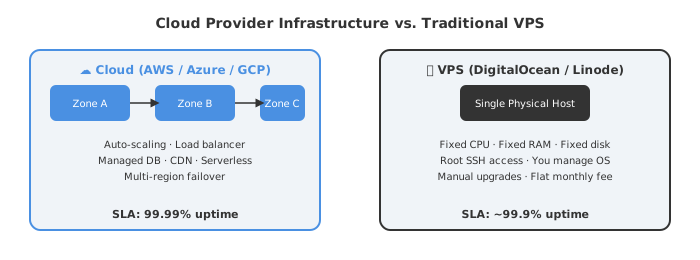
- Cloud workloads run across multiple Availability Zones — physically separate data centres within a region.
- If one zone fails, traffic reroutes automatically with no manual intervention [7][8].
- Industry SLAs promise 99.99% uptime — fewer than 53 minutes of downtime per year.
Enterprise-Grade Security Without the Price Tag
- Hyperscalers invest billions in DDoS mitigation, hardware-level encryption, IAM, and compliance certifications (SOC 2, ISO 27001, HIPAA, GDPR) [1][11].
- A 3-person startup gets the same physical security posture as a Fortune 500 company.
Managed Services That Eliminate Toil
- Need a relational database? Spin up AWS RDS or Cloud SQL — no DBA needed.
- Need a message queue? Use SQS or Pub/Sub — no RabbitMQ cluster to babysit.
- Machine learning APIs, video transcoding, real-time analytics: all available as managed, pay-per-use services [12].
The Case for VPS: Where DigitalOcean Still Wins
Despite everything listed above, a plain VPS is far from obsolete. DigitalOcean, Linode (Akamai Cloud), and Hetzner occupy a very real, practical niche [6][9].
A VPS is a virtual machine on a single physical host. You get root access, a fixed slice of CPU and RAM, and a predictable monthly invoice — typically $6–$24 for an entry-level Droplet [6][10].
VPS still makes excellent sense when:
- Traffic is predictable. A portfolio site, a small SaaS with steady visitors, or a CI runner doesn’t need auto-scaling. Paying for the ability to scale when you never will is pure overhead [9].
- You need a fixed monthly budget. No surprise bills from a Lambda function stuck in a loop or accidental S3 egress charges.
- Full-stack control matters. Root SSH lets you install any runtime, tweak kernel parameters, and avoid cloud-specific abstractions or vendor lock-in [6].
- You host multiple small projects cheaply. One $12/month Droplet can serve a dozen low-traffic apps using Nginx virtual hosts or Docker containers.
- Your users are all in one region. A nearby VPS can outperform a multi-region cloud setup for latency-sensitive workloads that don’t benefit from geographic distribution.
Research consistently shows that businesses running consistent, predictable workloads often pay 40–60% more on cloud platforms than they would for equivalent VPS resources [8]. That cost delta is real and must be weighed honestly.
Cloud vs. VPS: Head-to-Head Comparison
| Feature | Cloud (AWS / Azure / GCP) | VPS (DigitalOcean / Linode) |
|---|---|---|
| Scalability | Auto-scales in seconds | Manual upgrade required |
| Uptime SLA | 99.99% (multi-zone) | ~99.9% (single server) |
| Pricing model | Pay-per-use (variable) | Fixed monthly fee |
| Global regions | 30–40+ worldwide | Fewer; varies by provider |
| Managed services | Databases, AI, queues, CDN | Minimal; mostly DIY |
| Security tooling | Built-in IAM, DDoS, compliance certs | Basic firewall; self-managed |
| Learning curve | High (hundreds of services) | Low; straightforward Linux/SSH |
| Best for | Variable loads, microservices, AI | Stable apps, dev environments, side projects |
So — Should You Ditch Your VPS?
Not necessarily. Think of a VPS as a reliable, affordable apartment — you know the rent, you control every corner of it, and it suits you perfectly when your needs are stable. The cloud is more like a global hotel chain: more expensive per square foot, but you can check in with a different room size in any city, tonight, on zero notice [11].
Upgrade to cloud computing if:
- Traffic to your application spikes unpredictably.
- You need multi-region redundancy or global CDN delivery.
- You want managed AI, ML, or data pipeline services without running infrastructure.
- Your team lacks bandwidth to patch and maintain servers.
- Compliance requirements demand SOC 2, HIPAA, or GDPR certifications [1][11].
Stick with your VPS if:
- Traffic is steady and well-understood.
- You want a transparent, fixed monthly bill.
- You are building side projects, dev environments, or low-traffic client sites.
- You need root-level control without cloud vendor lock-in.
- Your app never justifies the auto-scaling overhead [9][10].
Many teams ultimately adopt a hybrid approach — cloud hyperscalers for production and burst capacity, VPS for cost-sensitive, stable workloads. Multi-cloud and hybrid adoption hit 89% among enterprises in 2026 [3], proving the industry is not picking one or the other, but picking both strategically. The cloud is not the answer to every problem — but for growing applications that demand reliability, global reach, and developer velocity, it is increasingly hard to beat.
Sources
- Cloud Computing Guide 2026: Advantages, Disadvantages, and Real Business Impact
- Cloud Computing in 2026: Benefits, Business Impact, and Future Growth
- Cloud Market Share 2026: AWS vs Azure vs Google Revenue & Full Stats
- IaaS vs. PaaS vs. SaaS — Red Hat
- SaaS vs PaaS vs IaaS – Types of Cloud Computing – AWS
- What is a Virtual Private Server (VPS)? — Google Cloud
- Cloud vs. VPS Hosting: Pros, Cons and Key Differences — Cloudways
- VPS vs Cloud Hosting: Performance, Cost & Security Comparison for 2026 — HostMyCode
- VPS vs. Cloud Hosting: Key Differences, Pros & Cons — SiteGround
- Cloud Server vs VPS Hosting: Price Comparison 2026 — LetsCloud
- Cloud Hosting vs VPS vs Dedicated: Which Is Best for 2026? — SkyNet Hosting
- Cloud Computing: Types, Benefits & Use Cases Explained (2026) — Techimply