
Nobody ever forgets their first fight with CSS centering. You Google it, paste a Stack Overflow snippet, and move on — never stopping to ask if that was the right way or just a way. In 2026, there are at least seven distinct ways to center a div, and some of them should have been buried years ago.
Here’s all of them, ranked worst to best.
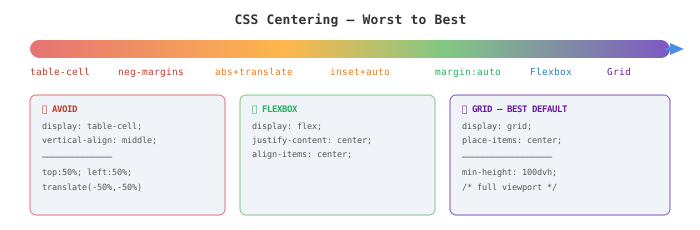
The Full Comparison
| Method | Horizontal | Vertical | Verdict |
|---|---|---|---|
display: table-cell | Yes | Yes | Never |
| Negative margins | Yes | Yes | Never |
abs + translate(-50%, -50%) | Yes | Yes | Avoid |
inset: 0 + margin: auto | Yes | Yes | Sometimes |
margin: auto | Yes | No | Horizontal only |
| Flexbox | Yes | Yes | Good default |
| CSS Grid | Yes | Yes | Best default |
| CSS Anchor Positioning | Relative | Relative | Specific use |
1. display: table-cell — Please Stop
This is what people did before Flexbox existed. You wrap your element in a fake table, trick the browser into treating it like a <td>, and abuse vertical-align: middle.
.wrapper {
  display: table;
  width: 100%;
  height: 300px;
}

.box {
  display: table-cell;
  vertical-align: middle;
  text-align: center;
}
Two immediate problems. First, you need an extra wrapper div just to fake the table row — that’s extra markup purely for layout. Second, you’re semantically lying to the browser. This made sense in 2012. Flexbox shipped in 2013. display: table-cell for centering has no place in 2026. [1]
The one exception is HTML emails, where Outlook’s rendering engine still lives in 2003 and this technique is genuinely necessary. Outside of email templates, walk away.
2. Negative Margins — Brittle by Design
The idea here is to push the element 50% down and 50% right, then pull it back by exactly half its own dimensions using negative margins.
.box {
  position: absolute;
  top: 50%;
  left: 50%;
  width: 200px;
  height: 100px;
  margin-top: -50px;   /* half of height */
  margin-left: -100px; /* half of width */
}
You have to hardcode the element’s dimensions. The moment content changes and the div grows or shrinks, your centering breaks. Dynamic content — which is basically every real element — makes this technique collapse immediately. This one predates even display: table-cell hacks. There is genuinely no reason to write this in 2026 [2].
3. position: absolute + translate — The Classic Hack
This was the dominant snippet of the 2015–2020 era. It solved the hardcoded-dimensions problem of negative margins by using translate, which works as a percentage of the element’s own size.
.parent {
  position: relative;
}

.box {
  position: absolute;
  top: 50%;
  left: 50%;
  transform: translate(-50%, -50%);
}
It works, and it doesn’t break on dynamic content. But it’s still a hack — you’re bending position: absolute well past its intended purpose. The element is pulled out of normal flow, the parent needs a defined height, and the whole thing reads like something written by someone who knew the what but not the why. CSS-Tricks’ state-of-centering piece in 2026 calls this approach “worth avoiding,” comparing it to how float-based layouts were eventually retired when something better came along [1]. I agree.
Use this only if you’re maintaining legacy code from before 2018 and can’t touch the structure. Otherwise, there are cleaner options below.
4. inset: 0 + margin: auto — Absolute Positioning Done Right
If you have to work with position: absolute or position: fixed, this is the modern way to center inside it. No transform math, no offsets.
.parent {
  position: relative;
}

.box {
  position: absolute;
  inset: 0;
  margin: auto;
  width: fit-content;
  height: fit-content;
}
inset: 0 is shorthand for top: 0; right: 0; bottom: 0; left: 0. With all four edges pinned to zero and margin: auto, the browser evenly distributes the leftover space on all sides — centering the element cleanly [3].
This is genuinely readable. It does what it says. The downside is still that position: absolute takes the element out of normal flow, so the parent needs a defined height and surrounding elements won’t interact with it naturally. Appropriate for modals, overlays, and loading spinners — not a general purpose solution.
5. margin: auto — Honest About Its Limits
.box {
  width: 700px;
  margin: 0 auto;
}
Everyone knows this one. It’s been in CSS forever. Set a width on a block element, add margin: auto on the horizontal axis, and it snaps to the horizontal center of its container.
margin: auto does nothing for vertical centering in normal flow. That’s not a bug, it’s how the spec works. For vertical auto margins, you need a flex or grid formatting context. So this is a horizontal-only tool — and a very good one for that job. Constraining a content column to the center of the page? This is exactly the right choice. Don’t try to make it do more [4].
6. Flexbox — The Reliable Workhorse
Flexbox is probably what most frontend devs reach for by reflex in 2026, and honestly, that’s fine.
.parent {
  display: flex;
  justify-content: center; /* horizontal */
  align-items: center;     /* vertical */
}
Two properties. Both axes. Done. The parent doesn’t need a fixed pixel height — as long as there’s available vertical space, this works. Where Flexbox genuinely shines over Grid is in mixed-alignment scenarios: center one item while right-aligning another, stretch some children while centering others, that sort of thing [5].
The one gotcha that catches people constantly: if the parent container has no defined height, there is no vertical space to center into, so nothing appears to shift. Set min-height: 100dvh or a fixed height and it immediately works. This single misunderstanding accounts for a huge fraction of “why isn’t my centering working” questions [6].
7. CSS Grid — The Best Default in 2026
Two lines.
.parent {
  display: grid;
  place-items: center;
}
place-items is shorthand for align-items + justify-items. One property, both axes, zero tricks. For a full-page hero, a centered card, or a loading screen, this is the cleanest option available — readable, intentional, and nearly impossible to break [1].
/* Full viewport centered layout */
.page {
  display: grid;
  place-items: center;
  min-height: 100dvh;
}
If you need to center a group of items as a block (rather than centering each item in its own cell), swap place-items for place-content: center. Different behavior, worth knowing both.
CSS Grid sits at 97%+ browser support in 2026 [7]. There is no production browser you’re targeting that doesn’t support this. The “browser support” excuse for avoiding Grid died around 2020.
8. CSS Anchor Positioning — New, Specific, and Not What You Think
Anchor positioning is the most exciting CSS centering addition in years, but it’s solving a specific problem — centering a floating element relative to another specific element — not general centering.
.button {
  anchor-name: --my-button;
}

.tooltip {
  position: absolute;
  position-anchor: --my-button;
  bottom: anchor(top);
  justify-self: anchor-center;
}
anchor-center is a new alignment value that centers the positioned element over its named anchor element — not the viewport, not the nearest positioned ancestor, but the exact element you declare [3]. As of mid-2026, this is supported in Chrome 125+, Edge 125+, Safari 26+, and Firefox 147+ [7].
Don’t reach for anchor positioning just to center a div on a page. It’s designed for elements that follow another element — tooltips, popovers, dropdowns, context menus. The mechanism is completely different from Grid or Flexbox and brings in a lot of complexity for something those two solve in one line. Use it when the use case actually fits.
The One Rule That Trips Everyone Up
Doesn’t matter which technique you use — if the parent has no defined height, vertical centering produces no visible result. The container collapses to fit its content, leaving zero empty space to distribute. Every method on this list behaves the same way. Set min-height, a fixed height, or 100dvh on the parent. Then the centering works as expected [4].
For 99% of cases: reach for Grid with place-items: center. When you need more control over mixed-alignment children, drop down to Flexbox. For floating UI elements anchored to specific elements, anchor positioning is finally there. Everything above those three in this list is legacy — or worse, a habit from 2015 that nobody questioned.
End
Sources
- The State of CSS Centering in 2026 | CSS-Tricks
- 10 Relevant Ways to Center a div — DEV Community
- Using CSS Anchor Positioning — MDN Web Docs
- How To Center a Div — The Ultimate Guide | Josh W. Comeau
- How to Center Any Element in CSS: 7 Methods That Always Work — freeCodeCamp
- The Complete Guide to Centering in CSS | Modern CSS Solutions
- Introducing the CSS Anchor Positioning API | Chrome for Developers