
Most blogs I have seen over the years run on WordPress — a database, PHP, plugins, security patches every other week. A lot of moving parts for a site that basically publishes text. Hugo is the opposite of all that. No database. No runtime. Just plain HTML files served off a CDN, generated in under a second.
What is Hugo exactly — and why is it so fast?
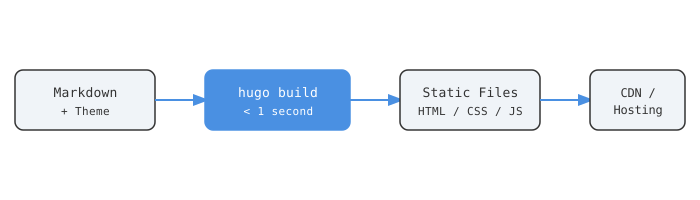
Hugo is an open-source static site generator written in Go [1]. You write content in Markdown, pick a theme, run one command, and it produces a folder of plain HTML, CSS, and JS. That folder is your entire website. Nothing runs on the server. No PHP, no Python, no Node process to keep alive.
The speed is not marketing. Hugo has been benchmarked generating sites with over 10,000 pages in under 10 seconds [2]. Some benchmarks put it at up to 100x faster than alternatives like Jekyll [3]. The reason is Go — compiled, concurrent by design, and Hugo uses that well.
No runtime = no attack surface. No database to breach, no server-side code to exploit, no forgotten plugin that stopped receiving security updates in 2021 [4].
Setting It Up
Install Hugo. On macOS:
brew install hugo
On Ubuntu/Debian:
sudo apt install hugo
Verify:
hugo version
Stay on v0.158.0 or later [1]. If you plan on working with SCSS-heavy themes, install the extended version — it ships with Dart Sass built in [2].
Create your site
hugo new site my-site
cd my-site
git init
Hugo scaffolds this structure immediately:
my-site/
├── archetypes/
├── assets/
├── content/
├── layouts/
├── static/
├── themes/
└── hugo.toml
content/— your Markdown posts and pagesthemes/— theme files live herestatic/— copied as-is to the output (favicon, images, fonts)hugo.toml— site-wide config
Write your first post
hugo new content content/posts/hello-world.md
Open the file and you’ll see front matter pre-filled:
+++
title = "Hello World"
date  = "2026-06-01T22:45:10+05:30"
draft = true
+++
Set draft = false when you’re ready to publish. Hugo silently skips draft posts during a production build [1].
Preview locally
hugo server -D
The -D flag includes drafts. Your site is at http://localhost:1313, hot-reloading as you save [1].
Themes — Pick One and Stop Overthinking
The official Hugo themes gallery lists over 200 options [5]. Three worth knowing:
| Theme | Stars | Best For |
|---|---|---|
| PaperMod | 11,000+ | Developer blogs, clean reading |
| Congo | 1,300+ | Personal sites, Tailwind-based |
| Ananke | 1,200+ | General purpose, official starter |
PaperMod is the most starred Hugo theme on GitHub [6]. Fast, supports dark mode, has built-in search, table of contents, multilingual support, multiple authors. I’d start there and not look at anything else until you actually need to.
Install it as a git submodule:
git submodule add https://github.com/adityatelange/hugo-PaperMod.git themes/PaperMod
Set it in hugo.toml:
theme = "PaperMod"
PaperMod, Congo, and Ananke are all configuration-driven, not code-driven [6]. Customization is done through hugo.toml params and front matter — your changes don’t get wiped when the theme updates.
Where to Deploy
Three genuinely free options that work well with Hugo:
| Platform | Free Bandwidth | Edge CDN | Auto Deploy | Watch Out For |
|---|---|---|---|---|
| Cloudflare Pages | Unlimited requests | Global edge | Yes | Shifting focus to Workers [8] |
| GitHub Pages | Unlimited (public repos) | Limited | Via Actions | Fewer features overall [1] |
| Netlify | 100 GB/month | Yes | Yes | Credit billing since late 2025 [8] |
Cloudflare Pages is where I’d put anything public-facing. Cloudflare’s global edge network means your HTML hits visitors from a node close to them [7]. The free tier doesn’t throttle bandwidth. One honest caveat: Cloudflare is increasingly pushing its Workers product over Pages [8], so the roadmap is worth watching.
Netlify is the fastest to set up — connect a GitHub repo, it auto-detects Hugo, deploys. But Netlify changed to credit-based billing in late 2025 [8]. When you exceed the free allowance, they pause your site. Cloudflare just keeps serving.
GitHub Pages works fine if you’re already deep in the GitHub ecosystem. No preview deployments, fewer features — but zero friction if your repo is there already [1].
Deploying to Cloudflare Pages is five steps:
- Push your Hugo repo to GitHub or GitLab
- Connect the repo in the Cloudflare Pages dashboard
- Set build command:
hugo --minify - Set output directory:
public - Add env variable:
HUGO_VERSION = 0.158.0[7]
Every push to main triggers a rebuild and deploy automatically. No babysitting.
Day-to-Day Maintenance
This is where static sites genuinely win. No server to patch. No plugin updates. No PHP version to stay compatible with. No “your WordPress installation is out of date” warning.
The entire content workflow is:
hugo new content content/posts/new-post.md
# write in your editor
git add content/posts/new-post.md
git commit -m "add: new post"
git push
Push to main. Site rebuilds in seconds. Done [9].
For non-technical collaborators, Decap CMS integrates with Hugo and provides a browser-based editor backed by Git [9]. Writers edit content in a UI, the CMS commits Markdown to the repo, Hugo builds. Nobody touches a terminal.
Hugo version upgrades are one env variable change in your hosting dashboard. No npm audit alerts, no dependency tree conflicts, no ecosystem drama.
Why Static at All?
Static sites have been around since the web started. They went out of fashion when databases got cheap and WordPress made CMS accessible to everyone. The case for going back:
- Speed — pre-built HTML from a CDN loads faster than anything rendered at request time [4]
- Security — no database, no server execution, no exploitable surface [4]
- Cost — genuinely free hosting for most personal and small business projects
- Portability — source is Markdown files in a git repo; migrate to any host in an afternoon
- Reliability — a static file on a CDN is very hard to bring down compared to a PHP server under traffic load [3]
Hugo adds one more that matters if you have a lot of content: build time. A 1,000-page site in under a second [3]. Live reload as you write, no waiting. Large teams updating content frequently won’t be blocked by slow builds.
If you are running a blog, documentation site, portfolio, or marketing site that doesn’t need real-time data — there is no good reason to run a dynamic server for it.
End
Sources
- Hugo Quick Start
- A Guide to Using Hugo in 2024 and 2025 — Strapi
- Why Hugo is the Best Static Blog Framework in 2025 — DEV Community
- The Resurgence of Static Sites — DillonBaird.io
- Hugo Themes Gallery
- Hugo PaperMod — GitHub
- Deploy a Hugo Site — Cloudflare Pages Docs
- Hugo Deployment: Netlify, Vercel, and Cloudflare Pages Comparison
- Hugo with Decap CMS: Git-Based Content Management
- Top Hugo Themes 2025 — Rost Glukhov