cloudmato.com is a research-driven technology blog. Every article is written from live web sources with cited references — covering web development, browser internals, networking, security, databases, distributed systems, and the AI tools and models changing how software gets built.

Articles are published in English, Hindi, and Marathi so the same research reaches more readers in the language they’re comfortable with.

Browse the latest posts below, or suggest a topic.

Understanding Common HTTP Headers on Amazon
Every request you make to a website carries a small pile of metadata you never see. Headers. They decide whether your connection is encrypted, whether a page can be embedded in an iframe, which CDN edge served you, and whether the browser should remember a cookie for a year. I wanted to see what a real, busy production site sends, so I pointed curl at an Amazon endpoint and dumped the response headers. Turns out there’s a lot to unpack.
Can You Still Call an API RESTful Without Every Rule?
Everyone slaps “RESTful” on their API. Open any docs page, scroll the marketing copy, and there it is — “our clean, RESTful API.” But here’s the uncomfortable bit: by the strict definition, almost none of them actually are. So the question you’re really asking is whether the word still means anything if you break some of the rules. Honestly, that’s where it gets tricky. Short answer first, because I hate articles that bury it: yes, you can still call it RESTful in everyday conversation, but no, it isn’t a REST API by Roy Fielding’s original definition unless it’s hypertext-driven. Both of those things are true at the same time, and the gap between them is the whole story.
How to Write the Best Git Commit Message
Run git log on any project that’s more than a year old and you’ll find the truth about a team. Half the messages say “fix”, “update”, “wip”, “asdf”, or my personal favourite — “stuff”. And then one day production breaks, you run git blame on the offending line, and the commit that introduced it just says “minor changes”. Cool. Very helpful. Thanks, past me. I’ve been writing code for over a decade and I’ll be honest: for the first few years my commit messages were garbage. It wasn’t until I had to debug someone else’s six-month-old code (and then realised the someone else was me) that the penny dropped. A diff tells you what changed. Only the commit message can tell you why. That’s the whole game.
TLS Termination Explained (and Is SSL Really Transport Layer?)
Two questions get mashed together constantly: “what is TLS termination” and “is SSL a transport layer thing?” People assume the answer to the second is obviously yes — it’s literally called Transport Layer Security, right? Well. That naming has fooled a lot of smart people, and the confusion bleeds straight into how folks reason about termination. So let me untangle both, because once the layer question clicks, termination stops feeling like magic.
All Types of Software Testing Explained
Most developers I talk to have this vague understanding about testing — they know they should do it, but they’re not always clear on which tests do what and why it matters. So you write a unit test here, run some manual clicks there, and hope the whole thing works. That’s not a strategy. Testing has distinct types for distinct purposes. Let me walk you through what each testing type actually does and, more importantly, which ones companies genuinely implement versus which ones are nice-to-have theory.
Why SOLID Principles Matter & Why Developers Skip Them
Everyone talks about SOLID principles. Your senior dev mentions them in code review. Your architecture docs reference them. But why do actual projects become unmaintainable garbage despite teams “knowing” SOLID? The answer: understanding SOLID and actually building with it are two completely different things [1]. Most developers learn about SOLID early, nod along, then immediately violate these principles the moment a deadline hits. Let me show you where the rubber meets the road — and why it’s harder than it sounds.
How Elasticsearch Differs From Oracle Indexing
Most developers lump all indexes together — “just something that makes queries fast” — without understanding that Elasticsearch and Oracle DB are solving completely different problems. They index the same data in fundamentally opposite ways, and that difference shapes everything about how they perform. Let me show you why a full-text search on Oracle feels like pulling teeth, while Elasticsearch makes it look trivial. The Core Problem: Two Different Use Cases Oracle databases are built to answer questions like: “Give me the row where user_id = 5” or “Find all orders between January 1 and January 31.” Exact matches and range queries. The data is structured, indexed by column, and queries are usually precise.
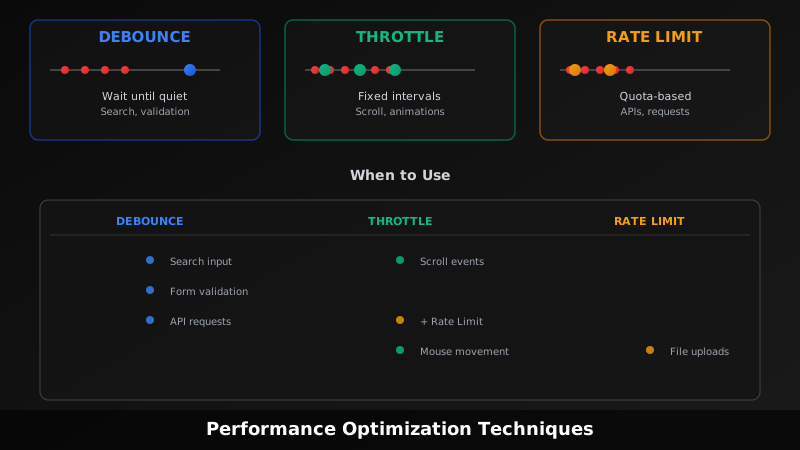
Debounce vs Throttle vs Rate Limiting
Everyone conflates these three concepts. You see them mentioned together constantly, people use the words interchangeably, and most articles mix them up or bury the differences in jargon. Here’s what they actually are, why they’re different, and when to use them. [1] Debouncing: Wait Until The Storm Passes Debouncing delays execution until after a period of inactivity. Imagine someone typing into a search box. Every keystroke is an event. Without debouncing, you’d fire an API request with every single keystroke — character 1, character 2, character 3, and so on. That’s wasteful.
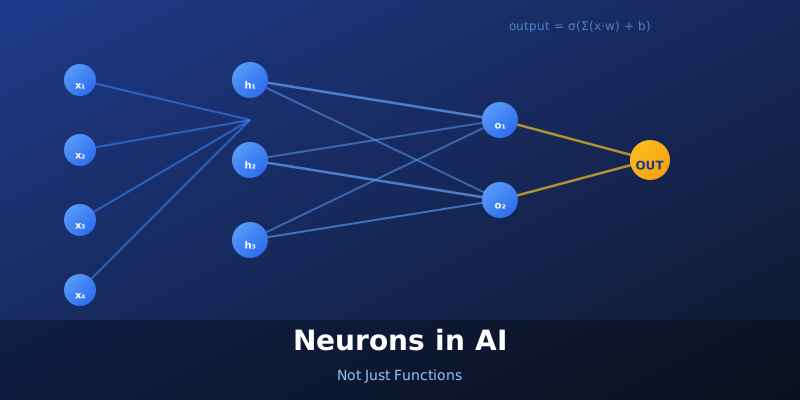
Neurons in AI: Not Just Functions
If you’ve heard “neural network” thrown around in tech circles, you probably imagined something biological. The term neuron can make beginners think they need to understand brain biology to work with AI. They don’t. But the confusion about what a neuron actually does — and how it differs from a function you’d write in code — is real. And that difference matters [1][2]. What’s a Neuron, Really? A neuron in AI is a computational unit. Stripped down, it’s a thing that takes inputs, does math, and produces an output. Sounds like a function, right? It kind of is. But that’s where the similarity ends.
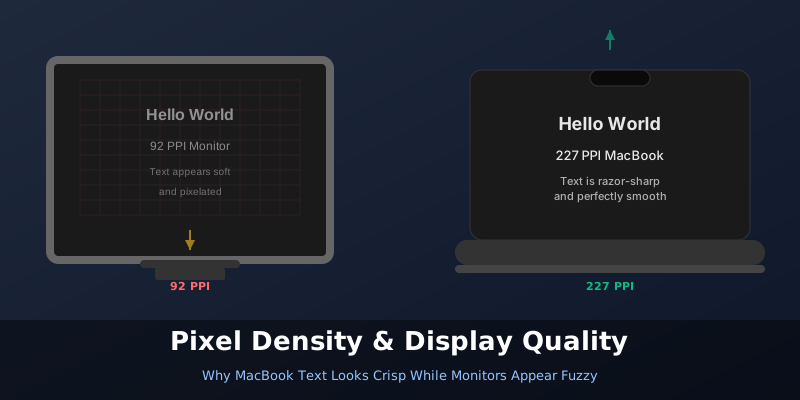
MacBook Text vs Monitor: Why Resolution Numbers Lie
You buy a Full HD (1920×1080) monitor and check the specs. Your MacBook also outputs to a similar resolution. Yet when you start working, the text on the monitor looks noticeably softer. Not broken or unreadable — just not as sharp as what you see on your MacBook’s built-in screen. What’s going on? The answer isn’t about resolution numbers. It’s about pixel density. The Pixel Density Problem Here’s the thing: two displays with the same resolution at different sizes will have completely different pixel densities [1]. A 24-inch Full HD monitor has roughly 92 pixels per inch (PPI) [2]. Your MacBook Air? Try 227 PPI [1]. Your 16-inch MacBook Pro? 254 PPI [1].