cloudmato.com is a research-driven technology blog. Every article is written from live web sources with cited references — covering web development, browser internals, networking, security, databases, distributed systems, and the AI tools and models changing how software gets built.

Articles are published in English, Hindi, and Marathi so the same research reaches more readers in the language they’re comfortable with.

Browse the latest posts below, or suggest a topic.
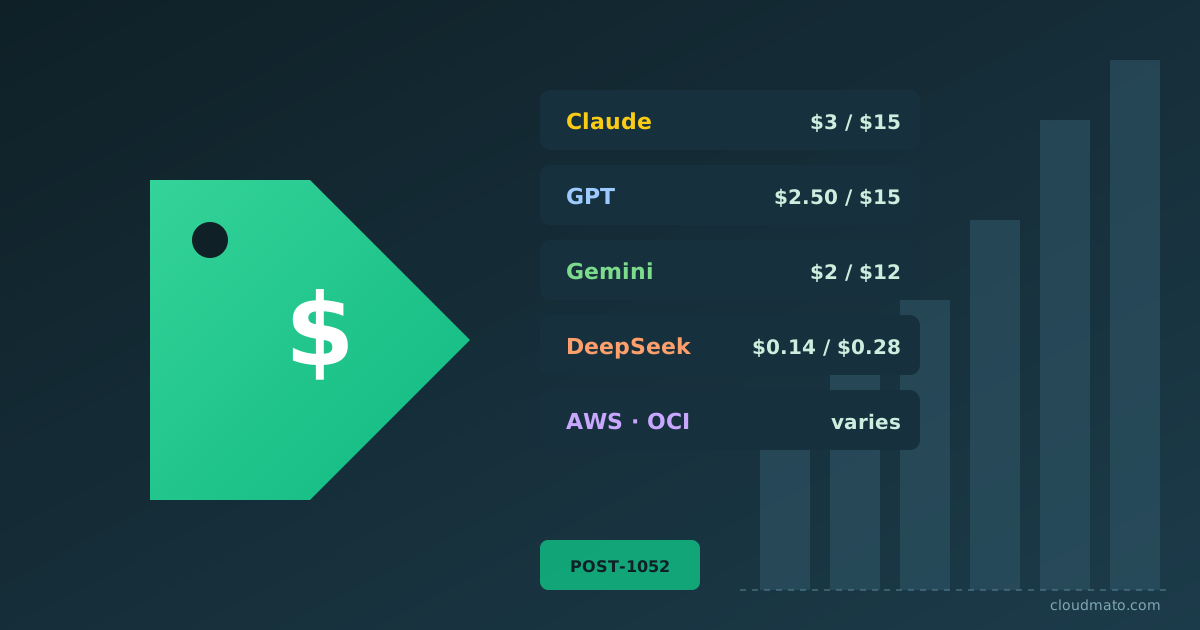
Cheapest LLM API in 2026: Claude vs GPT vs AWS vs OCI
I spent a chunk of last weekend with about fifteen pricing pages open in different tabs, trying to figure out why a small side project’s API bill quietly tripled in a month. Turns out the answer wasn’t “the model got more expensive” — it was that I picked the wrong model for the job, on the wrong platform, without caching anything. So I went down the rabbit hole properly: every major LLM API, every cloud wrapper, and the budget options nobody talks about until their AWS bill shows up.
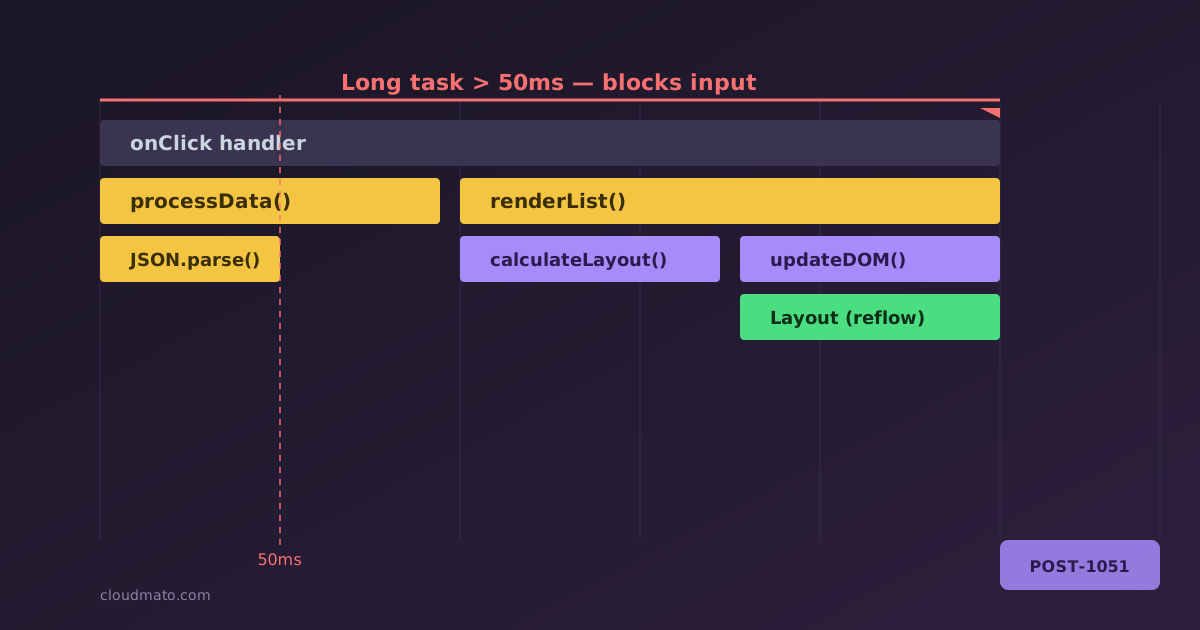
Chrome DevTools Performance Panel: Analyzing Code Execution
Open the Performance panel in Chrome DevTools for the first time and it looks like someone spilled a box of crayons across your screen. Dozens of colored bars, half a dozen tracks, three tabs at the bottom that all seem to show the same thing but slightly differently. No wonder most devs record one trace, get scared, and go back to console.log debugging. I did exactly that for years - until I actually sat down and learned what each piece means, and now it’s the first tool I reach for when something “feels slow.”
Session vs JWT Tokens: The Core Difference Explained
Every time someone asks me “should I use sessions or JWTs?”, I know what’s actually behind the question. They’ve read a few blog posts, seen the word “stateless” thrown around like it’s automatically better, and now they’re stuck. So let’s settle this properly - not with buzzwords, but with what’s actually happening on the wire and on your server. Sessions: the “we keep a record at the front desk” approach Think of session-based auth like checking into a hotel. You show your ID once at the front desk, the staff verifies it, and they hand you a room key card. That card doesn’t contain your name, your passport number, or your booking details - it’s just a random number. The hotel’s computer system has all your actual information stored in their database, linked to that card number.
Why Redis? History, Use Cases & Best Alternatives
“Just cache it in Redis” — you’ve probably heard that in a code review, a system design interview, or a Stack Overflow comment. It’s almost a reflex at this point. But why Redis specifically? Why not a regular database with a good index, or any other in-memory store? I dug into the history, the architecture, and the current landscape of alternatives, and the story is genuinely more interesting than the meme lets on.
Chrome DevTools Memory Tab: A Practical Guide
Your app is getting slower over time. Scroll position jumps. Tabs are consuming 800 MB of RAM. You open Task Manager and watch Chrome eat memory like it’s buffet day. Something is leaking — but where? The Chrome DevTools Memory tab is sitting right there, and most developers either ignore it or open it once, get confused by “Shallow Size” and “Retainers,” and quietly close it. This guide is for people who want to actually use it.
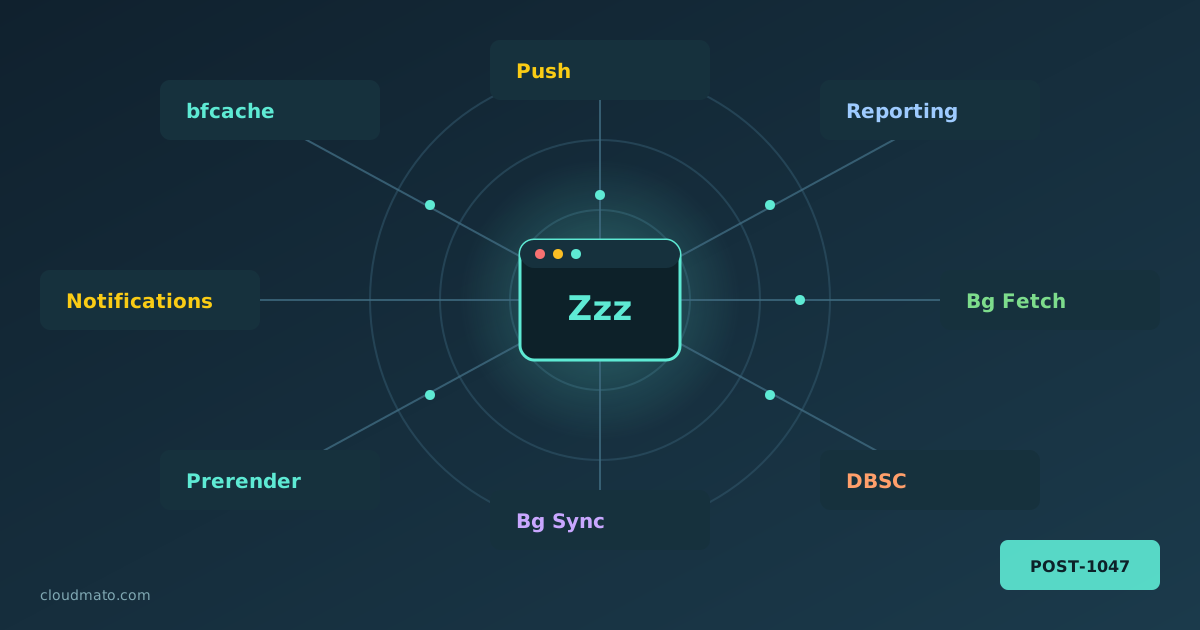
Chrome DevTools Background Services: Complete Guide
Your web app is probably doing things you’ve never actually debugged. Pages being prerendered before the user clicks anything, form submissions silently queued while offline, push notifications arriving at a sleeping service worker, sessions cryptographically bound to hardware keys — all of this happens through Chrome’s background service APIs, running completely invisibly. The Background Services panel in Chrome DevTools is where you finally get to watch all of it. Finding the Panel Open DevTools (F12 or right-click > Inspect), go to the Application tab, and scroll the left sidebar until you hit the “Background Services” section. You’ll find a list covering essentially every “invisible” API Chrome supports:
Chrome DevTools Storage: Every Mechanism Explained (With Use Cases)
Open DevTools, click on Application, and look at the left sidebar. Cookies, Local Storage, Session Storage, IndexedDB, Cache Storage, Shared Storage, Background Services… it’s a lot. I’ve seen senior developers reach for localStorage for everything — auth tokens, shopping carts, even megabytes of API responses — simply because it’s the one they know. That’s not always wrong, but it’s rarely the best choice. Let’s actually go through what each of these mechanisms does, where you’d find it in DevTools, and — more importantly — when you should reach for it instead of the other six options sitting right next to it.
Why Not Just Use One WebSocket Per Page Instead of HTTP?
I get why this question keeps coming up. A WebSocket stays open, remembers who you are, and lets the server push data to you without you asking for it again and again. So why are we still firing off a hundred separate HTTP requests for a single page load when we could just open one persistent pipe and be done with it? Honestly, the question sounds smarter than most people give it credit for — and the answer is not “because HTTP is better.” It’s a lot more nuanced than that.
What Are WebSockets and How Do They Differ From HTTP?
I kept hearing “use WebSockets for real-time stuff” without anyone explaining what actually happens on the wire. So I went and read the RFC, poked at a few servers, and figured I’d write down what I found — including the part that confused me the most: whether WebSocket is a protocol of its own or just some clever trick on top of HTTP. So what is a WebSocket? A WebSocket is a persistent, full-duplex communication channel between a browser (or any client) and a server, opened over a single TCP connection [1]. Full-duplex means both sides can send messages whenever they want — not just in response to a request. That’s the part that breaks the usual mental model of the web.
Loops in AI: What They Are and Why Everyone's Talking
Ask three people what “loop” means in AI right now and you’ll get three different answers. One will say the agent loop. Another will start talking about model collapse and feedback loops. A third will mention human-in-the-loop from some compliance meeting. They’re all correct, which is exactly why the word has become so confusing. I’ve been writing software for over 8 years, and I’ve watched plenty of jargon get recycled. But “loop” is special because it’s not one trend — it’s at least four different ideas that all happen to share the same word, and all of them got hot at roughly the same time. So let me untangle them.