
मैंने वर्षों में जितने भी ब्लॉग देखे हैं, वे ज़्यादातर WordPress पर चलते हैं — एक database, PHP, plugins, और हर दूसरे हफ़्ते security patches। मूल रूप से सिर्फ़ text publish करने वाली साइट के लिए बहुत सारे moving parts। Hugo इन सबके बिल्कुल विपरीत है। न database, न runtime। बस plain HTML files जो एक CDN से serve होती हैं, एक सेकंड से भी कम समय में generate होती हैं।
Hugo असल में क्या है — और यह इतना तेज़ क्यों है?
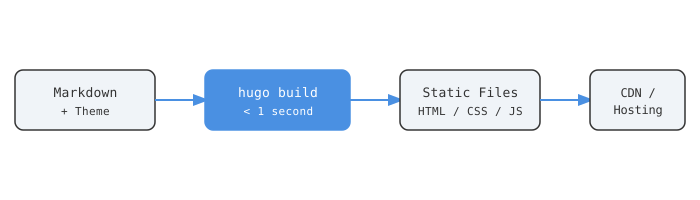
Hugo Go में लिखा गया एक open-source static site generator है [1]। आप Markdown में content लिखते हैं, एक theme चुनते हैं, एक command चलाते हैं, और यह plain HTML, CSS, और JS का एक folder तैयार कर देता है। वही folder आपकी पूरी website है। Server पर कुछ भी नहीं चलता। न PHP, न Python, न कोई Node process जिसे जीवित रखना पड़े।
यह speed सिर्फ़ marketing नहीं है। Hugo को 10,000 से ज़्यादा pages वाली sites को 10 सेकंड से कम में generate करते हुए benchmark किया गया है [2]। कुछ benchmarks में यह Jekyll जैसे alternatives से 100 गुना तक तेज़ पाया गया है [3]। इसकी वजह है Go — compiled, डिज़ाइन से ही concurrent, और Hugo इसका भरपूर उपयोग करता है।
कोई runtime नहीं = कोई attack surface नहीं। कोई database नहीं जिसे breach किया जाए, कोई server-side code नहीं जिसे exploit किया जाए, कोई भूला हुआ plugin नहीं जिसे 2021 से security updates मिलना बंद हो गई हों [4]।
इसे सेटअप करना
Hugo install करें। macOS पर:
brew install hugo
Ubuntu/Debian पर:
sudo apt install hugo
Verify करें:
hugo version
v0.158.0 या उसके बाद का version इस्तेमाल करें [1]। अगर आप SCSS-heavy themes के साथ काम करने की योजना बना रहे हैं, तो extended version install करें — इसमें Dart Sass built in आता है [2]।
अपनी साइट बनाएं
hugo new site my-site
cd my-site
git init
Hugo तुरंत यह structure तैयार करता है:
my-site/
├── archetypes/
├── assets/
├── content/
├── layouts/
├── static/
├── themes/
└── hugo.toml
content/— आपके Markdown posts और pagesthemes/— theme files यहाँ रहती हैंstatic/— output में जैसे-का-तैसे copy होता है (favicon, images, fonts)hugo.toml— पूरी साइट की config
अपनी पहली post लिखें
hugo new content content/posts/hello-world.md
फ़ाइल खोलें और आपको pre-filled front matter दिखेगा:
+++
title = "Hello World"
date  = "2026-06-01T22:45:10+05:30"
draft = true
+++
जब publish करने के लिए तैयार हों, तो draft = false करें। Hugo production build के दौरान draft posts को चुपचाप skip कर देता है [1]।
Local में preview करें
hugo server -D
-D flag drafts को शामिल करता है। आपकी साइट http://localhost:1313 पर उपलब्ध है, save करते ही hot-reload होती है [1]।
थीम — एक चुनें और ज़्यादा सोचना बंद करें
Hugo themes gallery में 200 से ज़्यादा options हैं [5]। तीन जो जानने लायक हैं:
| थीम | Stars | किसके लिए सबसे अच्छा |
|---|---|---|
| PaperMod | 11,000+ | Developer blogs, साफ़ reading |
| Congo | 1,300+ | Personal sites, Tailwind-based |
| Ananke | 1,200+ | सामान्य उपयोग, official starter |
PaperMod GitHub पर सबसे ज़्यादा stars वाली Hugo theme है [6]। तेज़, dark mode सपोर्ट करती है, built-in search, table of contents, multilingual support, multiple authors। मैं वहीं से शुरू करूँगा और जब तक वास्तव में ज़रूरत न हो, कुछ और नहीं देखूँगा।
इसे git submodule के रूप में install करें:
git submodule add https://github.com/adityatelange/hugo-PaperMod.git themes/PaperMod
इसे hugo.toml में set करें:
theme = "PaperMod"
PaperMod, Congo, और Ananke सभी configuration-driven हैं, code-driven नहीं [6]। Customization hugo.toml params और front matter के ज़रिए होता है — theme update होने पर आपके बदलाव मिटते नहीं।
कहाँ Deploy करें
तीन वास्तव में मुफ़्त options जो Hugo के साथ अच्छी तरह काम करते हैं:
| Platform | मुफ़्त Bandwidth | Edge CDN | Auto Deploy | सावधान रहें |
|---|---|---|---|---|
| Cloudflare Pages | Unlimited requests | Global edge | हाँ | Workers पर बढ़ता ध्यान [8] |
| GitHub Pages | Unlimited (public repos) | सीमित | Via Actions | कम features [1] |
| Netlify | 100 GB/month | हाँ | हाँ | 2025 के अंत से credit billing [8] |
Cloudflare Pages वह जगह है जहाँ मैं कोई भी public-facing चीज़ रखूँगा। Cloudflare का global edge network इसका मतलब है कि आपका HTML visitors तक उनके पास के node से पहुँचता है [7]। Free tier bandwidth throttle नहीं करता। एक ईमानदार बात: Cloudflare तेज़ी से Pages की जगह अपने Workers product को push कर रहा है [8], इसलिए roadmap पर नज़र रखना उचित है।
Netlify सेटअप करने में सबसे तेज़ है — एक GitHub repo connect करें, यह Hugo को auto-detect करता है, deploy करता है। लेकिन Netlify ने 2025 के अंत में credit-based billing में बदलाव कर लिया [8]। जब आप free allowance से ज़्यादा हो जाते हैं, तो वे आपकी साइट pause कर देते हैं। Cloudflare बस serving जारी रखता है।
GitHub Pages ठीक काम करता है अगर आप पहले से GitHub ecosystem में हैं। कोई preview deployments नहीं, कम features — लेकिन अगर आपका repo वहाँ पहले से है तो कोई झंझट नहीं [1]।
Cloudflare Pages पर deploy करना पाँच steps में होता है:
- अपना Hugo repo GitHub या GitLab पर push करें
- Cloudflare Pages dashboard में repo connect करें
- Build command set करें:
hugo --minify - Output directory set करें:
public - Env variable add करें:
HUGO_VERSION = 0.158.0[7]
main पर हर push automatically rebuild और deploy trigger करता है। कोई देखरेख नहीं।
रोज़मर्रा की देखभाल
यहीं पर static sites वास्तव में जीतती हैं। कोई server patch नहीं करना। कोई plugin updates नहीं। किसी PHP version के साथ compatible रहने की ज़रूरत नहीं। “आपका WordPress installation पुराना है” जैसी कोई चेतावनी नहीं।
पूरा content workflow यह है:
hugo new content content/posts/new-post.md
# अपने editor में लिखें
git add content/posts/new-post.md
git commit -m "add: new post"
git push
main पर push करें। साइट सेकंडों में rebuild हो जाती है। बस [9]।
non-technical collaborators के लिए, Decap CMS Hugo के साथ integrate होता है और Git-backed browser-based editor प्रदान करता है [9]। Writers एक UI में content edit करते हैं, CMS Markdown को repo में commit करता है, Hugo build करता है। किसी को terminal छूने की ज़रूरत नहीं।
Hugo version upgrades hosting dashboard में एक env variable बदलने की बात है। कोई npm audit alerts नहीं, कोई dependency tree conflicts नहीं, कोई ecosystem drama नहीं।
आख़िर Static क्यों?
Static sites तब से हैं जब से web शुरू हुई। जब databases सस्ते हो गए और WordPress ने CMS को सबके लिए accessible बनाया तो ये fashion से बाहर हो गईं। वापस जाने के कारण:
- Speed — CDN से pre-built HTML, request के समय render होने वाली किसी भी चीज़ से तेज़ load होती है [4]
- Security — कोई database नहीं, कोई server execution नहीं, कोई exploitable surface नहीं [4]
- Cost — अधिकांश personal और small business projects के लिए वास्तव में मुफ़्त hosting
- Portability — source git repo में Markdown files है; किसी भी host पर एक दोपहर में migrate करें
- Reliability — CDN पर एक static file को traffic load के तहत PHP server की तुलना में बंद करना बहुत मुश्किल है [3]
Hugo एक और चीज़ जोड़ता है जो तब मायने रखती है जब आपके पास बहुत सारा content हो: build time। 1,000 pages की साइट एक सेकंड से भी कम में [3]। लिखते समय live reload, कोई प्रतीक्षा नहीं। बड़ी teams जो अक्सर content update करती हैं, slow builds से block नहीं होंगी।
अगर आप एक blog, documentation site, portfolio, या marketing site चला रहे हैं जिसे real-time data की ज़रूरत नहीं है — तो इसके लिए dynamic server चलाने का कोई अच्छा कारण नहीं है।
समाप्त
स्रोत
- Hugo Quick Start
- A Guide to Using Hugo in 2024 and 2025 — Strapi
- Why Hugo is the Best Static Blog Framework in 2025 — DEV Community
- The Resurgence of Static Sites — DillonBaird.io
- Hugo Themes Gallery
- Hugo PaperMod — GitHub
- Deploy a Hugo Site — Cloudflare Pages Docs
- Hugo Deployment: Netlify, Vercel, and Cloudflare Pages Comparison
- Hugo with Decap CMS: Git-Based Content Management
- Top Hugo Themes 2025 — Rost Glukhov